
5 Samsung Galaxy Features Google Pixel Doesn’t Have
5 Samsung Galaxy Features Google Pixel Doesn’t Have: The Ultimate Showdown
If you’re in the market for the latest and greatest Android experience, Google’s Pixel lineup is often the first recommendation that comes to mind. After all, Google develops Android itself, and Pixel phones are always first in line to receive new features and updates. Plus, the stock Android experience on Pixel devices tends to be cleaner and more streamlined than the heavily customized skins offered by other manufacturers. Yet, according to Statcounter, Samsung remains the second-largest smartphone vendor in the U.S., trailing only Apple.
A significant portion of Samsung’s enduring popularity can be attributed to its long-standing presence in the smartphone market. While Google’s Pixel lineup only debuted in 2016, Samsung has been a dominant force for over a decade. Additionally, Samsung offers an unparalleled variety of devices across all price points, from the budget-friendly Galaxy A15 to the cutting-edge Galaxy Z Fold series. Whether you’re looking for affordability or bleeding-edge technology, there’s a Samsung phone for everyone.
While Google Pixels have their strengths—like the innovative Pixel Snap feature we highlighted in our Pixel 10 Pro XL review—Samsung’s Galaxy lineup takes the crown when it comes to sheer feature richness. From hardware innovations like the S Pen and anti-reflective displays to the extensive customization options in One UI, here are five Samsung-exclusive features that Google Pixel users can only dream about.
A Built-in Stylus: The S Pen Revolution
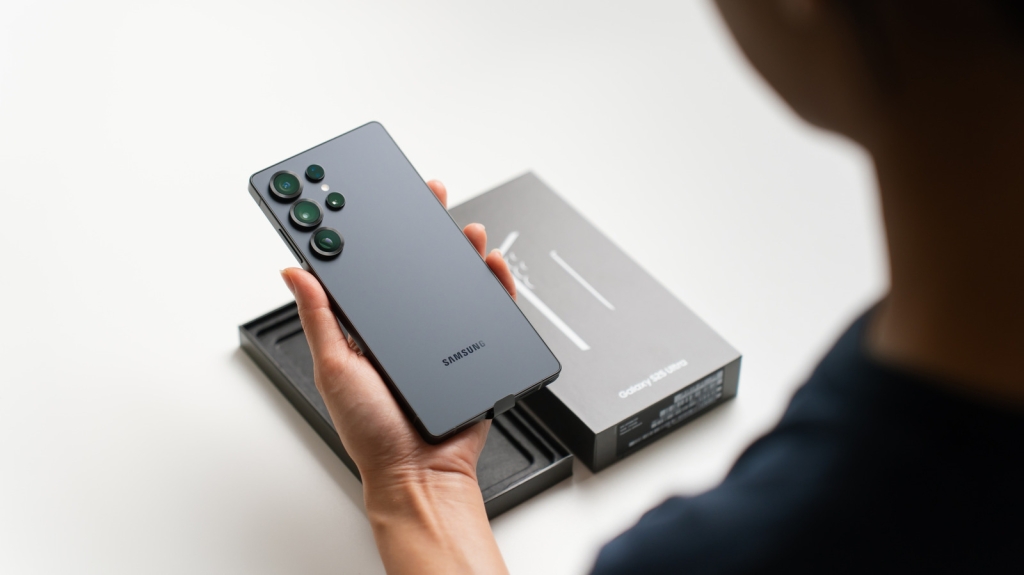
One hardware feature that sets Samsung apart from virtually every other mainstream smartphone manufacturer is the built-in stylus. Samsung pioneered this concept with the Galaxy Note series back in 2011, and although the Note line was discontinued in 2020, the S Pen lives on in Samsung’s premium Galaxy S Ultra flagships.
The S Pen isn’t just a simple stylus—it’s a productivity powerhouse. Unlike third-party styluses that you can purchase for other Android phones (and we’ve rounded up the highest-rated options), the S Pen feels like a natural extension of the phone itself. Certain Samsung models ship with Bluetooth-enabled S Pens that support “Air Actions,” allowing you to control your phone with gestures in mid-air. While Samsung controversially removed Bluetooth support from newer models like the Galaxy S25 Ultra, the S Pen remains an incredibly versatile tool.
For note-takers, artists, and creative professionals, the built-in S Pen offers unmatched precision and functionality. While you could technically use a third-party stylus with a Pixel phone, Samsung’s One UI is specifically optimized for the S Pen experience, making it far more seamless and intuitive.
Virtually Endless Customization with Good Lock
Android has always been celebrated for its customization capabilities, but not all Android phones offer the same level of flexibility. While Pixel phones run a mostly vanilla version of Android, they’re not ideal for power users who want to tweak every aspect of their device. Sure, root access and third-party apps can unlock extensive customization, but they’re not elegant solutions.
Samsung phones, on the other hand, come with robust built-in customization options, and the Good Lock app takes things to the next level. Think of Good Lock as a comprehensive customization engine that lets you modify virtually every aspect of your Galaxy phone’s software experience—from the lock screen and home screen to quick settings and navigation gestures.
Available exclusively through the Galaxy Store, Good Lock might seem overwhelming at first glance with its numerous modules, but it’s surprisingly user-friendly. The NavStar module lets you completely overhaul your navigation bar with custom icons and layouts. QuickStar transforms your Quick Panel with different themes and indicator configurations. There are countless ways to customize your Galaxy phone with Good Lock—including tweaking elements that most Android skins don’t even allow you to touch.
Other Hardware Extras That Give Samsung the Edge
While the Pixel 10 Pro is undoubtedly well-built with excellent cameras and thoughtful hardware choices, Samsung consistently delivers superior performance in the flagship segment. According to synthetic benchmarks from NanoReview, Qualcomm’s Snapdragon 8 Elite Gen 5 significantly outperforms Google’s in-house Tensor G5. For mobile gamers and performance enthusiasts, choosing a Pixel over a Samsung flagship simply doesn’t make sense.
Beyond raw processing power, Samsung incorporates several innovative hardware features that Google hasn’t matched. The anti-reflective display coating introduced with the Galaxy S24 Ultra dramatically improves outdoor visibility, making it much easier to use your phone in bright sunlight. The latest Galaxy S26 Ultra features Privacy Display technology, which makes on-screen content nearly impossible to see from off-angles—a game-changing feature for privacy-conscious users. Unlike permanent privacy screen protectors, this feature can be toggled on and off or even customized to protect specific areas like notifications or password fields.
For budget-conscious consumers, Samsung’s Galaxy A series supports storage expansion via microSD cards—a feature that’s become increasingly rare in modern smartphones. And while the Pixel 10 Pro is often praised for its computational photography prowess, the Galaxy S26 Ultra’s additional 3x telephoto lens enables sharper mid-range zoom shots that Pixels simply can’t match.
A Fully-Baked Desktop Experience with Samsung DeX
For several years now, compatible Samsung Galaxy phones and tablets have supported Samsung DeX, a feature that transforms your mobile device into a desktop-like computing environment when connected to an external monitor. While Google is developing its own desktop mode (currently in experimental beta), it lacks the polish and maturity that DeX has achieved through years of refinement.
Samsung DeX has been around since 2017 and has evolved significantly over time. With a simple USB-C to HDMI adapter, you can connect your Galaxy phone or tablet to any monitor or TV and instantly access a desktop interface. If your display supports Miracast, you can even use DeX wirelessly. In DeX mode, apps behave like individual windows that you can resize, overlap, and arrange however you prefer.
Galaxy tablets and foldables offer a “New DeX” mode with a more tablet-friendly interface. For an even better experience, you can connect a Bluetooth keyboard and mouse—though many Android apps are designed with touch input in mind. DeX is powerful enough that you can reliably use your Samsung tablet as a laptop replacement, as we demonstrated in our hands-on testing.
Other One UI Features That Pixel Users Miss Out On
Beyond the headline features, Samsung’s One UI includes numerous smaller utilities that collectively enhance the user experience in meaningful ways. App cloning is a prime example—while Pixel has a Private Space feature, it’s not quite the same thing. Samsung’s Dual Messenger allows you to run two instances of the same app independently, making it easy to manage multiple accounts without constantly switching between them.
Another incredibly useful One UI feature is the ability to route audio from specific apps to different output devices. For instance, you can have music playing from Spotify on a Bluetooth speaker while your phone continues using its built-in speaker for all other app notifications. For music lovers who always want background tunes, this feature is nothing short of revolutionary.
The Edge Panel is another feature that’s conspicuously absent from Pixel devices. As smartphone screens continue to grow larger, having quick access to your most frequently used apps with a simple swipe significantly improves one-handed usability.
A recent One UI 8.5 update added partial screen recording, allowing you to select exactly which portion of your screen you want to capture. This saves considerable time and effort since you won’t need to crop the footage afterward—a feature that power users will absolutely appreciate.
Tags: Samsung vs Google Pixel, Galaxy features, S Pen, Good Lock, Samsung DeX, Android customization, smartphone comparison, mobile productivity, One UI features, best Android phone, Pixel vs Galaxy, smartphone stylus, desktop mode Android, app cloning Android, privacy display, microSD expansion, Snapdragon vs Tensor
Viral Sentences: Samsung just embarrassed Google again with these 5 exclusive features! The S Pen alone is worth the upgrade. Google Pixel users are about to be jealous. Samsung’s Good Lock app gives you customization powers Pixel can only dream of. Why settle for vanilla Android when you can have the complete package? The anti-reflective display is a game-changer for outdoor use. Privacy Display technology is what your Pixel desperately needs. Samsung DeX proves foldables can replace laptops. App cloning in One UI is pure genius. These Samsung exclusives make Google Pixels look basic. The Snapdragon 8 Elite destroys Tensor in real-world performance. Your Pixel can’t do this—and it’s killing you inside. Samsung just raised the bar so high Google can’t even see it. One UI features that will make you ditch your Pixel tomorrow. The ultimate Android experience isn’t from Google—it’s from Samsung.
,

Leave a Reply
Want to join the discussion?Feel free to contribute!