
GuliKit’s tiny dongle lets you connect a PS5 controller to your Switch 2
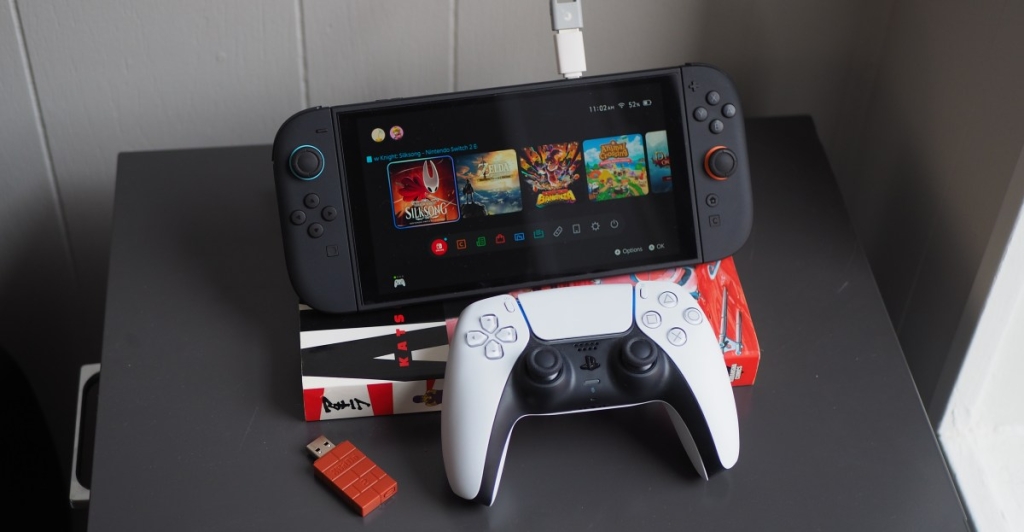
The Ultimate Gaming Hack: Transform Your Favorite Controllers into Switch 2 Superstars
For years, gaming dongles have been the black sheep of the accessory world—expensive, finicky, and often more trouble than they’re worth. But what if I told you there’s a tiny, unassuming piece of tech that could revolutionize your Switch 2 experience without breaking the bank? Enter the 8BitDo USB Adapter 2, the $20 miracle worker that’s about to make your gaming life infinitely better.
This isn’t just another dongle; it’s a passport to gaming freedom. Imagine plugging in your PlayStation 5 DualSense controller—complete with its signature haptic feedback and motion controls—and suddenly it works flawlessly with your Switch 2. The same goes for Microsoft’s latest Xbox controllers. It’s like discovering your favorite sneakers work perfectly with that expensive suit you never thought to pair them with.
The magic happens through a simple USB-A connection. You can plug it directly into your Switch 2’s dock or use a USB-A-to-USB-C adapter for a direct console connection. Either way, you’re looking at wireless nirvana for a fraction of what a new controller would cost.
But here’s where it gets really interesting: I’ve been using this setup with Splatoon 3, and I completely forget I’m holding a PS5 controller. The motion controls are that accurate. It’s like the game was designed with this exact configuration in mind, which, let’s be honest, it probably wasn’t.
Now, I know what you’re thinking: “Surely there’s a catch?” Well, yes and no. The adapter doesn’t support remote console wake-up (you’ll need to power on your Switch 2 manually first) or wireless audio through the controller’s headphone jack. And if you’re planning a multiplayer session, you’ll need to buy two adapters for two controllers. But honestly? These are minor inconveniences when you consider the freedom you’re gaining.
What really sets the 8BitDo adapter apart is its Ultimate Software. This free program lets you customize non-8BitDo controllers like never before. We’re talking button remapping, macro creation, vibration intensity adjustment, trigger range modification, and stick sensitivity tuning. It’s like giving your old controller a complete personality transplant.
The adapter also offers multiple connection modes—Xinput, Dinput, Mac mode, and Switch mode—all accessible through simple button combinations. It’s this level of flexibility that makes the 8BitDo feel less like a dongle and more like a universal translator for gaming controllers.
But wait, there’s competition in this space. The GuliKit Hyperlink Gen 2 USB-A adapter is slightly cheaper at $16.99 and notably smaller. It comes bundled with GuliKit’s TT Pro and TT Max controllers or can be purchased separately. This little powerhouse supports Xbox controllers and both PlayStation 4 and 5 controllers, and it’s compatible with a wide range of devices including PCs, Steam Decks, and Android devices.
However, GuliKit’s controller support doesn’t quite match 8BitDo’s extensive compatibility list, which stretches back to the PS3 and Wii era and includes 8BitDo’s own impressive lineup of wireless controllers. It’s like comparing a local library to the Library of Congress—both have books, but one has significantly more options.
That said, the GuliKit adapter has its own tricks up its sleeve. In games like Hollow Knight: Silksong (which I’ve been absolutely obsessed with lately), the rumble feels more refined, closer to the HD rumble experience you’d get from premium Switch controllers like the EasySMX S10. The 8BitDo, by comparison, makes the same game’s rumble feel like an afterthought.
But gaming is subjective, and other titles tell a different story. Take Donkey Kong Bananza—its intense rumble feedback feels equally disappointing on both adapters when using a DualSense. Some games just weren’t meant to be played with certain controllers, no matter how good the dongle is.
For PC gamers, the GuliKit offers something special: low-latency wireless connection that can boost controller polling rates beyond what consoles typically allow. While the latency improvement wasn’t as dramatic as I’d hoped, the overall connection stability and easy setup were genuinely impressive. Both adapters, along with countless other Bluetooth dongles, deliver this kind of PC gaming enhancement.
So, what’s the verdict? If you’re someone who values guaranteed compatibility and extensive customization options, the 8BitDo USB Adapter 2 is your best bet. It’s like having a Swiss Army knife for gaming controllers. But if you’re looking for a more compact solution with potentially better rumble in certain games, and you don’t mind waiting for GuliKit’s promised customization software (expected in Q2 2026), the Hyperlink Gen 2 deserves serious consideration.
The beauty of both these solutions is that they let you breathe new life into controllers you already own. Instead of dropping $60-70 on a new Switch 2 controller, you can invest $16-20 in a dongle and use hardware you’re already comfortable with. It’s economical, environmentally friendly, and lets you maintain muscle memory across different gaming platforms.
In a world where gaming accessories often feel overpriced and underdelivering, these dongles represent a refreshing change. They’re proof that sometimes the smallest pieces of tech can make the biggest difference in your gaming experience. Whether you choose 8BitDo’s feature-rich powerhouse or GuliKit’s compact alternative, you’re getting a ticket to gaming freedom that’s hard to beat.
GamingHack #Switch2 #ControllerAdapter #8BitDo #GuliKit #GamingAccessories #TechReview #GamingSetup #BudgetGaming #ControllerCompatibility #GamingTips #SwitchHacks #GamingLife #TechDeals #GamingCommunity
DongleLife #GamingFreedom #ControllerCustomization #GamingOnABudget #Switch2Gaming #GamingSetupGoals #TechSavvyGamer #GamingAccessoriesMustHave #ControllerMagic #GamingInnovation #Switch2Hacks #GamingTech #BudgetFriendlyGaming #ControllerRevolution #GamingUpgrade
,
Leave a Reply
Want to join the discussion?Feel free to contribute!