
One of the best privacy upgrades you can give to your laptop costs less than you think
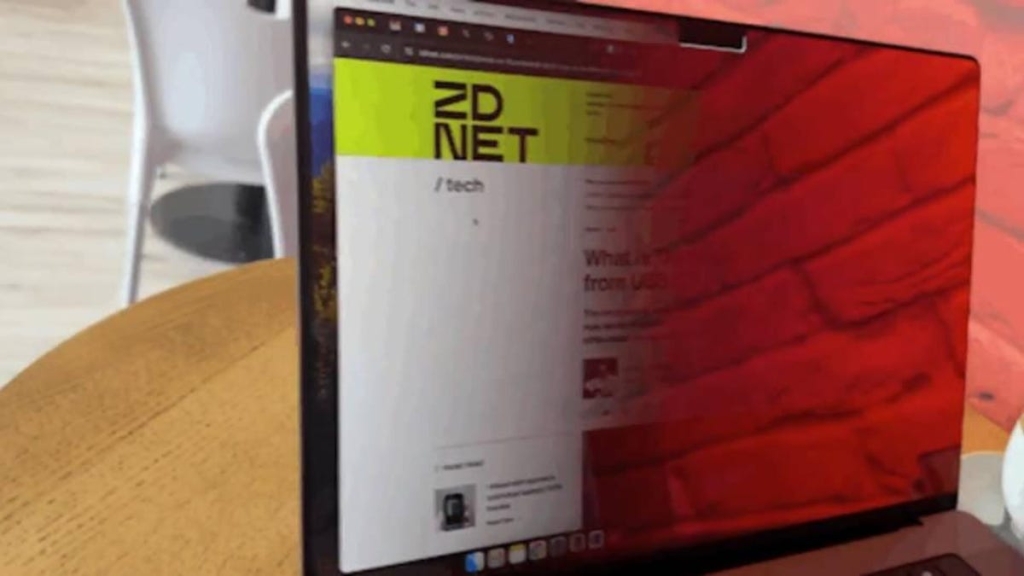
I Finally Found the Best Privacy Screen for My MacBook Pro—Here’s Why It’s a Game-Changer
If you’re like me, you probably spend a lot of time working in public spaces—coffee shops, libraries, airports, or even on public transport. And if you’re also like me, you’ve probably noticed those sneaky glances from strangers trying to catch a glimpse of your screen. It’s human nature, I get it. But when you’re dealing with sensitive work, private emails, or confidential spreadsheets, those prying eyes can be more than just annoying—they can be a real security risk.
So, what’s the solution? Sure, you could type “STOP LOOKING AT MY SCREEN” in 72-point font, but that’s not exactly subtle. Enter the StarTech.com MacBook Pro Privacy Screen—a sleek, effective, and surprisingly affordable way to keep your digital life private.
Why I Chose This Privacy Screen (And Why You Should Too)
I’ve tried my fair share of privacy screens over the years, and let’s just say, most of them have been… underwhelming. From sticky adhesives that leave residue to filters that distort colors or make your screen look like it’s been dipped in fog, the struggle has been real.
But this one? This one’s different.
Easy Installation (Finally!)
First off, installation was a breeze. The kit comes with everything you need: a microfiber cloth for cleaning your screen, transparent adhesive strips that leave no residue, and the filter itself. No more wrestling with sticky tape or accidentally trapping dust bunnies between your screen and the filter. It took me less than five minutes to get it on, and the fit is perfect. Even the cutout for the camera and sensors at the top of the display is spot-on.
Crystal Clear Privacy
Here’s the magic: when you’re sitting directly in front of the screen, you don’t notice the filter at all. But the moment you shift to the side, the screen darkens dramatically. I tested it by sitting next to my laptop, and even then, it was nearly impossible to see what was on the screen. It’s like having a built-in “do not disturb” mode for your display.
A Touch of Style
Let’s talk about the gold finish. Yes, it’s gold. And yes, it’s as stylish as it sounds. When viewed from an angle, the filter has a reflective, almost mirror-like quality that’s both functional and fashionable. It’s the kind of detail that makes you feel like you’re in a spy movie—minus the espionage, of course.
The Trade-Offs (Because Nothing’s Perfect)
Now, I’ll be honest: this filter does alter the brightness and color calibration of your display. If you’re a graphic designer, video editor, or someone who relies on precise color accuracy, this might not be the best fit for you. But for the rest of us—writers, analysts, spreadsheet warriors—it’s a small price to pay for peace of mind.
I did have to crank up the brightness a bit more than usual, but honestly, it’s a minor adjustment. And the added privacy? Totally worth it.
ZDNET’s Buying Advice
If you’re worried about people snooping on your screen while you’re out and about, the StarTech.com MacBook Pro Privacy Screen is a no-brainer. It’s easy to install, highly effective, and surprisingly affordable. Plus, it’s not just for MacBook Pros—StarTech offers a range of privacy screens for other laptops and displays, so you’re covered no matter what device you’re using.
And here’s a pro tip: even if the filter isn’t a perfect match for your laptop’s dimensions, it can still work with a little tweaking. I’ve seen people use it on 14- or 16-inch laptops with great results.
Tech Specs at a Glance
- Compatibility: 14- and 16-inch 2021 and 2023 MacBook Pros (and other displays with similar dimensions).
- Microlouver Technology: Obscures the view outside a 60-degree angle.
- Blue Light Blocking: Blocks up to 51% of blue light.
- Light Transmission: Allows 60% light transmission for better readability.
- Anti-Glare Coating: Matte side is scratch- and fingerprint-resistant.
- Extras: Includes a microfiber cloth and residue-free adhesive strips.
Final Verdict
This is hands-down one of the best privacy screens I’ve ever used. It’s well-made, easy to install, and incredibly effective. Whether you’re working on sensitive documents, binge-watching your favorite show on a plane, or just want to keep your screen to yourself, this filter has got you covered.
So, if you’re tired of those nosy neighbors peeking at your screen, do yourself a favor and grab the StarTech.com MacBook Pro Privacy Screen. Your digital privacy will thank you.
Tags & Viral Phrases:
- “Stop looking at my screen” solution
- Gold privacy screen for MacBook Pro
- Best privacy screen for public workspaces
- Easy-to-install laptop privacy filter
- Keep your screen private in coffee shops
- Anti-snooping laptop accessory
- Stylish and functional privacy screen
- Protect your sensitive data on the go
- Privacy screen for MacBook Pro 2021/2023
- Microlouver technology for ultimate privacy
- Blue light blocking privacy filter
- Anti-glare matte finish privacy screen
- Residue-free adhesive strips included
- Perfect fit for MacBook Pro camera and sensors
- Affordable laptop privacy solution
- Spy-level privacy for your laptop
- Stop screen snooping today
- Privacy screen that actually works
- Sleek and stylish privacy filter
- Peace of mind for public workspaces
,
Leave a Reply
Want to join the discussion?Feel free to contribute!