
Android 17 lets users customize launcher search shortcuts
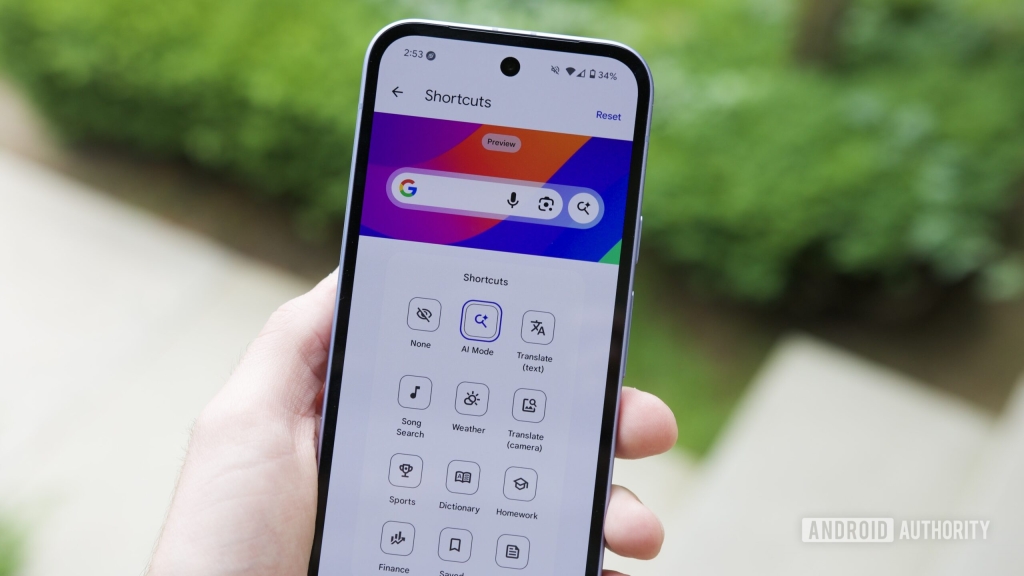
Google Finally Brings Custom Shortcuts to Pixel Launcher Search Bar in Android 17 Beta 1
In a move that’s been a long time coming, Google is finally bringing the same level of customization to the Pixel Launcher’s search bar that users have enjoyed with the Google Search widget for years. With the release of Android 17 Beta 1, Pixel owners can now swap out the default AI Mode shortcut for any other option of their choosing—a feature that’s been conspicuously absent from the launcher until now.
For years, Android users have had a love-hate relationship with Google’s search ecosystem. Between Chrome, the Google app, the app drawer, Gemini, and various search widgets, there’s no shortage of ways to find what you’re looking for. But when it comes to home screen search options, two have dominated the conversation: the Pixel Launcher’s built-in search bar anchored at the bottom of your screen, and the more flexible Google Search widget that can be placed anywhere.
The Google Search widget has always had a clear advantage in terms of customization. While both search interfaces offer the same default buttons—voice input, Google Lens, and AI Mode—the widget allowed users to replace the AI Mode shortcut with something more personally useful. Whether you wanted quick access to your favorite app, a specific contact, or a particular setting, the widget gave you that freedom.
Now, that same flexibility is finally coming to the Pixel Launcher itself.
Android 17 Beta 1, which began rolling out recently, introduces this long-awaited feature. Early adopters who’ve flashed the beta to their Pixel devices can now access the customization options, though the implementation appears to be a work in progress. Users report being able to access the shortcut-changing UI, but actually making changes doesn’t always stick—at least not yet.
This development is significant for several reasons. First, it brings parity between Google’s two primary search interfaces on the home screen, eliminating a key differentiator that previously favored the widget. Second, it demonstrates Google’s continued commitment to refining the Android experience based on user feedback and usage patterns. And third, it hints at Google’s broader strategy of creating a more unified and customizable interface across its ecosystem.
The timing of this feature’s arrival is particularly interesting given the broader context of Android 17’s development. As Google continues to integrate more AI features throughout the operating system, having quick access to these tools becomes increasingly important. The ability to customize which shortcuts appear in your primary search interface means users can tailor their experience to their specific needs and workflows.
For power users and those who’ve been waiting for this feature, the beta release offers an early glimpse at what’s to come. However, Google has been clear that beta releases are, by nature, works in progress. The fact that the customization feature isn’t fully functional yet isn’t necessarily a red flag—it’s more of a reminder that we’re still in the early stages of Android 17’s development cycle.
The glitchy implementation also raises interesting questions about how Google is approaching this feature’s rollout. Is the company testing different customization options? Are there backend services that need to be fully enabled before the feature works as intended? Or is this simply a matter of ironing out bugs before the stable release?
Whatever the case, the inclusion of this feature in Android 17 Beta 1 suggests it will likely be part of the final release, even if the current implementation needs refinement. Given Google’s typical beta testing timeline, there’s ample opportunity for the company to address these issues before Android 17’s official launch.
For those eager to try out this new functionality (and other Android 17 features), the beta is available for download on supported Pixel devices. However, potential beta testers should be aware of the risks involved with running pre-release software. Beta versions can be unstable, may contain bugs that affect device functionality, and could potentially lead to data loss if something goes wrong.
The move to bring customizable shortcuts to the Pixel Launcher search bar also fits into a larger narrative about Google’s evolving approach to Android customization. In recent years, Google has gradually opened up more aspects of the Android experience to user modification, from lock screen customization to expanded widget options. This latest change continues that trend, giving users more control over how they interact with their devices.
As Android 17 development continues, it will be interesting to see how this feature evolves and what other customization options Google might introduce. Will we see similar updates to other parts of the Android interface? Could this be a precursor to more extensive home screen customization options in future releases?
For now, Pixel users can look forward to a more personalized search experience coming their way, even if they’ll need to exercise a bit of patience as Google works out the final details. The era of the static Pixel Launcher search bar appears to be coming to an end, replaced by an interface that can adapt to each user’s unique needs and preferences.
Android17 #PixelLauncher #GoogleSearch #AndroidBeta #HomeScreenCustomization #TechNews #GoogleIO #AndroidUpdate #PixelPhones #MobileTech
Customizable shortcuts, Pixel Launcher upgrade, Android 17 features, Google search bar, home screen personalization, beta testing, mobile interface design, AI Mode access, Android customization, Pixel device updates
,


Leave a Reply
Want to join the discussion?Feel free to contribute!