
How to Choose the Right Gaming Laptop (2026): What You Need to Know
Gaming Laptops in 2026: The Ultimate Guide to Choosing Your Perfect Machine
Gaming laptops have undergone a remarkable transformation in recent years. Gone are the days when they were simply powerful but unwieldy bricks that required a dedicated gaming backpack just to transport. Today’s gaming laptops span an incredible spectrum of options, from ultra-portable powerhouses to desktop replacements that blur the line between mobile and stationary gaming.
The evolution has been staggering. You can now find gaming laptops that push performance boundaries without compromise, ultra-thin designs that prioritize portability, budget-friendly options that deliver solid frame rates, and even convertible 2-in-1 devices that transform from laptop to tablet. This explosion of choice means that selecting the right gaming laptop requires careful consideration of your specific needs, budget, and gaming habits.
To help you navigate this complex landscape, we’ve updated our comprehensive guide with the latest information from CES 2026, current pricing trends, and the evolving memory market. Whether you’re a competitive esports player, a AAA enthusiast, or someone who wants to game on the go, we’ll break down everything you need to know to make an informed decision.
What Size Gaming Laptop Should You Get?
When shopping for a gaming laptop, the display size is typically your first major decision point. These machines generally come in three primary sizes: 14-inch, 16-inch, and 18-inch configurations, each serving different user needs.
16-inch: The Goldilocks Zone
The 16-inch gaming laptop has emerged as the sweet spot for most gamers. These machines strike an impressive balance between portability and performance, offering enough internal space for robust cooling solutions while providing a satisfyingly large display for immersive gaming sessions.
This size has largely replaced the older 15.6-inch laptops that used 16:9 aspect ratio screens. Modern 16-inch gaming laptops typically feature 16:10 aspect ratio displays with significantly thinner bezels, giving you more screen real estate in a similar footprint. The extra vertical space is particularly beneficial for productivity tasks when you’re not gaming.
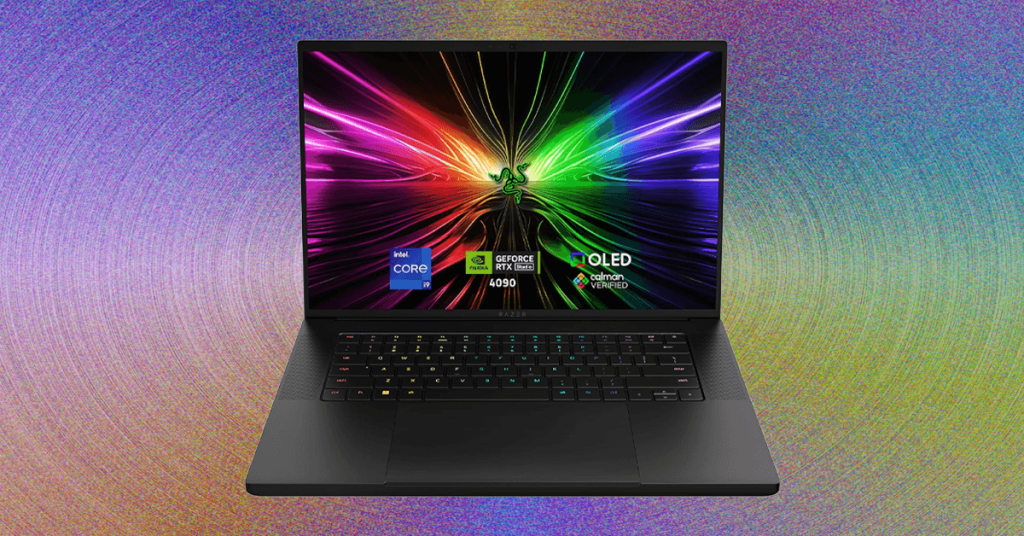
Notable examples include the razor-thin Razer Blade 16, which manages to pack serious power into an impressively slim chassis, and the Lenovo Legion 7i Gen 10, which prioritizes raw performance with a more traditional, thicker design. The Asus ROG Strix G16 offers another excellent option in this category, balancing performance and portability at a competitive price point.
14-inch: Maximum Portability
The 14-inch gaming laptop category is relatively new but rapidly gaining popularity among gamers who prioritize mobility. These compact machines are designed for gamers who frequently travel or need a powerful laptop that doesn’t weigh them down.
The Razer Blade 14 and Asus ROG Zephyrus G14 are the category leaders, offering impressive performance in remarkably small packages. Other manufacturers have entered the fray with options like the Acer Nitro 14, Asus TUF A14, and HP Omen Transcend 14, each bringing their own take on the ultra-portable gaming laptop concept.
These laptops are ideal for students, professionals who game, or anyone who needs serious gaming performance in a machine that can easily fit in a backpack. However, the compact size does mean thermal constraints, so these typically use the latest, most efficient components to maintain performance without overheating.
18-inch: Desktop Replacement Power
At the other end of the spectrum, 18-inch gaming laptops are essentially portable desktops. These massive machines are designed to stay primarily at a desk or dedicated gaming station, offering the largest possible display and room for the most powerful components.
The trade-offs are significant: they’re heavy, bulky, and often have poor battery life. However, if you primarily game at home and want the largest possible screen without connecting an external monitor, these laptops deliver an unparalleled experience. The Asus ROG Strix Scar 18 and MSI Titan 18 HX AI are prime examples, offering desktop-class performance in a (somewhat) mobile form factor.
How to Navigate Performance
Performance considerations for gaming laptops are complex, but graphics cards are the natural starting point. Every gaming laptop needs a discrete GPU to handle 3D gaming, and in 2026, that means choosing from Nvidia’s RTX lineup.
The Latest RTX 50-Series
Nvidia’s RTX 50-series launched throughout 2025, bringing several new options to the gaming laptop market. The lineup includes the flagship RTX 5090, the RTX 5080, RTX 5070, RTX 5070 Ti, RTX 5060, and RTX 5050. Each offers different performance levels at various price points.
Nvidia heavily promotes multi-frame generation as a key feature of these new GPUs, though real-world testing has shown mixed results depending on the game and settings. Regardless, this technology is available across the lineup, giving you access to cutting-edge rendering techniques.
Memory Considerations
One crucial aspect to understand is the memory configuration across the RTX 50-series. The high-end models—RTX 5090 (24 GB), 5080 (16 GB), and 5070 Ti (12 GB)—all received significant VRAM upgrades over their predecessors. This additional video memory is particularly important for gaming at higher resolutions and with demanding texture packs.
However, the mid-range and entry-level options—RTX 5070, 5060, and 5050—are all limited to 8 GB of VRAM. This creates an interesting dynamic where the performance jump from the RTX 5070 to the 5070 Ti might be more significant than the jump from the 5060 to the 5070, particularly in memory-intensive games.
Laptop vs. Desktop GPU Performance
It’s crucial to remember that laptop versions of these GPUs don’t directly correspond to their desktop counterparts in terms of raw performance. Laptop GPUs are designed with power efficiency and thermal constraints in mind, meaning they typically operate at lower clock speeds and power limits than desktop versions.
This doesn’t mean laptop GPUs are inferior—far from it. They’re optimized for the mobile form factor, delivering impressive performance while managing heat in confined spaces. However, when comparing specifications, understand that a laptop RTX 5080 won’t match a desktop RTX 5080 in raw performance, but it will offer excellent gaming performance in a portable package.
CPU Considerations
While the GPU is crucial for gaming performance, the CPU plays an important supporting role, particularly for games that are CPU-intensive or for multitasking while gaming. Modern gaming laptops typically feature Intel’s latest Core processors or AMD’s Ryzen 7000/8000 series chips.
For most gamers, a high-end 6-core or 8-core processor provides more than enough performance. However, content creators who game might benefit from the additional cores and threads offered by higher-end CPUs, which can significantly improve rendering times and multitasking performance.
Storage and RAM
Fast storage is essential for quick game load times and system responsiveness. Most modern gaming laptops come with PCIe Gen4 or Gen5 SSDs, offering blazing-fast read and write speeds. For gaming, 1TB of storage is becoming the minimum recommendation, with many gamers opting for 2TB or more to accommodate large game libraries.
RAM is equally important, with 16GB being the current sweet spot for most gaming scenarios. However, 32GB is becoming increasingly common, particularly in high-end systems where it can provide a performance buffer for both gaming and content creation tasks.
Understanding Thermal Design
One of the biggest challenges in gaming laptop design is thermal management. Powerful components generate significant heat, and fitting adequate cooling into a slim laptop chassis requires innovative engineering.
Different manufacturers take different approaches to this challenge. Some prioritize raw performance with robust cooling systems that result in thicker laptops, while others focus on slim designs that may throttle under sustained loads. Understanding a laptop’s thermal design can help you predict its real-world performance, particularly during extended gaming sessions.
Look for features like vapor chamber cooling, multiple heat pipes, and strategically placed exhaust vents. Some high-end laptops even include user-accessible fan control software, allowing you to balance performance and noise levels based on your preferences.
Display Technology
The display is your primary interface with games, making it a crucial consideration. Modern gaming laptop displays offer various refresh rates, response times, and technologies that can significantly impact your gaming experience.
Refresh Rates and Response Times
Higher refresh rates (120Hz, 144Hz, 240Hz, or even 360Hz) provide smoother motion and can give competitive gamers an edge in fast-paced games. However, to take advantage of these high refresh rates, you need a GPU powerful enough to consistently deliver high frame rates in your games.
Response times, measured in milliseconds, affect how quickly pixels can change color. Lower response times (1ms to 3ms) reduce motion blur and ghosting, particularly important in competitive gaming scenarios.
Panel Technologies
IPS panels offer excellent color accuracy and wide viewing angles, making them great for both gaming and content creation. OLED displays, while less common in gaming laptops, provide incredible contrast ratios and color saturation, though they can suffer from burn-in with static elements in games.
Mini-LED technology is emerging as an exciting option, offering improved contrast ratios compared to traditional LED-backlit displays while avoiding some of OLED’s drawbacks.
Resolution Considerations
While 4K displays offer incredible detail, they require significantly more GPU power to drive at high frame rates. For most gamers, 1440p (2560×1440) represents an excellent balance between visual fidelity and performance, while 1080p (1920×1080) remains popular for competitive gaming where high frame rates are prioritized over resolution.
Battery Life Reality
Gaming laptops are notorious for poor battery life, and for good reason. Powerful components consume significant power, and gaming laptops typically prioritize performance over battery longevity.
Expect 2-4 hours of light use and significantly less during gaming sessions. Some manufacturers have made strides in optimizing battery life for productivity tasks, but if you need all-day battery life, a gaming laptop might not be your best choice.
Consider laptops with larger battery capacities or those that offer different performance modes that can extend battery life when gaming isn’t required.
Connectivity and Ports
Modern gaming laptops need to accommodate various peripherals, from gaming mice and keyboards to VR headsets and external displays. USB-C/Thunderbolt ports are becoming standard, offering versatile connectivity options.
Ethernet ports remain important for competitive gaming where stable, low-latency connections are crucial. Many gamers also appreciate HDMI 2.1 ports for connecting to high-refresh-rate external displays or the latest gaming consoles.
Brand Considerations
Different manufacturers have distinct philosophies when it comes to gaming laptops:
Asus ROG (Republic of Gamers) tends to push the boundaries of performance and features, often introducing innovative designs and technologies. Their Zephyrus line focuses on thin-and-light gaming, while the Strix series offers more traditional gaming laptop designs.
Razer emphasizes premium build quality and minimalist design, appealing to gamers who want powerful machines that don’t look out of place in professional settings. Their Blade laptops are known for their aluminum unibody construction and high-quality displays.
Lenovo Legion laptops often provide excellent value, offering solid performance at competitive price points. They tend to focus on practical designs that prioritize function over flashy aesthetics.
MSI typically goes all-in on performance, offering some of the most powerful gaming laptops on the market. Their Titan and Raider series are desktop replacements that don’t compromise on hardware.
Acer Predator and Nitro lines offer options across different price points, from budget-friendly Nitro laptops to high-end Predator machines with advanced cooling and premium features.
HP Omen laptops strike a balance between performance and design, often featuring distinctive aesthetics and solid build quality.
Future-Proofing Your Purchase
Technology evolves rapidly, and gaming laptops are no exception. When making your purchase, consider how future-proof you need your system to be.
Investing in higher-end components like the RTX 5090 or a high-core-count CPU can extend your laptop’s useful life, though this comes at a premium. Alternatively, choosing a laptop with good upgrade options (RAM and storage) can help you adapt to future needs without replacing the entire system.
Consider the laptop’s build quality and brand reputation for long-term reliability. A well-built laptop from a reputable manufacturer might serve you well for 5+ years, while cheaper options might need replacement sooner.
Tags: gaming laptop guide 2026, best gaming laptop, RTX 50-series laptops, portable gaming PC, gaming laptop buying guide, laptop GPU comparison, 14-inch gaming laptop, 16-inch gaming laptop, 18-inch gaming laptop, Razer Blade 14, Asus ROG Zephyrus, Lenovo Legion, MSI Titan, gaming laptop performance, thermal design gaming laptop, gaming laptop display technology, future-proof gaming laptop, competitive gaming laptop, AAA gaming laptop, budget gaming laptop, premium gaming laptop, gaming laptop brands, laptop battery life gaming, gaming laptop connectivity, gaming laptop upgrade options
Viral Sentences:
- “Gaming laptops in 2026 aren’t just powerful anymore—they’re practically portable supercomputers that can outperform many desktop rigs!”
- “The 16-inch gaming laptop has become the sweet spot that Goldilocks would choose: not too big, not too small, but just right for serious gaming.”
- “Who needs a desktop when you can have an 18-inch gaming laptop that delivers desktop-class performance without being chained to a desk?”
- “The RTX 5090 with 24GB VRAM isn’t just a graphics card—it’s a time machine that future-proofs your gaming for years to come.”
- “Gaming laptops have evolved from clunky bricks to sleek powerhouses that can slide into a backpack and still crush the latest AAA titles at max settings.”
- “Multi-frame generation might be Nvidia’s buzzword of 2026, but the real question is whether your favorite games will actually use it effectively.”
- “That 14-inch gaming laptop you’re eyeing? It’s probably more powerful than the gaming desktop you owned three years ago.”
- “Battery life on gaming laptops still sucks, but who cares when you can get 4 hours of light use or 90 minutes of intense gaming between charges?”
- “The war between 1080p high-refresh and 1440p resolution gaming is the eternal debate that divides gamers more than console vs. PC.”
- “Gaming laptops have become the ultimate test of engineering: how do you fit a nuclear reactor’s worth of power into something that won’t burn your lap?”
,


Leave a Reply
Want to join the discussion?Feel free to contribute!