
This new Android feature is amazing, but I’m scared for its future
Android 16’s Live Updates: A Brilliant Feature Nobody’s Using
Six months into Android 16’s release, and I’m still obsessed with one feature that’s quietly revolutionizing how we interact with our phones: Live Updates. These contextual, priority notifications are exactly what our “smart” phones should be doing—delivering the right information at the right moment without cluttering our screens.
The Magic of Live Updates
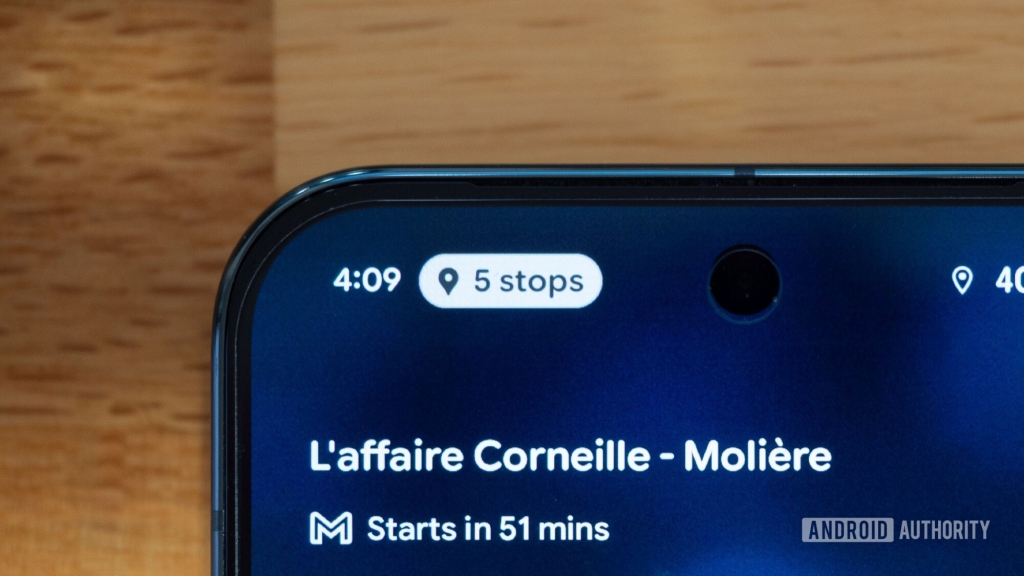
Live Updates are Android’s answer to notification fatigue. Instead of burying critical information among dozens of alerts, they surface front and center. Take Google Maps, for example. When navigating, a small bubble appears in your status bar showing your next direction—whether you’re walking, driving, or taking public transit. No app switching required, no constant checking needed.
I’ve been riding Paris’s public transport frequently, and this feature has become indispensable. I can browse social media or watch videos during my commute without missing my stop. Just a glance at my screen tells me what’s coming up. Need more details? Tap the bubble for a full progress bar. It’s elegant, functional, and genuinely useful.
When driving as a passenger, these updates add traffic information, letting me keep my husband informed about our progress without leaving whatever app I’m using. But the real game-changer? They appear on your always-on display. That means critical information is available even when your phone is locked and the screen is off—perfect for navigating busy city streets without getting distracted by cyclists or cars.
The Developer Adoption Crisis
Here’s the problem: almost no apps are using Live Updates. Uber supports them for trip tracking. Lyft does too. A few food delivery apps have implemented them. That’s essentially the complete list of major apps embracing this feature.
Google Wallet supposedly supports Live Updates for flights and events, but I’ve never seen a single one despite multiple travels and numerous events in my wallet. The handful of apps that do support them are mostly niche: flight-tracking app byAir, torrent downloader Flud, and open-source projects like LiveMedia (a music notification manager) and InstallerX.
What’s truly maddening is that Google’s own apps aren’t leading by example. The Clock app doesn’t show Live Updates for ongoing stopwatches. Google Home doesn’t pop them up for Nest speaker timers. The Google app uses clunky floating bubbles for sports scores instead. The Play Store doesn’t display app download progress this way. It’s like Google created this brilliant API and then decided to wait for others to figure it out.
Why This Matters
Live Updates represent a fundamental shift in how we receive information from our devices. They prioritize what matters most, reduce cognitive load, and make our phones genuinely smarter. But without developer adoption—especially from Google itself—this feature risks becoming another forgotten Android API that could have changed everything.
I’m watching with growing concern as another potentially revolutionary Android feature withers from neglect. These updates deserve more love, more support, and most importantly, Google needs to get its app teams to adopt them across the board.
Viral Tags & Phrases
- Android 16 Live Updates
- priority notifications
- contextual information
- notification fatigue
- always-on display notifications
- Google Maps navigation
- Uber Live Updates
- Lyft notifications
- Google Wallet events
- byAir flight tracker
- Flud torrent downloader
- LiveMedia music manager
- InstallerX APK installer
- Android API adoption
- notification revolution
- smart phone intelligence
- Paris public transport
- navigation bubble
- status bar notifications
- ongoing timers
- app download progress
- sports scores notifications
- Nest speaker timers
- stopwatch notifications
- developer adoption crisis
- Google app neglect
- Android feature wasteland
- contextual alerts
- glanceable information
- lock screen notifications
- driving navigation
- transit directions
- walking directions
- traffic updates
- passenger information
- cognitive load reduction
- information prioritization
- app switching elimination
- progress bars
- elegant functionality
- genuinely useful features
- time and sanity saver
- busy city navigation
- cyclist awareness
- car safety
- floating bubbles
- clunky interfaces
- API potential
- revolutionary capability
- Google leadership failure
- developer heavy lifting
- feature neglect
- Android evolution
- smart device future
,

Leave a Reply
Want to join the discussion?Feel free to contribute!