
Gemini can now create audio summaries of your Google Docs
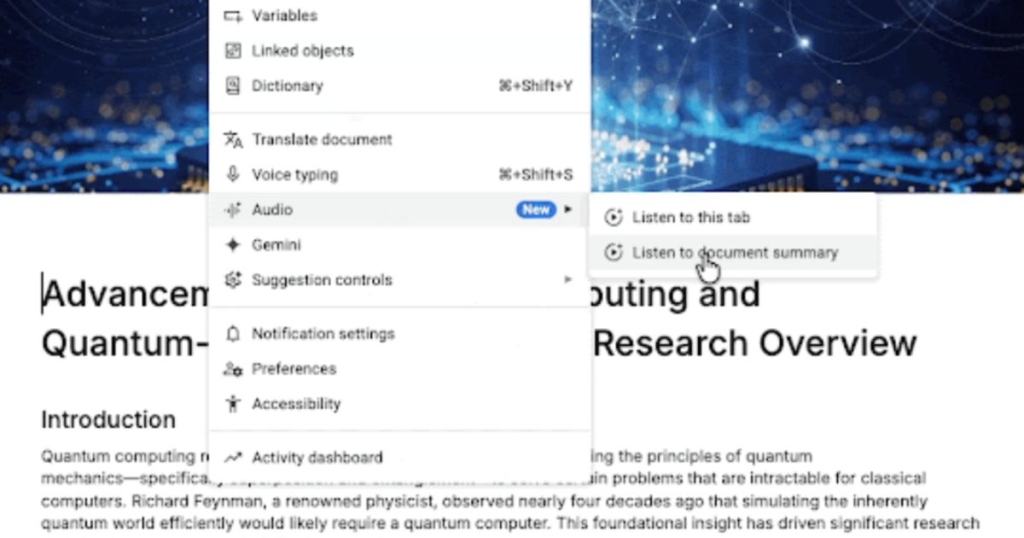
Google has just unleashed a game-changing feature for Google Docs that’s set to revolutionize the way we consume information. Say hello to Audio Summaries, a cutting-edge addition powered by Google’s Gemini AI that transforms your lengthy documents into bite-sized, podcast-style audio overviews. Whether you’re a busy professional, a student on the go, or someone who simply prefers listening over reading, this feature is about to become your new best friend.
Imagine this: You’ve got a 50-page quarterly business report, a dense product manual, or a marathon meeting’s minutes sitting in your Google Docs. Instead of squinting at your screen for hours, you can now hit a button and let Gemini do the heavy lifting. In just a couple of minutes, you’ll get a concise, natural-language summary that captures the essence of the document. It’s like having a personal assistant who reads everything for you and delivers the key points in a clear, conversational tone.
How It Works
Getting started with Audio Summaries is a breeze. Here’s how it works:
- Open your document in Google Docs on the web.
- Navigate to Tools > Audio > Listen to document summary.
- Let Gemini scan your document and generate a narrated summary.
- Sit back, relax, and listen to the summary—or, if you want the full details, use the “Listen to this tab” option to have the entire page read aloud.
The voices are surprisingly natural, almost like listening to a real podcast host. And if you’re someone who likes to customize your experience, you’re in luck. You can adjust the playback speed, choose from different voice styles, and even control standard playback options like play, pause, and timeline scrubbing. It’s like having a Spotify playlist for your documents.
Why This Is a Big Deal
In today’s fast-paced world, time is our most valuable resource. Audio Summaries are designed to help you reclaim it. Whether you’re commuting to work, hitting the gym, or cooking dinner, you can now stay productive by listening to your documents instead of reading them. It’s a game-changer for multitaskers and anyone who’s ever felt overwhelmed by information overload.
But the benefits don’t stop there. For individuals with accessibility needs, this feature is a lifeline. It makes documents more accessible to those with visual impairments or reading difficulties, ensuring that everyone can stay informed and engaged.
The Catch: It’s Not for Everyone (Yet)
Before you get too excited, there’s a caveat: Audio Summaries isn’t available to all Google Docs users. At the moment, it’s rolling out gradually and is limited to paid tiers, including:
- Workspace Business (Standard and Plus)
- Enterprise (Standard and Plus)
- Google AI Ultra and AI Pro add-ons
So, if you’re a free user, you’ll have to wait a bit longer to get in on the action. But hey, it’s worth keeping an eye on—Google has a history of rolling out features to free users eventually.
A Word of Caution
While Audio Summaries is undeniably cool, it’s not perfect. Gemini’s AI is incredibly advanced, but it’s still an AI. That means there’s a chance it might miss some nuances or details in your document. If you’re dealing with highly technical or critical information, it’s always a good idea to double-check the summary against the original text.
The Future of Productivity
Google’s Audio Summaries is more than just a nifty feature—it’s a glimpse into the future of productivity. As AI continues to evolve, we can expect even more tools that make our lives easier and more efficient. Whether it’s turning documents into podcasts, generating insights from data, or automating repetitive tasks, the possibilities are endless.
So, if you’re a paid Google Docs user, go ahead and give Audio Summaries a try. It’s a small change that could make a big difference in how you work, learn, and stay informed. And if you’re not a paid user yet, well, maybe it’s time to consider upgrading. After all, who wouldn’t want their documents to sound like a podcast?
Tags: Google Docs, Audio Summaries, Gemini AI, productivity, multitasking, accessibility, Google Workspace, AI-powered tools, document summarization, podcast-style summaries, Google AI Ultra, Google AI Pro, future of productivity, AI advancements, Google updates, tech innovation, digital trends, workplace efficiency, information consumption, hands-free productivity, AI-generated content, Google ecosystem, document accessibility, time-saving tools, AI-driven summaries, Google Gemini, tech news, viral tech, cutting-edge technology, Google Workspace updates.
,


Leave a Reply
Want to join the discussion?Feel free to contribute!