
Apple, please give us more control over iPhone Mirroring privacy
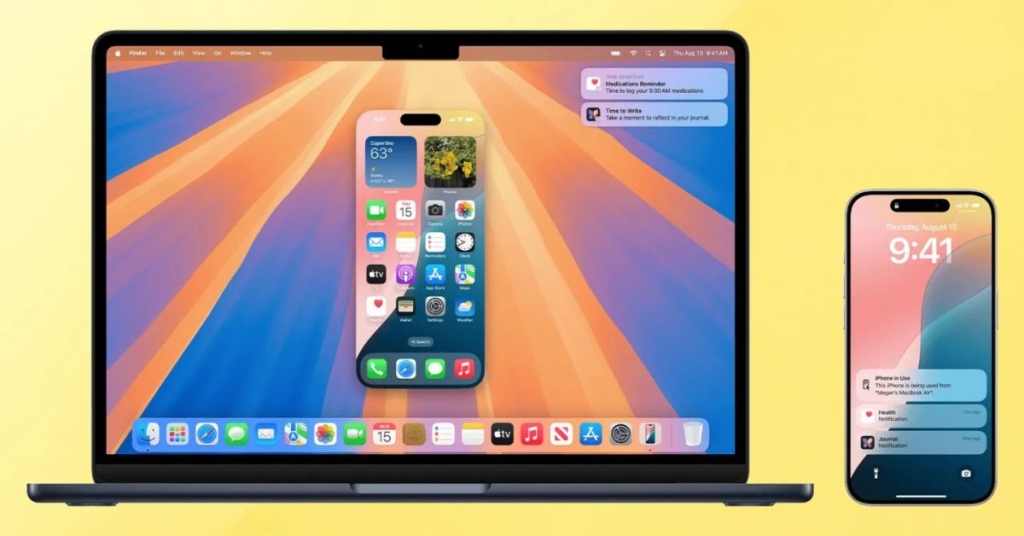
iPhone Mirroring Privacy Frustrations Spark Call for User Control Over Apple’s Strict Security Settings
In a passionate appeal to Apple, longtime Mac user and tech writer Ben Lovejoy has called for more granular control over iPhone Mirroring privacy settings, arguing that the feature’s current restrictions are hampering daily productivity for power users.
A Daily Essential Turned Daily Frustration
For Lovejoy, iPhone Mirroring has become one of Apple’s most valuable ecosystem enhancements in recent years. The feature allows users to mirror their iPhone screen directly onto their Mac, creating a seamless workflow that eliminates the need to constantly switch between devices.
“I actually keep iPhone Mirroring open throughout the day,” Lovejoy reveals, describing himself as a “Mac-first guy” who spends considerable time at his desk. The convenience of interacting with a single device while maintaining access to iPhone-only apps has made the feature indispensable for his workflow.
What began as what Lovejoy suspected was an “eccentric usage pattern” turned out to be more common than expected. After consulting with colleagues, he discovered he wasn’t alone in keeping the mirroring feature running continuously throughout the workday.
Apple’s Privacy-First Approach: Understandable But Restrictive
Apple’s cautious approach to iPhone Mirroring privacy is entirely justified, Lovejoy acknowledges. The feature could be exploited in dangerous situations, particularly in abusive relationships where one partner might use it for surveillance.
The current restrictions include:
- Mirroring only works when the iPhone is locked
- Automatic authentication options still require passcode entry relatively frequently
- The feature times out aggressively, even when devices are charging
- Notifications alert users when mirroring has been active
These protections serve legitimate purposes. The locked iPhone requirement prevents passive spying, while post-session notifications inform users that the feature was accessed. The timeout feature, initially assumed to be battery-related, persists even when devices are plugged in.
The Case for User Control
Despite understanding Apple’s privacy-first philosophy, Lovejoy argues that power users should have more control over these restrictions. His proposed optional settings include:
- Unlocked iPhone Access: The ability to use mirroring whether or not the iPhone is locked
- Face ID Authentication: Always requiring Face ID rather than passcode entry (unless the phone has been restarted)
- Persistent Sessions: Never timing out unless the Mac goes to sleep
These changes wouldn’t compromise security for average users while providing flexibility for those who understand the risks and benefits of their usage patterns.
The Broader Ecosystem Context
Lovejoy’s frustration highlights a larger tension in Apple’s ecosystem strategy. The company has built its reputation on creating a seamless, integrated experience across devices, with features like iCloud document sharing, Continuity functions, Universal Clipboard, automatic syncing of notes and photos, AirDrop, and personal hotspot capabilities.
iPhone Mirroring represents the logical extension of this ecosystem philosophy, yet its restrictive implementation creates friction for users who have come to expect the fluid device integration that defines Apple’s competitive advantage.
Community Response and Industry Implications
The call for greater control over iPhone Mirroring privacy settings resonates with many power users who feel caught between security and productivity. As remote work and multi-device workflows become increasingly common, the ability to customize security settings based on individual risk assessments could become a competitive differentiator.
Apple faces a delicate balance: maintaining its industry-leading privacy standards while accommodating the diverse needs of its user base. The company’s response to such feedback could signal how it plans to evolve its approach to user control versus system-wide security defaults.
What Users Are Saying
The tech community has largely echoed Lovejoy’s sentiments, with many expressing frustration over the current limitations. Comments on the original article suggest that users would welcome optional settings that allow them to trade some security for increased convenience in trusted environments.
Some users have proposed compromise solutions, such as allowing mirroring to remain active for extended periods when both devices are on the same trusted Wi-Fi network or when biometric authentication has recently been performed.
The Future of iPhone Mirroring
As Apple continues to refine its ecosystem features, the pressure to provide more nuanced control over privacy settings will likely intensify. The company’s ability to implement optional settings that maintain security for average users while providing flexibility for power users could determine whether iPhone Mirroring reaches its full potential as a productivity tool.
For now, users like Lovejoy continue to navigate the current limitations, hoping that Apple will recognize the value of giving users more control over how they balance privacy and productivity in their daily workflows.
Tags & Viral Phrases:
- iPhone Mirroring privacy settings
- Apple ecosystem productivity hacks
- Mac iPhone integration tips
- Face ID authentication preferences
- Locked iPhone mirroring restrictions
- Power user workflow optimization
- Apple privacy vs convenience debate
- Continuity features explained
- Multi-device workflow solutions
- iPhone Mirroring timeout issues
- Granular privacy controls needed
- Apple security restrictions frustration
- Mac desktop iPhone mirroring
- Ecosystem integration challenges
- User control over security settings
- iPhone Mirroring daily usage
- Apple ecosystem productivity
- Privacy protection overkill
- Customizable security preferences
- Mirroring feature limitations
,
Leave a Reply
Want to join the discussion?Feel free to contribute!