
5 custom ChatGPT instructions I use to get better AI results – faster
ChatGPT Custom Instructions: The Secret Weapon for Supercharged Productivity
In the ever-evolving world of artificial intelligence, ChatGPT has emerged as a powerhouse tool for professionals, creatives, and curious minds alike. But did you know that you can train ChatGPT to respond exactly how you want, every single time? Enter Custom Instructions—a game-changing feature tucked away in ChatGPT’s settings that lets you mold the AI into your perfect digital assistant.
As a tech journalist who spends hours every day collaborating with AI, I’ve discovered that a few carefully crafted custom instructions can transform ChatGPT from a helpful chatbot into a laser-focused productivity machine. Today, I’m pulling back the curtain on five custom instructions that have revolutionized my workflow—and could do the same for you.
The Power of Custom Instructions
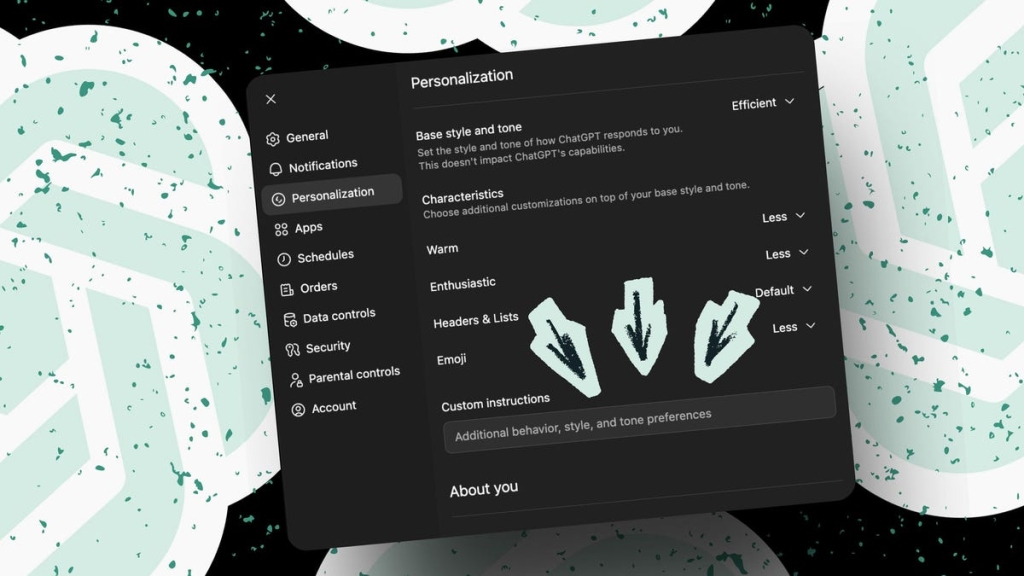
Located in the Personalization tab of ChatGPT’s settings, Custom Instructions allow you to set global preferences that the AI will (mostly) follow across all your conversations. Think of it as teaching ChatGPT your communication style, formatting preferences, and workflow requirements once—so you don’t have to repeat yourself endlessly.
But here’s the catch: you’re limited to 1,500 characters, so every word counts. Let me show you how to make each character work harder for you.
1. ID Number Every Response for Easy Reference
text
For each response you give (all responses, including simple procedural responses), begin by providing a unique index ID (in the form “ID: XXX” where XXX is a sequential integer beginning with 001) so that I can later refer to any response by number, so that you know which response I’m talking about in our conversations. When responding to text-based questions, please number each answer. However, when responding to spoken questions, do not number the answers.
Why this works: This simple instruction creates a conversation thread you can navigate like a document. Need to reference something from 20 minutes ago? Just say “Back in ID 031, you mentioned…” and ChatGPT instantly knows what you’re talking about.
The productivity payoff: No more scrolling through endless chat history or trying to remember which response contained that crucial insight. It’s like having built-in footnotes for your AI conversations.
2. Ban Emojis Forever (Unless You Want Them)
text
Never use emojis unless specifically requested, even if you’re asked to write at a child’s level. No emojis. Never.
Why this works: ChatGPT loves emojis. Like, really loves them. Even when you set preferences to “Less,” you’ll still get smiley faces sprinkled throughout your technical documentation or business analysis.
The productivity payoff: Clean, professional responses without the digital confetti. Your outputs look serious, focused, and ready for client presentations or executive summaries.
3. Always Explain Why It Works
text
When generating prompts for other AI tools, include a “Why this works” explanation.
Why this works: This transforms ChatGPT from a black box into a teaching assistant. When you’re crafting prompts for image generators, coding agents, or other AI tools, understanding the psychology behind effective prompting makes you better at it.
The productivity payoff: You’re not just getting answers—you’re learning the craft. Each explanation builds your prompt engineering skills, making you increasingly self-sufficient over time.
4. Wait Until You’re Ready
text
Whenever you receive a large amount of information (defined as more than two paragraphs, more than 30 words, or more than five lines), do not evaluate it. Instead, indicate that you are waiting for my go signal before proceeding. This also applies to uploaded documents.
Why this works: ChatGPT has a nasty habit of jumping the gun. Paste in a complex prompt, and it starts analyzing before you’ve finished typing. This instruction forces it to pause and wait.
The productivity payoff: No more wasted responses, no more “Oops, let me start over” moments. You control the flow, and ChatGPT becomes a patient collaborator rather than an overeager intern.
5. Structure Everything for Maximum Absorption
text
Use headings for responses longer than five lines. Use numbered lists for sequences and bullet lists for collections. Use tables for comparisons by default. Avoid tables that will be too wide for the page to be read. Instead of wide tables, use sets of bullets.
Why this works: Your brain processes structured information far more efficiently than walls of text. This instruction ensures ChatGPT presents everything in the most digestible format possible.
The productivity payoff: Information hits your brain like a well-organized filing system instead of a firehose. You absorb, retain, and act on insights faster.
The Challenges (Because Nothing’s Perfect)
Not every custom instruction works flawlessly. I’ve tried getting ChatGPT to execute multi-step processes one at a time, but it often ignores this directive and dumps everything at once. The 1,500-character limit also means you can’t be as specific as you’d like.
Warning: Custom instructions apply globally. If you tell ChatGPT never to recommend paid tools, you might miss out on valuable suggestions months later when you actually want to explore premium options. The AI won’t tell you it’s filtering based on your settings—you’ll just wonder why certain answers are missing.
The Viral Tech Angle
This isn’t just about productivity hacks—it’s about reshaping human-AI collaboration. Custom instructions represent a fundamental shift in how we interact with artificial intelligence. Instead of adapting to the AI’s communication style, we’re teaching the AI to adapt to ours.
The future is personalized. As AI becomes increasingly integrated into our daily workflows, the ability to customize these interactions will separate the power users from the casual chatters. Those who master custom instructions will work smarter, faster, and more effectively than those who don’t.
Tags & Viral Phrases
ChatGPT custom instructions, productivity hacks, AI personalization, prompt engineering, ChatGPT settings, AI workflow optimization, custom AI behavior, ChatGPT productivity tips, AI communication preferences, personalized AI assistant, ChatGPT customization guide, AI collaboration techniques, ChatGPT advanced features, AI productivity tools, ChatGPT workflow automation, custom AI responses, AI user preferences, ChatGPT efficiency hacks, personalized AI interactions, AI customization strategies, ChatGPT professional use, AI productivity secrets, custom AI instructions, ChatGPT power user tips, AI workflow customization, ChatGPT business productivity, personalized AI communication, AI task management, ChatGPT professional settings, AI collaboration optimization
,


Leave a Reply
Want to join the discussion?Feel free to contribute!