
I tested the most affordable Copilot+ laptop I could find, and Asus’ Vivobook 14 surprised me
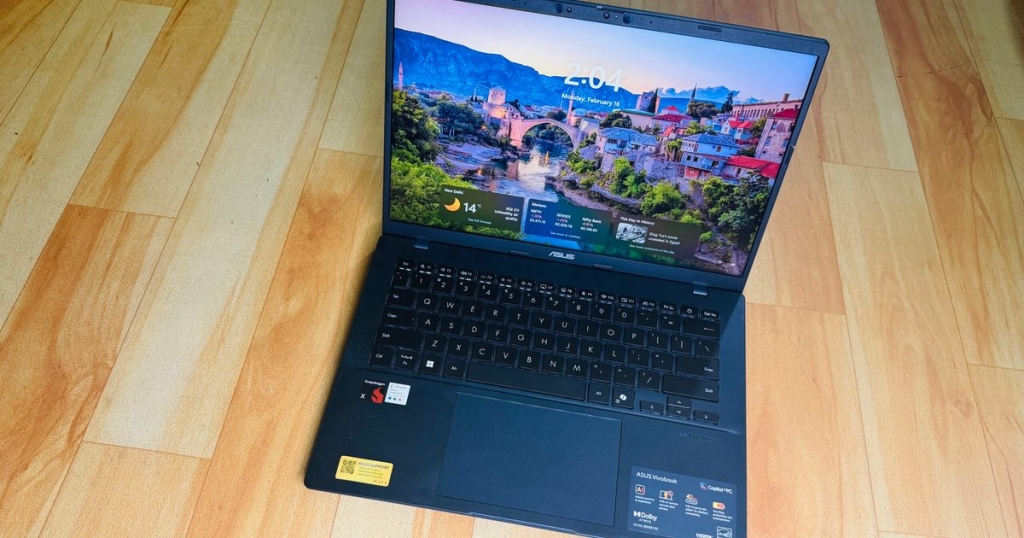
Asus Vivobook 14 Review: A Copilot+ PC Bargain That Delivers More Than Expected
The Asus Vivobook 14 emerges as a compelling contender in the budget-friendly laptop segment, particularly for those seeking a Copilot+ PC without breaking the bank. Priced at $649 (often lower during sales), this 14-inch machine punches above its weight class in several key areas while making a few compromises that are easy to forgive at this price point.
Design and Build Quality
The Vivobook 14 sports a utilitarian design that prioritizes function over flash. Available in Cool Silver and Quiet Blue finishes, the laptop features a MIL-STD 810H military-grade build that immediately sets it apart from competitors in this price bracket. This certification means the laptop can withstand drops, vibrations, extreme temperatures, and humidity—a significant advantage for students and professionals who commute regularly.
The chassis construction uses a mix of materials, with the lid and keyboard deck made from plastic that shows some flex under pressure. However, the overall build feels sturdy and durable, with the hinge mechanism providing just the right amount of resistance for one-handed opening. At 3.28 pounds and measuring 1.79-1.99 cm in thickness, it strikes a reasonable balance between portability and usability.
Display: Functional But Flawed
The 14-inch LED-backlit display offers a full HD resolution (1920 x 1080) with a 60Hz refresh rate. While the 87% screen-to-body ratio provides decent immersion, the display struggles in bright environments. Maximum brightness requires cranking to 100% in well-lit rooms, and even then, outdoor visibility remains challenging.
Out of the box, the panel exhibits a noticeable color cast that requires manual calibration for accurate color reproduction. Color saturation is adequate but not impressive, and the 45% NTSC color gamut coverage limits its appeal for creative professionals. However, Asus includes thoughtful software features like E-reading mode (converting the display to grayscale) and multiple blue light reduction levels, which help reduce eye strain during extended use.
Keyboard and Trackpad
The keyboard impresses with its 1.7mm key travel and responsive feedback. Keys offer a satisfying tactile response with good resistance, making typing comfortable for extended sessions. While there’s minor flex in the center of the deck, it doesn’t significantly impact the typing experience. The inclusion of a full numpad on the 14-inch form factor is a welcome addition for data entry tasks.
The precision touchpad supports edge gestures that add practical functionality beyond standard Windows gestures. Sliding along the left and right edges adjusts volume and brightness respectively, while the top edge controls media playback. These gestures are intuitive and don’t require memorization, enhancing the overall user experience.
Port Selection: A Major Win
Where the Vivobook 14 truly shines is its port selection. Unlike many modern laptops that have sacrificed connectivity for slim profiles, this machine offers excellent versatility:
- 2x USB 3.2 Gen 1 Type-A ports
- 2x USB 4.0 Gen 3 Type-C ports (with DisplayPort and Power Delivery support)
- 1x HDMI 2.1 port
- 1x 3.5mm combo audio jack
This comprehensive selection eliminates the need for dongles in most scenarios, making it ideal for presentations, external displays, and connecting various peripherals simultaneously.
Performance: Snapdragon X Efficiency
Powered by the Snapdragon X1 26 100 processor (30MB cache, up to 2.97GHz, 8 cores, 8 threads) with Qualcomm Adreno graphics and Hexagon NPU (up to 45 TOPS), the Vivobook 14 delivers respectable performance for everyday tasks. The 16GB LPDDR5X RAM and 512GB NVMe PCIe 4.0 SSD provide adequate headroom for multitasking and storage needs.
In real-world usage, the laptop handles productivity applications, web browsing with multiple tabs, and communication tools like Slack and Teams without significant issues. The Snapdragon architecture excels at efficiency, keeping power consumption low while maintaining responsiveness for typical workloads.
However, the system shows limitations under sustained heavy loads. Performance can become inconsistent, with occasional stuttering and random crashes when pushing the machine with multiple Chrome windows or demanding applications. The integrated Adreno GPU struggles with graphics-intensive tasks, achieving only around 9fps in 3DMark Steel Nomad and 18fps in gaming benchmarks. Gaming remains impractical, with cloud gaming services being the only viable option.
Battery Life: Outstanding Performer
The 50Wh battery proves to be one of the Vivobook 14’s strongest assets. In balanced power mode with screen brightness around 60%, the laptop consistently delivers around 11 hours of mixed usage. Even in high-performance mode, it manages 8-9 hours of continuous work before requiring a charge.
The fast charging capability deserves special mention—just one hour of charging provides enough power for a full day’s work. This feature, combined with the long battery life, makes the Vivobook 14 an excellent travel companion for users who spend extended periods away from power outlets.
Asus includes thoughtful battery management features through the MyAsus app, including a battery care mode that limits charging to 80% to extend battery lifespan, with the option to temporarily override this for 24 hours when maximum capacity is needed.
Audio and Camera
The audio system features Smart Amp technology with built-in speakers and array microphone. While the speakers won’t impress audiophiles, they provide adequate volume and clarity for video calls and casual media consumption. The microphone array performs well for voice calls and virtual meetings.
The FHD camera with IR function supports Windows Hello facial recognition for convenient and secure login. The physical privacy shutter adds an extra layer of security, addressing privacy concerns that many users have with always-on cameras.
AI Features and Software
As a Copilot+ PC, the Vivobook 14 qualifies for all Windows AI features, including on-device translation, AI-powered image editing in Paint, and Windows Recall. While these features add value, they’re unlikely to be the primary reason most buyers choose this laptop. The Qualcomm Hexagon NPU enables these AI capabilities while maintaining the system’s excellent battery efficiency.
Pros and Cons
Pros:
- Excellent value with 16GB RAM and 512GB SSD
- Comprehensive port selection eliminates dongle dependency
- Outstanding battery life with fast charging
- Military-grade build quality
- Convenient biometric login with physical privacy shutter
- Thoughtful software features for eye care and battery management
- Solid keyboard with good travel and feedback
Cons:
- Display struggles in bright environments
- Inconsistent performance under heavy loads
- Noisy fans even during light workloads
- Plastic construction shows flex
- Limited graphics performance rules out gaming
- Display color accuracy requires calibration
Who Should Buy This?
The Asus Vivobook 14 is ideal for students, remote workers, and budget-conscious professionals who need a reliable daily driver for productivity tasks. Its strengths in battery life, port selection, and build quality make it particularly suitable for those who commute or work in various locations. The Copilot+ PC certification future-proofs the machine for upcoming Windows features.
However, creative professionals, gamers, and users who require color-accurate displays or consistent high-performance computing should look elsewhere. The display limitations and performance inconsistencies make it unsuitable for graphics work, video editing, or any application requiring sustained high performance.
Final Verdict
The Asus Vivobook 14 represents an excellent value proposition in the current laptop market. It delivers where it matters most for its target audience: long battery life, comprehensive connectivity, durable construction, and adequate performance for everyday tasks. While it makes compromises in display quality and consistent performance, these are reasonable trade-offs at the $649 price point.
In a market where PC prices are rising due to memory shortages and component costs, the Vivobook 14 stands out as a genuinely affordable option that doesn’t feel cheap or compromised in critical areas. It’s not trying to compete with premium machines but rather serves as a reliable, efficient workhorse that gets the job done without unnecessary frills.
For users seeking a dependable laptop for productivity, communication, and media consumption without spending a premium, the Asus Vivobook 14 delivers impressive value and performance that exceeds expectations for its price bracket.
Tags: #AsusVivobook14 #CopilotPC #BudgetLaptop #SnapdragonX #Windows11 #StudentLaptop #RemoteWork #BatteryLife #PortSelection #MilitaryGradeBuild
Viral Phrases: “The $649 laptop that outlasts premium machines,” “Military-grade durability at budget prices,” “Say goodbye to dongle hell,” “11-hour battery life that keeps going,” “The Copilot+ PC everyone can afford,” “Built like a tank, priced like a bargain,” “Your commute just got easier,” “The battery that won’t quit,” “Ports galore for the modern worker,” “AI features without the premium price”
,
Leave a Reply
Want to join the discussion?Feel free to contribute!