
Google’s Snapseed camera for iPhone launches: Pro controls, retro
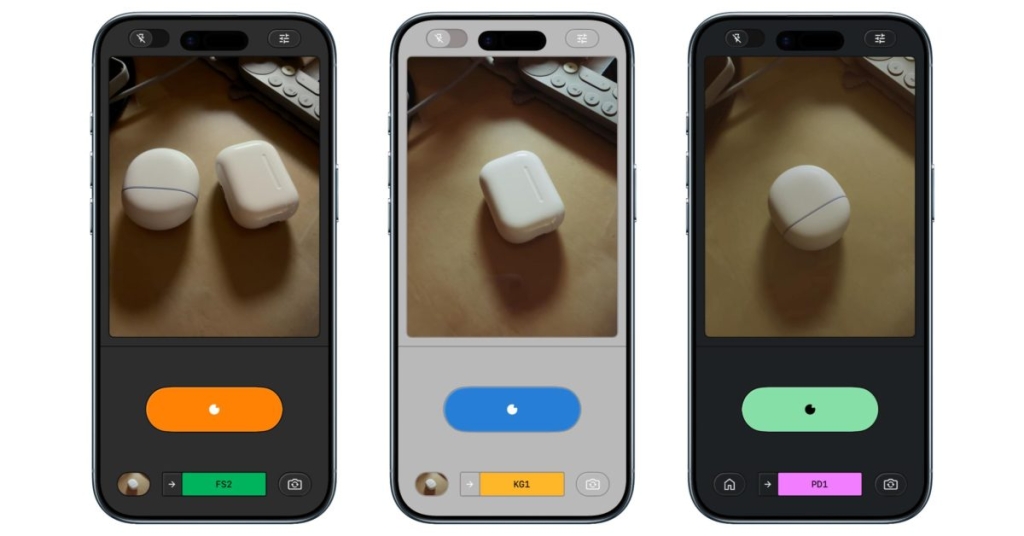
Snapseed’s New Camera Feature Transforms It from Photo Editor to Full-Fledged Camera App
Google’s beloved photo editing app Snapseed has just received a major upgrade that’s sending shockwaves through the mobile photography community. The app that once specialized solely in post-processing now boasts an integrated camera system, effectively transforming it into a complete photography solution that’s available completely free of charge.
The Evolution of Snapseed
For years, Snapseed has been the go of choice for photographers seeking powerful editing capabilities without the complexity of desktop software. With its intuitive interface and professional-grade tools, it carved out a unique niche in the crowded mobile photo editing landscape. Now, Google is taking things to the next level by embedding a fully functional camera directly into the app.
The camera feature, which initially soft-launched in December, is now rolling out globally to iOS users. This isn’t just a basic camera addition—it’s a sophisticated imaging system that brings professional-level controls to your iPhone’s fingertips.
Seamless Integration and User Experience
The most noticeable change is the prominent camera icon now residing in the top-right corner of the Snapseed interface. This strategic placement makes the transition from editing to capturing seamless, encouraging users to stay within the app’s ecosystem for their entire photography workflow.
But the innovation doesn’t stop at mere accessibility. The camera interface has been thoughtfully designed with both casual users and photography enthusiasts in mind. The PRO mode toggle in the top-left corner unlocks manual controls that would make even DSLR owners envious.
Professional Controls at Your Fingertips
When PRO mode is activated, three powerful buttons appear at the bottom of the viewfinder: ISO, Shutter Speed, and Focus. These aren’t just decorative elements—they provide real, granular control over your image capture. The addition of a skeuomorphic dial for adjusting settings from Auto adds a touch of tactile satisfaction to the digital experience.
This level of control is unprecedented in a free mobile app. Photographers can now fine-tune their exposure triangle—the fundamental relationship between ISO, shutter speed, and aperture—directly from their iPhone. Whether you’re trying to freeze action with a fast shutter speed or create dreamy motion blur with a slow one, Snapseed’s camera puts you in complete control.
Film Emulation That Will Blow Your Mind
Perhaps the most exciting feature is Snapseed’s real-time film emulation capabilities. The app offers an impressive array of film stocks that you can apply before even taking the shot:
- KP1 & KP2: Inspired by Kodak Portra 400 and 160 respectively
- KG1: Modeled after Kodak Gold 200
- KE1: Based on Kodak E200 slide film
- FS1 & FS2: Inspired by Fuji Superia 200 and 800
- FP1: Modeled after Fuji Pro 400h
- AG1 & AS1: Based on Agfa Optima 200 and Scala 200
- PD1: Inspired by classic Polaroid 600 film
- TC1: Modeled after Technicolor’s iconic color palette
Each film stock isn’t just a simple filter—it’s a sophisticated algorithm that replicates the unique characteristics of these legendary films, including their color rendition, grain structure, and tonal response. The skeuomorphic rewind animation when switching between films adds a delightful touch of nostalgia that film photography enthusiasts will appreciate.
Non-Destructive Editing: A Game Changer
Google has implemented a revolutionary approach to photo capture with Snapseed’s camera. Every photo you take includes a complete editing stack, meaning you can modify, fine-tune, or completely revert any aspect of the look even after the photo has been saved to your gallery. This non-destructive workflow is typically found in professional desktop applications but is now available in your pocket.
This feature alone could revolutionize how people approach mobile photography. No longer will you be stuck with a photo that’s almost perfect but needs just a slight adjustment. You can revisit and refine your images indefinitely, experimenting with different looks and styles long after the moment has passed.
Customization Options Galore
Snapseed doesn’t just stop at powerful camera controls and film emulation. The app offers extensive customization options for the viewfinder itself. Users can choose from various Color Themes including Editor, Dusk, Negative, Steel, Haze, and Depth. These themes don’t just change the appearance of the interface—they can influence how you perceive and compose your shots.
The thoughtful reorganization of controls also deserves mention. Flash has been moved to the bottom-left corner, while zoom controls sit on the opposite side, creating an ergonomic layout that feels natural and intuitive.
The Android Question
While iOS users are currently enjoying these groundbreaking features, Android users haven’t been forgotten. Google is actively working on updating the Android version of Snapseed with the redesigned editor that debuted for iPhone and iPad last year. While the camera feature hasn’t been confirmed for Android yet, the company’s track record suggests it’s only a matter of time before Android users get to experience this revolutionary update.
A Free Revolution in Mobile Photography
Perhaps the most remarkable aspect of this update is that Snapseed 3.15.0 remains completely free. In an era where professional photo editing apps often come with hefty subscription fees, Google’s decision to offer this powerful tool at no cost is nothing short of revolutionary.
The implications for mobile photography are profound. Amateur photographers now have access to tools that were previously the domain of professionals. The barrier to entry for high-quality mobile photography has never been lower, and the creative possibilities have never been greater.
What This Means for the Future
Snapseed’s transformation from a simple photo editor to a comprehensive photography platform signals a broader trend in mobile imaging. As smartphone cameras continue to improve and computational photography becomes more sophisticated, the distinction between mobile and professional photography continues to blur.
This update positions Snapseed as not just a competitor to other mobile editing apps, but as a potential replacement for dedicated camera apps for many users. The combination of powerful capture controls, sophisticated film emulation, and non-destructive editing creates a compelling all-in-one solution that’s hard to beat.
Tags & Viral Elements
Snapseed #Google #MobilePhotography #iPhoneCamera #FilmEmulation #PhotoEditing #PhotographyTips #TechNews #FreeApp #ProfessionalPhotography #CameraApp #iOSUpdate #AndroidComingSoon #NonDestructiveEditing #MobileCreativity #PhotographyRevolution #TechInnovation #FreePhotographyTools #SmartphonePhotography #DigitalPhotography #FilmPhotography #CameraControls #PhotoStack #CreativeApps #MobileEditing #PhotographyCommunity #TechUpdate #GooglePhotos #iPhonePhotography #AndroidPhotography
,

Leave a Reply
Want to join the discussion?Feel free to contribute!