
Suffering From Slow Internet Speeds? It May Be Super Simple To Fix
Suffering From Slow Internet Speeds? It May Be Super Simple To Fix
In today’s hyper-connected world, few things are more frustrating than a sluggish internet connection. Whether you’re trying to binge-watch the latest season of your favorite show, dominate in online gaming, or simply join a crucial video conference, slow Wi-Fi can turn your digital life into a nightmare. But what if the solution to your internet woes is hiding in plain sight, right in your own home?
The Hidden Culprit: Your Ethernet Cable
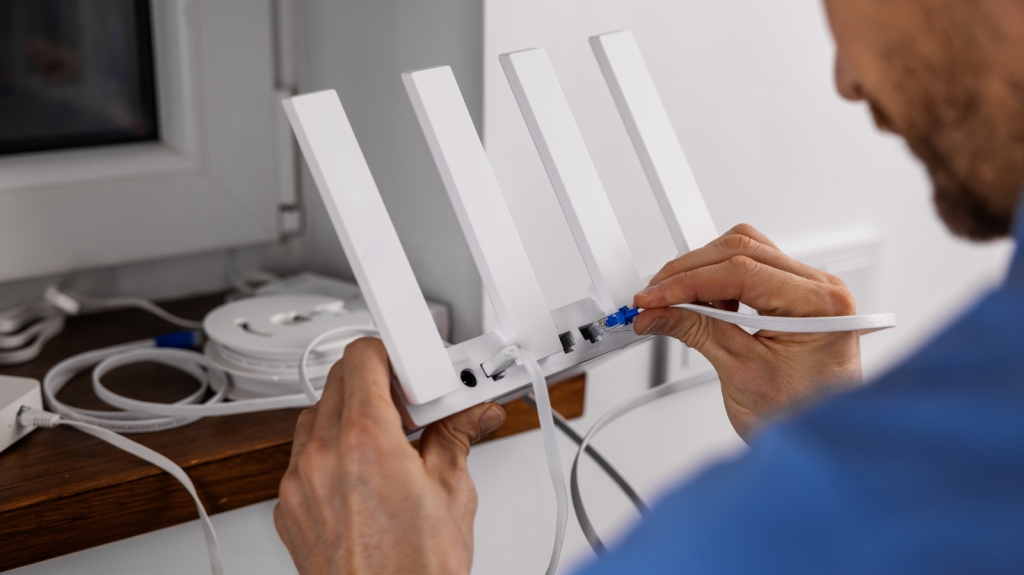
You might be surprised to learn that one of the most common causes of slow internet speeds is something as simple as an outdated Ethernet cable. Yes, that humble cord connecting your modem to your router could be the bottleneck throttling your internet experience.
Here’s the deal: if you’re paying for high-speed internet (think 200 Mbps, 500 Mbps, or even 1 Gbps), but you’re still using an old Cat5 Ethernet cable, you’re essentially leaving money on the table. These older cables are designed to max out at 100 Mbps, which means you’re only getting a fraction of the speed you’re paying for.
Imagine this scenario: you’re trying to stream 8K videos on multiple devices while your family members are gaming online. With a Cat5 cable, you’ll likely experience frustrating slowdowns, buffering, and lag. It’s like trying to fill an Olympic-sized swimming pool with a garden hose – you’re just not going to get the flow you need.
The Cat Cable Conundrum
Ethernet cables come in various categories, each designed to handle different speeds and bandwidths. Here’s a quick breakdown:
- Cat5: Maximum speed of 100 Mbps
- Cat5e: Supports up to 1 Gbps
- Cat6: Can handle 10 Gbps at shorter lengths, 1 Gbps at distances beyond 330 feet
- Cat6a and beyond: Even higher speeds and better performance
If your cables are still rocking that Cat5 rating, it’s time for an upgrade. For most home users, Cat5e cables should suffice, offering support for speeds up to 1 Gbps. However, if you want to future-proof your setup and ensure the best possible performance, consider investing in Cat6 cables.
Beyond the Cable: Other Potential Culprits
While upgrading your Ethernet cable is often the quickest fix, it’s not the only factor that can impact your internet speed. Here are a few other things to consider:
-
Router Age and Quality: If you’re using an older router, it might not be capable of handling today’s high-speed internet plans. Consider upgrading to one of the fastest Wi-Fi routers available on the market.
-
Router Placement: The position of your router can significantly affect signal strength and coverage. Try placing it in a central, elevated location, away from walls and obstructions.
-
Wi-Fi Band Selection: Most modern routers offer both 2.4 GHz and 5 GHz bands. The 5 GHz band typically offers faster speeds but shorter range, while the 2.4 GHz band provides better coverage but slower speeds. Experiment with both to find the best balance for your needs.
-
Signal Congestion: If you live in a densely populated area, you might be experiencing interference from neighboring Wi-Fi networks. Try changing your router’s channel or consider setting up a mesh Wi-Fi system for better coverage and less congestion.
-
Router Antenna: Some routers allow you to upgrade or replace the antenna. A higher-gain antenna can often improve signal strength and range.
The Bottom Line
In the grand scheme of technological troubleshooting, checking and potentially upgrading your Ethernet cable is one of the simplest and most cost-effective ways to boost your internet speed. It’s a quick fix that can yield significant results, especially if you’re currently using outdated Cat5 cables.
Remember, in our increasingly digital world, a fast and reliable internet connection is no longer a luxury – it’s a necessity. Whether you’re working from home, attending online classes, or simply trying to unwind with some Netflix, you deserve the speed you’re paying for.
So, the next time you find yourself staring at a buffering icon or experiencing lag in your favorite game, don’t immediately blame your internet service provider. Take a closer look at that unassuming Ethernet cable snaking its way from your modem to your router. It might just be the key to unlocking the blazing-fast internet speeds you’ve been craving.
Tags
InternetSpeed #EthernetCable #TechTips #WiFiBoost #HomeNetworking #Cat5vsCat6 #RouterUpgrade #Streaming #OnlineGaming #DigitalLifeHacks
ViralSentences
“Buffering? More like suffering!”
“Your Ethernet cable might be the bottleneck you never knew you had.”
“Upgrade your cable, upgrade your life.”
“Don’t let an old cord slow down your digital dreams.”
“The simple fix that could revolutionize your internet experience.”
“From Cat5 to Cat6: The upgrade that pays for itself.”
“Internet speed secrets hiding in plain sight.”
“Why you might be paying for speed you can’t even use.”
“The unsung hero of your home network: The Ethernet cable.”
“Boost your bandwidth with this one simple change.”
,

Leave a Reply
Want to join the discussion?Feel free to contribute!