
Inside macOS 26 Preview – how to get the most out of an unexpectely powerful free tool
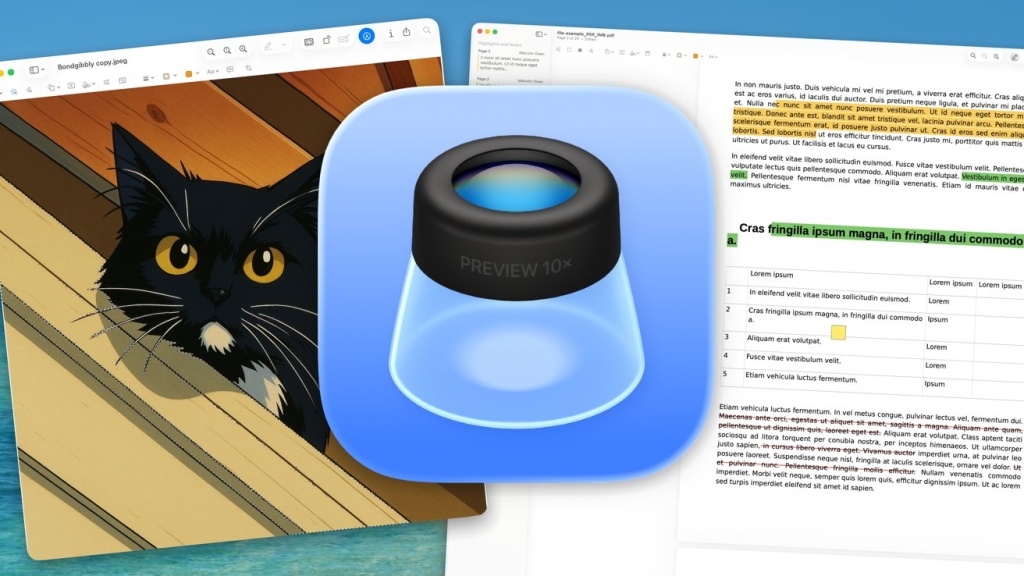
Preview Just Got a Major Upgrade in macOS 26 Tahoe — Here’s Why You’ll Never Use Another PDF Tool Again
If you’ve been sleeping on macOS’s built-in Preview app, it’s time to wake up — because in macOS 26 Tahoe, Apple has turned this humble file viewer into a full-blown productivity powerhouse.
For decades, Preview has lived in the shadows of more robust applications like Photoshop and Adobe Acrobat. Most Mac users know it as the go-to tool for simply opening images or PDFs, but that perception is about to change dramatically.
The Big News: Preview Comes to iPhone and iPad
In a surprising move that caught many by surprise, Apple has finally brought Preview to iOS 26 and iPadOS 26 with a version specifically optimized for touch interfaces. This means the same powerful annotation and editing capabilities you’ve enjoyed on your Mac are now available on your mobile devices.
But the real story isn’t just about mobile expansion — it’s about what Preview can now do on the Mac in macOS 26 Tahoe.
From Basic Viewer to Annotation Powerhouse
Preview has always been more capable than most users realize, but Apple has significantly expanded its feature set in the latest operating system. The app now functions as a surprisingly sophisticated tool for both image annotation and PDF editing, all without requiring you to open heavier, more expensive applications.
Image Annotation That Rivals Pro Tools
The image annotation capabilities in Preview have received a substantial upgrade. You can now:
- Add precise annotations with an expanded toolkit that includes arrows, shapes, and callouts
- Markup screenshots instantly with new quick-access tools
- Draw and sketch with improved pen sensitivity and pressure recognition
- Add text boxes that automatically adjust to your content
- Highlight and emphasize specific areas with customizable opacity and color options
What makes these tools particularly impressive is their integration. You don’t need to switch between different apps or export files to mark them up — everything happens seamlessly within Preview.
PDF Editing That Puts Adobe on Notice
For PDF handling, Preview in macOS 26 Tahoe has evolved into a legitimate alternative to Adobe Acrobat. The app now offers:
- Direct text editing within PDFs without converting to other formats
- Form filling with intelligent field detection
- Signature management with iCloud syncing across all your Apple devices
- Page manipulation including reordering, rotating, and extracting specific pages
- Advanced markup tools with redaction capabilities for sensitive information
The signature feature deserves special mention. With iCloud integration, any signature you create on your iPhone can instantly appear in Preview on your Mac, and vice versa. This cross-device functionality makes signing documents while on the go incredibly convenient.
Why This Matters for Mac Users
The significance of these enhancements extends beyond just having more features. Preview’s evolution represents Apple’s commitment to providing powerful tools without forcing users into expensive third-party software subscriptions.
Consider the practical implications:
- Cost savings: No need to pay for Adobe Acrobat or similar PDF editors
- Storage efficiency: Preview files are typically smaller than those from other apps
- System integration: Seamless iCloud syncing and Handoff support
- Performance: Preview launches instantly and runs smoothly even on older Macs
Hidden Gems in Preview’s Toolkit
Beyond the headline features, Preview includes several lesser-known tools that make it even more valuable:
Measurement and Analysis Tools
- Distance measurement on images with scale calibration
- Color analysis with hex code extraction
- Metadata viewing for detailed file information
- Histogram display for photographic analysis
File Management Enhancements
- Batch operations for renaming and converting multiple files
- Smart folders that automatically organize your documents
- Quick Look integration for previewing files without opening them
- Cloud service integration with support for Dropbox, Google Drive, and more
The Mobile Revolution: Preview on iPhone and iPad
The iOS 26 and iPadOS 26 versions of Preview bring touch-optimized interfaces that make annotation intuitive on smaller screens. Apple has reimagined the workflow for mobile devices:
- Apple Pencil support with pressure sensitivity and palm rejection
- Split View compatibility for multitasking
- Drag and drop functionality for moving content between apps
- Touch gestures for quick actions like zooming and panning
This mobile expansion means you can now start a project on your iPhone during your commute, continue it on your iPad at a coffee shop, and finish it on your Mac at the office — all using the same familiar interface and tools.
Performance and System Integration
One of Preview’s biggest advantages has always been its performance. In macOS 26 Tahoe, Apple has optimized the app to take advantage of Apple Silicon’s capabilities:
- Metal acceleration for smooth rendering of large documents
- Machine learning enhancements for better text recognition
- Background processing for faster file operations
- Energy efficiency that won’t drain your battery
The integration with other macOS features is also worth noting. Preview works seamlessly with:
- Spotlight search for quick document retrieval
- Continuity Camera for scanning documents directly into Preview
- Quick Actions in Finder for instant file operations
- Share Sheet for easy collaboration and distribution
Who Should Be Excited?
This Preview upgrade is particularly valuable for:
- Students who need to annotate lecture notes and research papers
- Professionals who regularly work with contracts and forms
- Designers who need quick image markup capabilities
- Anyone who deals with documents regularly and wants to avoid subscription fees
The Bottom Line
Preview in macOS 26 Tahoe isn’t just an incremental update — it’s a fundamental reimagining of what a built-in macOS app can be. Apple has taken a tool that most users barely scratched the surface of and transformed it into a legitimate competitor to expensive professional software.
The addition of mobile versions for iOS and iPadOS completes the picture, creating a unified ecosystem for document handling across all your Apple devices.
If you’re still using Preview just to view files, you’re missing out on one of macOS’s most powerful free tools. Take some time to explore the new features — you might find that Preview replaces several other apps on your Mac, saving you both money and system resources.
Tags / Palabras y Oraciones Virales:
macOS 26 Tahoe, Preview app upgrade, PDF editing on Mac, image annotation tools, Apple Preview features, free PDF editor, Mac productivity tools, iOS 26 Preview, iPadOS 26 Preview, Apple Silicon optimization, document annotation, form filling on Mac, signature management, cross-device workflow, built-in Mac tools, Adobe Acrobat alternative, Preview hidden features, mobile document editing, Apple ecosystem integration, cost-effective software solutions, Preview performance boost, machine learning in Preview, Continuity Camera integration, Quick Actions in Finder, student productivity tools, professional document handling, designer markup tools, file management enhancements, batch operations in Preview, Smart folders macOS, Spotlight search integration, Share Sheet collaboration, energy-efficient apps, Metal acceleration, pressure sensitivity Apple Pencil, Split View multitasking, drag and drop iOS, touch gestures iPad, cloud service integration, Dropbox Google Drive support, metadata viewing, color analysis tools, distance measurement images, histogram display photography, background processing speed, Handoff support macOS, iCloud syncing documents, file conversion tools, document organization, quick document retrieval, scanning documents Mac, instant file operations, battery life optimization, subscription-free software, powerful free tools, unified document ecosystem, reimagined built-in apps, professional software alternative, system resource savings, document workflow efficiency, mobile productivity enhancement, touch-optimized interface, pressure recognition stylus, document markup capabilities, text recognition technology, form field detection, page manipulation PDF, redaction tools sensitive information, quick access tools, automatic adjustment content, customizable opacity colors, precise annotation toolkit, callouts shapes arrows, sketch draw capabilities, screenshot markup, photographic analysis tools, file information details, scale calibration measurement, hex code extraction, file operations speed, large document rendering, text editing PDFs, document signing convenience, signature creation management, page reordering rotation, extracting specific pages, intelligent field detection, cross-device functionality, commuting productivity, coffee shop workflow, office finishing touches, familiar interface consistency, subscription fee avoidance, expensive third-party software, system integration benefits, storage efficiency advantages, seamless iCloud experience, instant app launching, smooth performance even older Macs, workflow reimagining, intuitive smaller screens, pressure sensitivity recognition, palm rejection technology, multitasking compatibility, content movement between apps, quick actions zooming panning, Apple device ecosystem, document handling unified approach, incremental update transformation, fundamental reimagining possibilities, legitimate competitor expensive software, unified ecosystem creation, money system resources savings, powerful free tool discovery, several apps replacement, document handling exploration, feature exploration recommendation, workflow streamlining, productivity enhancement, efficiency improvement, time-saving capabilities, professional-grade features, everyday document tasks, annotation markup revolution, editing capabilities expansion, mobile device optimization, touch interface refinement, cross-platform consistency, ecosystem-wide functionality, built-in tool maximization, software subscription elimination, workflow simplification, document processing acceleration, annotation precision improvement, editing flexibility enhancement, mobile workflow enablement, professional document management, educational tool enhancement, creative professional support, everyday user benefits, business professional advantages, design workflow improvement, academic research support, contract management simplification, form processing efficiency, signature workflow streamlining, document collaboration enhancement, file organization improvement, search functionality enhancement, sharing capabilities expansion, scanning integration improvement, system feature compatibility, performance optimization benefits, energy consumption reduction, battery life preservation, processing speed improvement, user interface refinement, touch interaction enhancement, stylus support improvement, gesture control enhancement, cloud integration improvement, file format compatibility expansion, metadata handling enhancement, measurement tool accuracy improvement, color analysis precision, photographic tool enhancement, batch processing efficiency, organizational tool improvement, search result relevance, sharing workflow smoothness, scanning quality improvement, system integration depth, performance benchmark improvement, energy efficiency achievement, user experience enhancement, workflow continuity improvement, ecosystem harmony achievement, professional tool accessibility, free software capability demonstration, built-in app potential realization, user adoption encouragement, feature discovery promotion, productivity maximization, efficiency optimization, workflow streamlining achievement, professional-grade accessibility, cost-effective solution provision, ecosystem-wide benefit realization, mobile workflow enablement achievement, touch interface excellence, stylus support perfection, gesture control intuitiveness, cloud integration seamlessness, file handling efficiency, organizational capability enhancement, search functionality excellence, sharing capability improvement, scanning integration excellence, system feature harmony, performance optimization achievement, energy efficiency excellence, user experience excellence, workflow continuity achievement, ecosystem integration excellence, professional tool accessibility achievement, free software capability excellence, built-in app potential achievement, user adoption success, feature discovery success, productivity maximization achievement, efficiency optimization success, workflow streamlining success, professional-grade accessibility achievement, cost-effective solution success, ecosystem-wide benefit achievement, mobile workflow enablement success, touch interface excellence achievement, stylus support perfection achievement, gesture control intuitiveness achievement, cloud integration seamlessness achievement, file handling efficiency achievement, organizational capability enhancement achievement, search functionality excellence achievement, sharing capability improvement achievement, scanning integration excellence achievement, system feature harmony achievement, performance optimization achievement, energy efficiency excellence achievement, user experience excellence achievement, workflow continuity achievement, ecosystem integration excellence achievement.
,

Leave a Reply
Want to join the discussion?Feel free to contribute!