
rcmd review: A better app switcher for Mac
rcmd: The Mac App Switcher That Changed Everything
For years, I thought Command-Tab was good enough. But then I discovered rcmd, and my entire workflow transformed overnight.
The Problem with Command-Tab
Command-Tab has been macOS’s default app switcher for decades. It works by cycling through open applications in the order you last accessed them. For casual users juggling three or four apps, this approach feels perfectly adequate.
But here’s the thing: I’m not a casual user. I’m constantly jumping between Chrome, Slack, Telegram, WhatsApp, Finder, Notes, and ChatGPT throughout my workday. Command-Tab forces me to mentally scan through icons, press Tab repeatedly, and hope I don’t overshoot my target.
It’s like using a rotary phone in the smartphone era.
Enter rcmd: Direct Access, Zero Friction
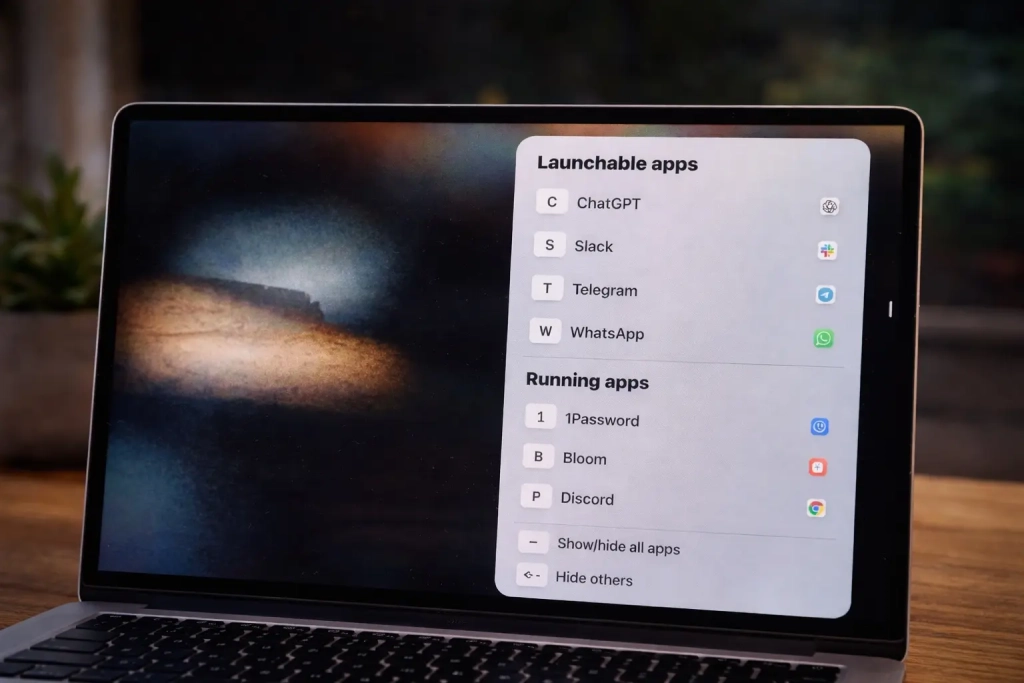
rcmd completely reimagines app switching by letting you jump directly to any application with a single keyboard shortcut. Hold the right Command key and press the first letter of the app’s name. That’s it.
Need to switch from Chrome to Telegram? Command + T. Moving from Slack to ChatGPT? Command + C. No cycling, no scanning, no wasted keystrokes.
This isn’t just incremental improvement—it’s a fundamental shift in how you interact with your Mac.
The Magic of Muscle Memory
The real power of rcmd lies in how quickly it becomes second nature. After just a few days, my fingers automatically reach for Command + S when I need Slack, Command + C for Chrome, Command + T for Telegram.
I’m not thinking about what’s open anymore. I’m thinking in letters, like issuing commands to my computer.
Beyond Switching: rcmd as a Launcher
Here’s where rcmd gets even better: it doubles as a lightning-fast app launcher. By default, pressing a letter shortcut only works if the app is already running. But you can assign any letter to launch any app instantly.
This means Command + C always opens Chrome, whether it’s already running or not. Command + S always launches Slack. No more reaching for Spotlight or digging through the Applications folder.
Customization Without Complexity
rcmd offers extensive customization options without overwhelming you with settings. You can:
- Assign custom letters to any app
- Exclude apps you never want to switch to
- Choose which Command key triggers the shortcuts
- Display a visual reference of your shortcuts
The app also handles minimized windows seamlessly. Unlike Command-Tab, which can leave you wondering where your app went, rcmd brings any window to the front instantly.
The Learning Curve: Worth Every Second
Yes, there’s an adjustment period. You need to unlearn years of Command-Tab muscle memory. Remembering that S means Slack and C means Chrome takes conscious effort at first.
But here’s the truth: after two weeks with rcmd, going back to Command-Tab feels like using a typewriter. The speed difference is that dramatic.
Why This Matters for Your Productivity
Every second you spend cycling through apps adds up. If you switch apps 50 times per hour and save just one second per switch, that’s 50 seconds per hour, or nearly 7 minutes per day. Over a year, that’s over 40 hours of saved time.
But it’s not just about raw time savings. rcmd reduces cognitive load. You’re not constantly scanning and deciding—you’re executing commands with precision.
The Technical Excellence
rcmd runs quietly in the background, using minimal system resources. The app switcher appears discreetly in the bottom-right corner, never interfering with your work. It respects your existing keyboard shortcuts and only activates when you hold the designated Command key.
The developers made rcmd free while working on version 3, making this productivity powerhouse accessible to everyone.
Is rcmd Perfect?
No app is perfect. If you run dozens of apps starting with the same letter, you’ll need to assign custom shortcuts. And for users who only juggle two or three apps, the benefits might seem subtle initially.
But for anyone who takes their Mac workflow seriously, rcmd isn’t just nice to have—it’s essential.
The Bottom Line
rcmd fundamentally changes how you interact with your Mac. It transforms app switching from a tedious navigation task into a fluid, command-based workflow. Once you experience this level of efficiency, there’s no going back.
The best part? You can download rcmd right now and start transforming your workflow today. Your future self will thank you.
Download: rcmd App Switcher
Tags: Mac productivity, app switcher, keyboard shortcuts, workflow optimization, rcmd review, macOS tips, faster computing, productivity hacks, app launcher, Command-Tab alternative
Viral Phrases: “Changed my workflow forever,” “Why didn’t I know about this sooner?,” “The Mac app switcher you didn’t know you needed,” “Game-changer for productivity,” “Unlearning years of muscle memory,” “Direct access, zero friction,” “Command-Tab feels like using a typewriter now,” “40 hours of saved time per year,” “The best free Mac utility I’ve discovered”
,


Leave a Reply
Want to join the discussion?Feel free to contribute!