
Strip out Windows 11’s bloatware, ads, and other grossness—for free
Revolutionize Your Windows Setup: Winhance Makes Debloating and Customization Effortless
If you’ve ever unboxed a brand-new PC only to be greeted by a barrage of pre-installed apps you’ll never use, you’re not alone. Windows setups have long been criticized for their bloatware overload, with some frustrated users even switching to Linux in search of a cleaner experience. But what if you could enjoy the best of both worlds—Windows’ familiar interface with the streamlined simplicity of Linux? Enter Winhance, the game-changing open-source tool that’s making waves in the tech community.
The Ultimate Solution to Windows Bloatware
Winhance isn’t just another utility—it’s a comprehensive system management powerhouse that transforms how you interact with Windows. Available completely free on GitHub, this innovative application puts you back in control of your PC’s performance and appearance.
Getting Started: Installation Made Simple
When you first launch Winhance, you’ll notice it takes a moment to initialize. This brief pause is actually a feature, not a bug—the program meticulously checks if system restore is enabled before proceeding, ensuring you have a safety net for any changes you make.
Debloating Made Effortless
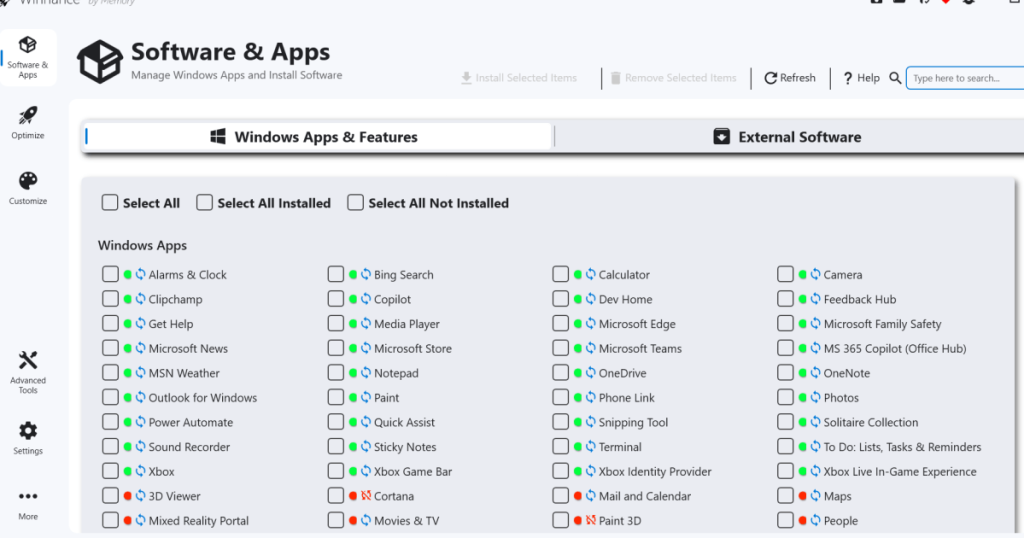
The first screen presents you with a comprehensive list of all Windows-native applications. Gone are the days of navigating through multiple menus or using command-line tools. With Winhance, debloating becomes as simple as:
- Scrolling through the application list
- Checking boxes next to unwanted programs
- Clicking “Remove Selected Items” in the top menu bar
The visual feedback system is brilliantly intuitive—apps you uninstall transition from green dots to red dots. A cross symbol indicates permanent removal, while a blue recycling symbol means you can reinstall later if needed.
Beyond Windows Apps: External Software Management
Winhance’s capabilities extend far beyond Microsoft’s native applications. Click the “External Software” tab to access a complete inventory of third-party programs installed on your system. Whether you’re performing a fresh setup or cleaning up an existing installation, you can manage external applications with the same streamlined interface—uninstall unwanted programs or reinstall previously removed ones with just a few clicks.
Optimize Your System Like a Pro
The “Optimize” tab is where Winhance truly shines, consolidating hundreds of Windows settings into a single, scrollable interface. From security configurations to advertisement controls and privacy settings, everything you need is at your fingertips.
What sets Winhance apart is its intelligent approach to system services. Under the “System Services” section, you’ll find clear, concise descriptions explaining what happens when you disable specific services. This eliminates the guesswork and potential risks associated with tweaking system settings manually.
Take Control of Updates
While disabling Windows Updates entirely isn’t recommended, Winhance gives you granular control over your update preferences. You can choose to install only security updates, skip feature updates, or customize your update schedule to suit your needs.
Customization Unleashed
The “Customizations” tab transforms Winhance from a utility into a personalization powerhouse. Switch between Light and Dark modes instantly, or dive deep into taskbar customization options that would typically require multiple menu navigations.
Why Winhance Matters
In an era where privacy concerns and system performance are paramount, Winhance represents a significant shift in how users interact with Windows. It bridges the gap between Windows’ user-friendly interface and the granular control typically associated with Linux systems.
The open-source nature of Winhance means continuous improvement driven by community feedback, while its free availability ensures accessibility for all users, regardless of budget constraints.
Related Content
- Goodbye, bloatware! How to clean out Windows 11’s cruft
- Why I’m waging a personal war against bloatware
- 6 things that annoy every Windows PC user
Winhance #WindowsOptimization #Debloating #PCSetup #TechTips #WindowsCustomization #SystemOptimization #OpenSource #PCGaming #TechHacks #Windows11 #PerformanceBoost #CleanWindows #TechLife #DigitalMinimalism #PCMasterRace #WindowsTweaks #TechSolutions #ComputerSetup #GamingPC
Revolutionize your Windows experience today with Winhance – the ultimate tool for debloating, optimizing, and customizing your PC setup. Say goodbye to bloatware and hello to peak performance!
Transform your new PC from cluttered to clean in minutes with this game-changing open-source tool.
Winhance makes Windows setup so simple, you’ll wonder why Microsoft doesn’t include this by default.
Take back control of your Windows system with the tool that’s got the tech community buzzing.
The secret weapon PC enthusiasts are using to optimize Windows like never before.
Debloating Windows has never been this easy – just check, click, and conquer.
Winhance: Because your new PC deserves to run at its full potential from day one.
The open-source revolution that’s making Windows feel fresh again.
Customize, optimize, and debloat – all from one beautifully simple interface.
Why settle for bloatware when you can have a lean, mean Windows machine?
Tech’s best-kept secret is finally out – and it’s completely free.
The tool that’s making Linux switchers think twice about leaving Windows behind.
Your PC’s performance potential is just one download away.
Winhance isn’t just a tool – it’s a complete Windows transformation system.
The future of Windows customization is here, and it’s absolutely free.
Say goodbye to the frustration of Windows bloatware forever.
The ultimate PC setup companion that puts you back in control.
Transform your Windows experience from overwhelming to effortless.
The game-changing tool that’s redefining what Windows can be.
Debloating made simple, optimization made powerful, customization made fun.
Winhance: Where Windows meets simplicity without sacrificing power.
,

Leave a Reply
Want to join the discussion?Feel free to contribute!