
Indie App Spotlight: ‘Summit’ is an all-in-one portfolio tracker for iPhone and iPad
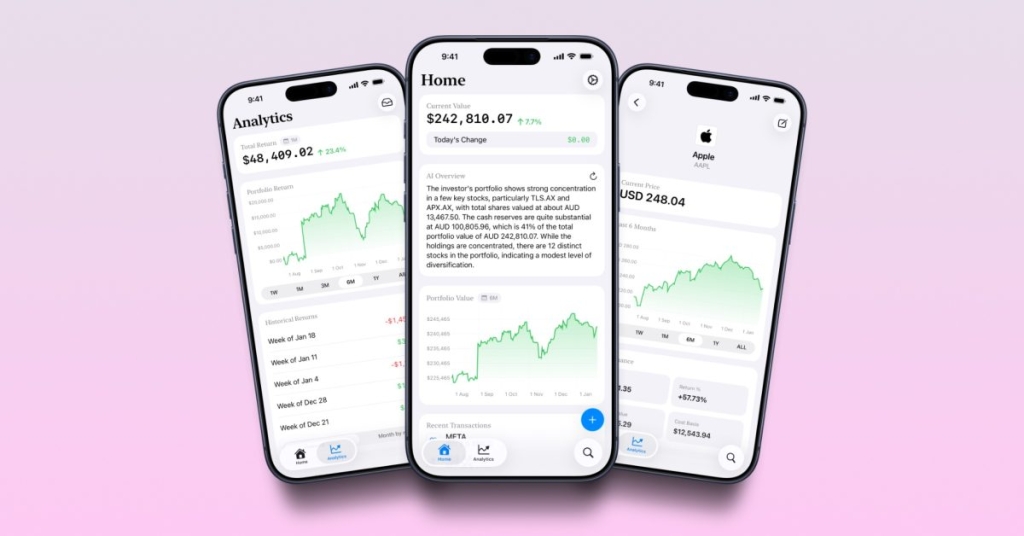
Summit: The All-in-One Investment Tracker That’s About to Revolutionize Your Portfolio Management
In the fast-paced world of personal finance and investing, keeping track of your assets across multiple platforms can feel like herding cats. Enter Summit, the sleek new iOS app that’s making waves in the indie app community by promising to be the ultimate solution for investors who want to consolidate their financial life into one beautifully designed interface.
The Problem Summit Solves
Let’s face it: if you’re serious about investing, you’re probably dealing with a fragmented ecosystem. Maybe you’ve got a Robinhood account for quick trades, a Fidelity account for retirement planning, and a crypto wallet for your digital assets. Or perhaps you’re stuck with a brokerage that has all the functionality of a 1990s website but none of the charm. Summit tackles both scenarios head-on, offering a unified dashboard that brings all your investments together regardless of where they’re held.
Design That Speaks to Modern Investors
What immediately stands out about Summit is its commitment to aesthetics without sacrificing functionality. The app’s interface is clean, intuitive, and—dare we say it—actually enjoyable to use. In an industry where financial apps often look like they were designed by accountants rather than UX experts, Summit breaks the mold with its modern design language that feels right at home on iOS.
The dashboard provides at-a-glance insights into your entire portfolio, showing you not just what you own, but how it’s performing in real-time. The daily change total gives you immediate feedback on market movements, while the analytics tab breaks down your investments in ways that actually help you make informed decisions.
The Setup Process: Worth the Initial Effort
Here’s where we need to be honest: Summit requires you to manually input your investment data. For some users, this might feel like a step backward in an age where apps promise to automatically sync with your accounts. However, this manual approach comes with significant advantages.
First, it means your data stays completely private—nothing is being transmitted to third-party servers. Second, it gives you a chance to review and verify all your holdings, which can be surprisingly enlightening. And third, Summit does offer CSV import functionality, which can significantly speed up the process if you’re migrating from spreadsheets or other tracking methods.
The initial time investment pays dividends once you’re set up. With your cost basis entered, Summit can show you your true returns over time, not just the current market value. This is crucial information that many casual investors overlook but that serious portfolio managers know is essential.
On-Device Processing: Privacy by Design
In an era where data breaches and privacy concerns dominate headlines, Summit’s commitment to on-device calculations is refreshing. Your financial information never leaves your Apple device, which means you get powerful analytics without the privacy trade-offs that come with cloud-based solutions.
The app calculates everything locally—from your overall portfolio value to asset allocation percentages and performance metrics. This approach not only protects your privacy but also means the app works reliably even without an internet connection (though you’ll need connectivity for real-time price updates).
Deep Analytics for Serious Investors
Summit isn’t just a pretty face—it’s packed with analytical tools that would make professional portfolio managers nod in approval. You can dive into historic returns to see how your investments have performed over different time periods. The asset allocation breakdown helps you ensure your portfolio stays balanced according to your investment strategy. And the largest positions feature quickly shows you where most of your money is concentrated, which is crucial for risk management.
These features transform Summit from a simple tracking app into a genuine investment management tool. Whether you’re a day trader who needs to monitor positions closely or a long-term investor who wants to ensure proper diversification, Summit provides the insights you need.
Cross-Device Synchronization (Coming Soon)
Currently available on iPhone and iPad for users running iOS 26 or later, Summit is promising a Mac version in the near future. This cross-device approach acknowledges that serious investors need access to their portfolio information across all their devices, whether they’re checking positions on the go or doing deep analysis on their desktop.
Summit Pro: Is It Worth the Upgrade?
The free version of Summit provides solid functionality for casual investors, but serious portfolio managers will want to consider Summit Pro. For $2.99 per month, $24.99 annually, or $49.99 for a lifetime license, you unlock:
- AI-powered overviews that can help identify trends and opportunities in your portfolio
- Advanced analytics that go beyond the basics to provide deeper insights
- CSV import/export capabilities for easy data management and backup
- Support for multiple accounts, perfect for those managing separate personal and business portfolios
The pricing is competitive, especially considering the lifetime option, which could pay for itself within two years compared to the annual subscription.
The Verdict: A Must-Have for iOS Investors
Summit represents a significant step forward in investment tracking apps. Its combination of beautiful design, powerful features, and privacy-focused architecture makes it stand out in a crowded field. While the manual data entry requirement might deter some users, those willing to invest the initial setup time will find themselves with a tool that genuinely enhances their investment management capabilities.
For iOS users who are serious about their investments and frustrated with the fragmented nature of modern investing, Summit offers a compelling solution that’s worth checking out. The free tier provides enough functionality to test the waters, and the Pro upgrade is priced reasonably for the value it delivers.
Download Summit today and take the first step toward consolidating your investment life into one elegant, powerful interface.
tags
InvestmentApp #PortfolioTracker #iOSFinance #AppleApps #PersonalFinance #StockMarket #InvestmentManagement #FinancialTech #WealthBuilding #MoneyManagement
viral
“This app changed how I track my investments forever”
“The privacy-focused portfolio tracker everyone needs”
“Finally, an investment app that doesn’t look like it’s from 1995”
“Manual data entry? Worth it for the privacy and control”
“Summit Pro is the best $2.99 I spend each month”
“Consolidate all your accounts in one beautiful interface”
“On-device calculations mean your data stays yours”
“CSV import makes setup surprisingly painless”
“Real-time analytics that actually help you make decisions”
“The Mac version can’t come soon enough”
“Privacy-first finance tracking is the future”
“Summit proves you don’t need to sacrifice beauty for functionality”
“Perfect for both crypto and traditional investments”
“Lifetime license is a steal for serious investors”
“Finally, an app that shows your true returns, not just market value”
,


Leave a Reply
Want to join the discussion?Feel free to contribute!