
‘Flow’ upgrade Android voice-to-text without replacing Gboard
Wispr Flow Revolutionizes Voice-to-Text on Android: A Game-Changer for Digital Communication
In a groundbreaking move that’s set to transform how millions of Android users interact with their devices, Wispr Flow has officially launched its AI-powered voice-to-text application on the Google Play Store. This innovative solution promises to dramatically improve the accuracy and efficiency of voice dictation on Android devices, potentially rendering traditional typing methods obsolete.
The Evolution of Voice-to-Text Technology
For decades, voice-to-text technology has been a promising yet frustrating frontier in human-computer interaction. While Google’s Pixel devices have set a high bar for voice recognition accuracy, users of other Android devices have often experienced inconsistent results that range from mildly annoying to downright unusable.
Wispr Flow emerges as a sophisticated answer to these longstanding challenges. The company’s technology represents years of AI development, fine-tuning, and optimization specifically for voice recognition and natural language processing.
What Makes Wispr Flow Different?
Unlike conventional voice-to-text solutions that often struggle with context, punctuation, and natural speech patterns, Wispr Flow employs advanced AI algorithms that understand the nuances of human communication. The app doesn’t just transcribe words—it comprehends intent, context, and conversational flow.
The technology behind Flow has been refined through extensive testing on other platforms, including Windows, iOS, and macOS, before making its Android debut. This cross-platform experience has allowed the development team to create a solution that truly understands how people speak in real-world scenarios.
Smart Integration with Android Ecosystem
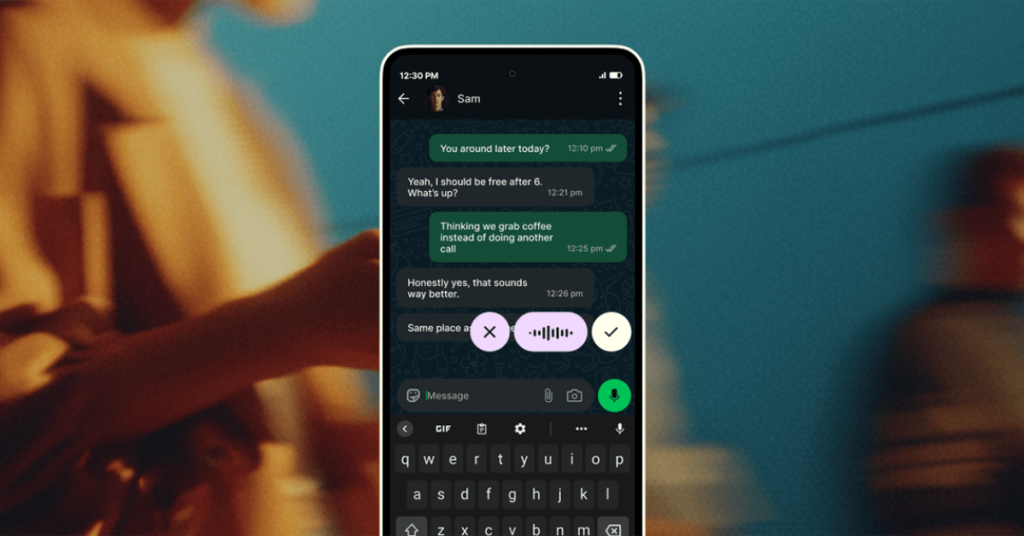
One of the most impressive aspects of Wispr Flow is its seamless integration with the Android ecosystem. Rather than forcing users to abandon their preferred keyboard applications, Flow operates as a complementary tool that works alongside existing keyboard solutions.
The app manifests as a floating button that appears whenever you need voice input. This design choice is particularly clever because it preserves user choice while providing an enhanced voice-to-text experience. Users can trigger the Wispr Flow interface with a simple tap, eliminating the need to navigate through keyboard settings or switch input methods.
Technical Excellence and Performance
Under the hood, Wispr Flow leverages cutting-edge AI models that process speech in real-time. The app’s architecture is optimized for Android’s diverse hardware landscape, ensuring smooth performance across devices ranging from budget smartphones to flagship models.
The voice recognition engine boasts impressive accuracy rates that surpass many built-in Android solutions. More importantly, it maintains this accuracy even in challenging acoustic environments, making it suitable for use in offices, coffee shops, or even moderately noisy public spaces.
Multilingual Capabilities That Impress
In our increasingly globalized world, multilingual support is no longer a luxury—it’s a necessity. Wispr Flow rises to this challenge with support for over 100 languages, including the increasingly popular Hinglish (a blend of Hindi and English that’s common in South Asian communities).
This multilingual capability extends beyond simple language switching. The app can understand and process mixed-language conversations, making it particularly valuable for bilingual users or those working in international environments.
User Experience That Feels Natural
The true test of any voice-to-text application lies in how naturally it integrates into daily workflows. Wispr Flow excels in this regard by offering an interface that feels intuitive and responsive.
Users can speak at their natural pace without worrying about artificial pauses or robotic speech patterns. The app’s AI understands natural speech rhythms and can differentiate between actual content and verbal fillers like “um” and “uh,” automatically filtering these out of the final transcription.
Privacy and Security Considerations
In an era where data privacy concerns are paramount, Wispr Flow has implemented robust security measures. The app processes voice data locally on the device whenever possible, minimizing the need for cloud-based processing that could potentially expose sensitive information.
For features that do require cloud processing, Wispr Flow employs end-to-end encryption and adheres to strict data retention policies. Users maintain control over their data, with clear options for managing privacy settings and deleting stored voice samples.
Pricing Strategy and Market Positioning
Currently, Wispr Flow is offering its Android version completely free during an extended early access period. This strategy is particularly noteworthy given that the iOS version typically limits users to 1,000 words per week unless they subscribe to the premium tier, which costs $12 per month.
This generous free offering on Android could be seen as a strategic move to rapidly build market share and gather user feedback before potentially introducing paid tiers. It also positions Wispr Flow as a compelling alternative to Google’s native voice-to-text solutions, which, while good, may not match Flow’s advanced features.
Real-World Applications and Use Cases
The potential applications for Wispr Flow span numerous scenarios and user types:
Professionals can use the app to dictate emails, reports, and meeting notes with unprecedented speed and accuracy. The ability to speak naturally while the AI handles formatting and punctuation can significantly boost productivity.
Students can leverage the technology for taking lecture notes, composing essays, or studying for exams. The multilingual support is particularly valuable for language learners or those studying in international programs.
Content creators will find Flow invaluable for drafting scripts, blog posts, or social media content. The app’s ability to understand context and maintain consistent tone can help streamline the creative process.
Individuals with accessibility needs will appreciate the enhanced accuracy and natural interaction that Flow provides, potentially making digital communication more accessible than ever before.
Performance in Challenging Conditions
One of the most impressive aspects of our early testing was Flow’s performance in less-than-ideal conditions. The app demonstrated remarkable resilience in moderately noisy environments, maintaining accuracy levels that would have been unthinkable just a few years ago.
The technology’s ability to filter out background noise and focus on the user’s voice represents a significant advancement in voice recognition capabilities. This makes Flow practical for use in real-world scenarios rather than just quiet, controlled environments.
The Future of Voice Interaction
Wispr Flow represents more than just an incremental improvement in voice-to-text technology—it signals a fundamental shift in how we might interact with our devices in the future. As AI continues to advance, solutions like Flow could eventually replace traditional input methods entirely for many users.
The app’s success on Android could also pressure other tech giants to accelerate their own voice recognition developments, potentially sparking a new wave of innovation in this space.
Early Access and Community Feedback
The current free early access period provides an excellent opportunity for users to experience the technology firsthand and provide valuable feedback to the development team. This community-driven approach to refinement could result in an even more polished product when it eventually transitions to a paid model.
Competitive Landscape
While Wispr Flow enters a market with established players like Google’s native voice typing and third-party solutions like Gboard, its advanced AI capabilities and user-friendly approach give it a competitive edge. The app’s ability to work alongside existing keyboards rather than replacing them entirely removes a significant barrier to adoption.
Technical Requirements and Compatibility
Wispr Flow is designed to work across a wide range of Android devices, though optimal performance is achieved on devices running Android 8.0 or later with at least 3GB of RAM. The app’s relatively modest system requirements ensure broad accessibility while still delivering premium performance.
Tags and Viral Phrases:
- Voice-to-text revolution
- AI-powered dictation
- Android game-changer
- Wispr Flow review
- Next-gen voice recognition
- Free voice typing app
- 100+ language support
- Smart voice assistant
- Digital communication evolution
- Productivity hack
- Accessibility breakthrough
- Mobile typing alternative
- Real-time speech processing
- AI transcription technology
- Voice input innovation
- Android keyboard enhancement
- Multilingual voice support
- Natural language processing
- Voice-to-text accuracy
- Future of mobile input
- Wispr Flow features
- Voice typing comparison
- Android voice assistant
- Smart dictation app
- Voice recognition breakthrough
- Mobile productivity tool
- AI keyboard technology
- Voice input revolution
- Android voice typing
- Speech-to-text innovation
- Wispr Flow Android
- Voice technology advancement
- Mobile voice assistant
- AI-powered keyboard
- Voice input solution
- Android voice enhancement
- Smart voice typing
- Voice recognition app
- Mobile dictation tool
- AI voice assistant
- Voice typing technology
- Android voice innovation
- Speech recognition app
- Voice input breakthrough
- Mobile voice technology
- AI dictation solution
- Voice typing revolution
- Android voice enhancement
- Smart voice recognition
,

Leave a Reply
Want to join the discussion?Feel free to contribute!