
This hidden Motorola Razr feature is like a time machine that takes you back to a simpler time
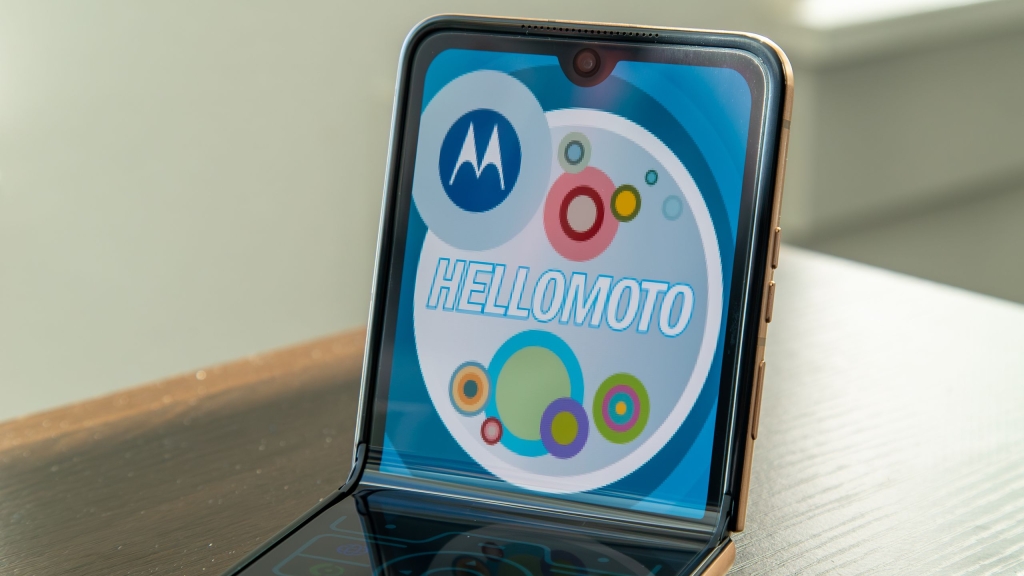
The Hidden Retro Razr Mode: A Nostalgic Trip Back to 2004
Flip phones have made a triumphant comeback in recent years, but today’s folding marvels are light-years ahead of their early 2000s predecessors. Samsung and Motorola are leading this foldable revolution, with the Galaxy Z Flip and Razr series pushing the boundaries of mobile innovation. While both offer compelling features, there’s something uniquely special about the Motorola Razr that goes beyond mere functionality—it taps into something deeper: nostalgia.
The Motorola Razr continues to hold a special place in my heart as my favorite smartphone line. With its impressive folding display technology and vibrant color options, it masterfully bridges the gap between yesterday and today. But what if I told you there’s a hidden feature that can transform your modern Razr into a genuine relic from the past? A secret mode that doesn’t just pay homage to the original RAZR V3—it becomes it.
What is Retro Razr?
Retro Razr is a clever software feature built into Motorola’s recent flip phone lineup, including the stunning Razr Ultra 2025. When activated, this mode completely transforms your device’s interface, recreating the exact look, feel, and functionality of the iconic 2004 Motorola RAZR V3—the phone that defined an era and became a cultural phenomenon.
The transformation is nothing short of remarkable. The bottom half of your Razr’s display morphs into a faithful recreation of the original’s keypad, complete with the distinctive circular navigation ring featuring directional buttons and a central selection key. You’ll find the familiar shortcut buttons positioned exactly where they were on the original, along with the Call and End buttons that millions of users pressed countless times.
Meanwhile, the top half transforms into a small rectangular “external display” that perfectly mimics the RAZR’s limited-resolution screen. You’ll see shortcuts arranged just like the original, a status bar at the top displaying battery life and signal strength in that classic pixelated font, and even period-appropriate wallpapers that transport you back to the mid-2000s. Everything is deliberately pixelated and low-resolution to match the original device’s modest display capabilities, creating an authentic throwback experience that’s both charming and impressive.
How to Turn On Retro Razr
Ready to take your Razr back in time? Here’s how to activate this hidden gem:
1. Swipe down from the top of the display to open the quick settings menu.
2. If you don’t immediately see the Retro Razr icon, tap the pencil icon in the top-right corner to enter edit mode.
3. Select “Edit quick settings” from the menu options.
4. Scroll through the available quick settings tiles until you find the Retro Razr icon—it’s cleverly designed to look like a closed old-school Razr phone.
5. Long-press and drag the Retro Razr icon to your active quick settings tiles for easy access.
6. Tap the back button or swipe back to exit edit mode.
7. Finally, tap the Retro Razr icon in your quick settings to activate the experience.
Once activated, your Razr transforms before your eyes. The modern Android interface disappears, replaced by this lovingly crafted recreation of mobile history. To exit the Retro Razr experience, simply swipe out or tap the back button—just like you would with any other app. It’s worth noting that Retro Razr doesn’t appear in your app drawer, making the quick settings menu your only gateway to this nostalgic journey.
The Experience: More Than Just a Skin
What makes Retro Razr truly special is the attention to detail. When you start tapping on the number keys, you’re greeted with an authentic old-school dialing interface. But here’s where Motorola really nailed it: each button press delivers subtle haptic feedback that perfectly emulates the tactile sensation of pressing physical buttons on the original RAZR. It’s not quite the same as the mechanical click of the 2004 model, but the vibration motor does an admirable job of recreating that satisfying button-press feel that defined the Razr experience.
However, it’s important to understand what Retro Razr actually is: an overlay, not a complete system transformation. While the interface looks and feels like the original RAZR, it’s still fundamentally running on modern Android underneath. If you tap on any shortcut or navigate to an app, you’ll be seamlessly transported back to the contemporary Razr experience. There’s no app drawer in Retro Razr mode, and it functions more as a visual and tactile skin than a full system replacement.
I Wish Motorola Took It Further
As much as I love Retro Razr, I can’t help but feel that Motorola missed an opportunity to create something truly extraordinary. Imagine if this wasn’t just an overlay, but a complete thematic transformation that permeated every aspect of the user experience.
Picture this: opening your app drawer reveals a collection of low-resolution, pixelated icons that look like they belong on a 2004 feature phone. The settings menu transforms into a recreation of the original RAZR’s minimalist options, complete with that characteristic blue-on-black color scheme. Even the quick settings menu could adopt a more retro aesthetic, perhaps with sliding animations that mimic the original device’s menu transitions.
The dialer could become a fully functional throwback, complete with T9 predictive text input that works exactly like the original. Messaging could adopt the classic SMS interface, and even the camera app could transform into a low-resolution shooter that produces intentionally pixelated photos—perfect for that authentic early-2000s social media aesthetic.
Motorola could even add Easter eggs, like hidden games (Snake, anyone?), or the ability to customize your wallpaper with actual RAZR V3 wallpapers from 2004. The possibilities for expanding this concept are endless, and it could become a defining feature that sets the Razr apart from competitors.
The Verdict: A Fun Party Trick with Massive Potential
For now, Retro Razr remains a delightful party trick—a fun way to show off your phone’s unique capabilities and impress friends with its ability to transform into a piece of mobile history. It’s perfect for those moments when you want to demonstrate how far smartphone technology has come, or simply indulge in a bit of nostalgia.
But more than just a gimmick, Retro Razr represents something important: Motorola’s understanding that the Razr brand carries emotional weight and cultural significance that extends far beyond its folding screen technology. By embracing this heritage and creating features that celebrate the original device’s impact, Motorola is building a stronger connection with users who remember the RAZR V3 fondly.
Whether you’re a longtime Razr fan or a newcomer curious about the hype, Retro Razr offers a unique way to experience mobile history firsthand. It’s a reminder that sometimes, the best features aren’t about being the newest or most advanced—they’re about creating meaningful connections to our shared technological past.
So the next time you want to take a trip down memory lane, or simply want to see the look on someone’s face when their modern smartphone transforms into a 2004 icon, give Retro Razr a try. Just don’t be surprised if you find yourself spending more time in 2004 than you planned.
Tags & Viral Phrases:
- Flip phones are back and better than ever
- Motorola Razr transforms into 2004 nostalgia machine
- Hidden Retro Razr mode will blow your mind
- Experience the magic of 2004 on your modern smartphone
- The ultimate throwback feature you never knew you needed
- Motorola nails the nostalgia factor with this secret mode
- Transform your Razr into a genuine RAZR V3
- The party trick that will impress all your friends
- Motorola’s love letter to the iconic 2004 flip phone
- Experience button-press haptics just like the original
- Pixelated perfection: The most authentic retro mode ever
- Why Samsung’s flip phone can’t do this
- The hidden feature that makes the Razr truly special
- Take a trip back to when flip phones ruled the world
- Motorola understands what Samsung doesn’t: Nostalgia sells
- The secret mode that changes everything
- Your modern Razr just got a serious blast from the past
- The ultimate flex for Razr owners
- Motorola’s genius move that no one saw coming
- The feature that makes me love the Razr even more
,
Leave a Reply
Want to join the discussion?Feel free to contribute!