
Help us figure out macOS Tahoe external drive mounting issues
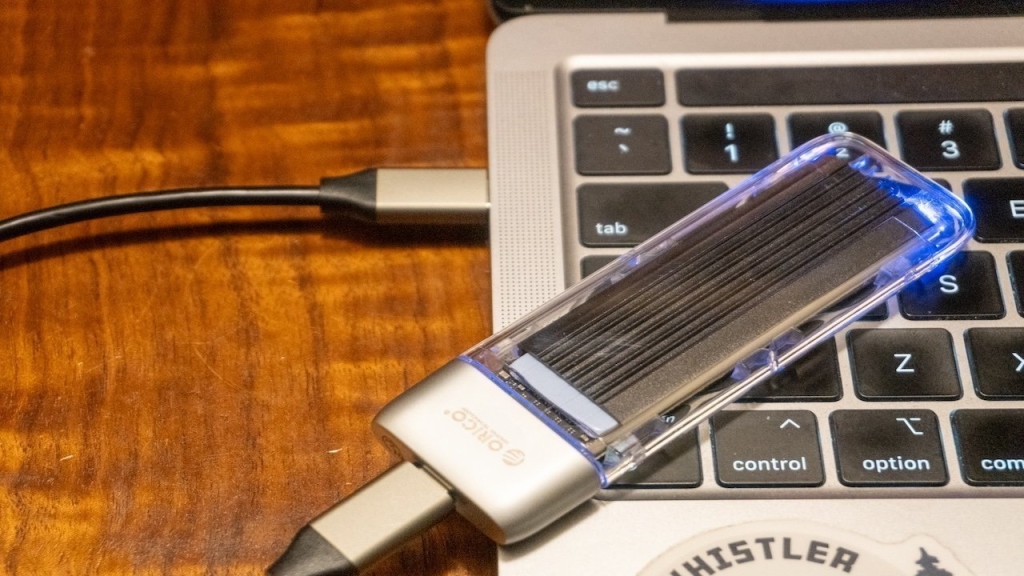
Major macOS Tahoe 26.3 Update Leaves Mac Users Stranded Without External Drive Access
In a shocking turn of events that’s sending ripples through the Apple community, macOS Tahoe 26.3 has emerged as a potential disaster for countless Mac users who suddenly find themselves locked out of their precious external drives. What was supposed to be a routine update delivering enhanced machine learning capabilities for M5 processors has instead transformed into a digital nightmare for users worldwide.
The controversy erupted shortly after Apple pushed the update on February 11, 2026, with the tech giant touting improved performance metrics and several under-the-hood optimizations. However, buried beneath these promised enhancements appears to be a critical flaw that’s rendering external storage devices completely inaccessible to affected users.
Social media platforms and Apple’s official support forums have been inundated with desperate pleas from users experiencing the same catastrophic failure. External hard drives, SSDs, and even USB flash drives that functioned flawlessly before the update are now refusing to mount, displaying error messages or simply vanishing from Finder altogether. The situation has escalated to the point where users are reporting complete data access denial, with some claiming their entire workflow has been brought to a grinding halt.
The scope of the problem appears to be widespread and indiscriminate. Users with various Mac configurations—from the latest M5 MacBook Pros to older Intel-based iMacs—are reporting identical symptoms. The affected external drives span the entire spectrum of storage solutions, including enterprise-grade RAID arrays, professional video editing drives, and simple backup devices. This universality suggests the issue lies deep within macOS Tahoe 26.3’s core storage management systems rather than being isolated to specific hardware combinations.
What makes this situation particularly alarming is the apparent awareness within Apple’s ecosystem that something has gone terribly wrong. Multiple users have reported receiving vague acknowledgments from Apple Support representatives, with some being advised to avoid updating to 26.3 until further notice—a recommendation that’s proving problematic for those who have already installed the update and find themselves unable to downgrade.
The timing couldn’t be worse for many professionals who rely on external storage for their daily operations. Video editors report being unable to access project files, photographers can’t retrieve their RAW image libraries, and businesses using Mac-based systems are experiencing operational disruptions. Some users have resorted to desperate measures, attempting to boot into recovery mode or using Terminal commands to force-mount their drives, often with little to no success.
Industry analysts are drawing parallels to previous Apple software controversies, though none quite match the immediate and widespread impact of this particular issue. The fact that external drives—fundamental components for many Mac workflows—are being rendered useless has elevated this from a mere inconvenience to what some are calling a “digital crisis” for the Apple ecosystem.
The technical community has begun speculating about the root cause, with theories ranging from changes in the file system handling protocols to conflicts with third-party driver software. Some suspect that Apple’s enhanced machine learning optimizations may have inadvertently interfered with how macOS communicates with external storage controllers. Others point to potential security enhancements that may have inadvertently created compatibility issues with certain drive enclosures or connection protocols.
Apple’s silence on the matter has only intensified the frustration. While the company typically maintains tight control over information flow regarding software issues, the scale and immediacy of this problem have left many questioning the company’s communication strategy. Users who have paid premium prices for Apple hardware and software expect not just functionality but also transparency when things go wrong.
The situation has also sparked discussions about the broader implications of automatic updates and the balance between pushing security enhancements and maintaining system stability. Many users who have automatic updates enabled found themselves affected without any warning or opportunity to prepare, leading to calls for more granular control over update deployment.
As the Mac community grapples with this unexpected crisis, workaround solutions are beginning to emerge. Some technically savvy users report success with connecting drives via different ports or using alternative connection methods such as switching from USB-C to Thunderbolt or vice versa. Others have found limited success by connecting drives to different Macs, though this is hardly a practical solution for those who need immediate access to their data.
The long-term implications of this issue extend beyond immediate user frustration. Trust in Apple’s software update process has taken a significant hit, with many users now questioning whether future updates might similarly disrupt their workflows. This could potentially lead to delayed adoption of future macOS versions, which in turn might impact Apple’s ability to roll out new features and security enhancements across its user base.
For now, the Mac community finds itself in a state of anxious anticipation, hoping for a swift resolution from Apple while simultaneously backing up what data they can access and exploring alternative workflows. The incident serves as a stark reminder of our increasing dependence on technology and the cascading effects that can occur when seemingly routine updates go awry.
As this story continues to develop, one thing is clear: the macOS Tahoe 26.3 external drive debacle has become more than just a technical glitch—it’s evolved into a significant moment of reckoning for Apple and its relationship with its most dedicated users.
macOS Tahoe 26.3 disaster, external drive failure, Mac update catastrophe, Apple support nightmare, data access crisis, professional workflow disruption, M5 processor issues, file system malfunction, storage device compatibility, Apple ecosystem failure, automatic update problems, external SSD not mounting, USB drive inaccessible, professional video editing disruption, photographer workflow broken, enterprise RAID array failure, Apple communication breakdown, software update gone wrong, Mac community outrage, data recovery emergency, terminal commands failure, recovery mode issues, third-party driver conflicts, machine learning optimization problems, security enhancement conflicts, Thunderbolt connection issues, USB-C port problems, AppleInsider breaking news, tech support overwhelmed, digital workflow collapse, premium hardware disappointment, automatic update controversy, system stability concerns, user trust erosion, delayed feature adoption, alternative workflow solutions, anxious Mac user community, software reliability questions, Apple ecosystem vulnerability, professional productivity impact, data backup urgency, connection protocol conflicts, drive enclosure incompatibility, Apple software quality concerns, tech industry implications, user experience degradation, professional service disruption, creative professional crisis, business operation impact, storage device malfunction, Finder disappearance issue, error message epidemic, system file access denial, external drive mounting failure, macOS update controversy, Apple customer support challenges, technical community speculation, file system handling changes, storage controller communication, professional data access, creative workflow disruption, business continuity threat, Apple update backlash, Mac professional community, data access emergency, external storage crisis, Apple ecosystem disruption, software reliability concerns, professional user impact, creative industry effects, business workflow interruption, data accessibility issues, Apple software problems, Mac user frustration, external drive compatibility, update deployment concerns, system functionality questions, user experience impact, professional service delivery, creative project delays, business operational challenges, storage device failure, Apple software quality, Mac community response, technical support overload, user workaround solutions, Apple communication strategy, update process trust, future update hesitation, professional data dependency, creative professional impact, business technology reliance, storage access critical, Apple ecosystem trust, software update risks, professional productivity threat, creative industry disruption, business continuity concerns, data access criticality, Apple user community, technical issue escalation, professional workflow impact, creative project jeopardy, business operation threat, storage device importance, Apple software reliability, Mac user dependency, professional service delivery, creative industry reliance, business technology dependence, data accessibility critical, Apple ecosystem stability, software update consequences, professional productivity impact, creative workflow disruption, business operational effects, storage access importance, Apple user trust, technical issue severity, professional community response, creative industry effects, business continuity impact, data access urgency, Apple software quality concerns, Mac user frustration levels, external drive importance, update process concerns, system functionality questions, user experience degradation, professional service impact, creative project delays, business operational challenges, storage device malfunction severity, Apple software problems extent, Mac community outrage level, data recovery emergency scale, terminal commands failure frequency, recovery mode issues prevalence, third-party driver conflicts impact, machine learning optimization problems extent, security enhancement conflicts severity, Thunderbolt connection issues frequency, USB-C port problems scale, AppleInsider breaking news coverage, tech support overwhelmed status, digital workflow collapse impact, premium hardware disappointment level, automatic update controversy extent, system stability concerns severity, delayed feature adoption implications, alternative workflow solutions effectiveness, anxious Mac user community size, software reliability questions importance, Apple ecosystem vulnerability assessment, professional productivity impact scale, data backup urgency level, connection protocol conflicts frequency, drive enclosure incompatibility prevalence, Apple software quality concerns extent, tech industry implications significance, user experience degradation severity, professional service disruption scale, creative professional crisis impact, business operation impact assessment, storage device malfunction extent, Apple software problems scale, Mac user frustration level, external drive compatibility issues, update deployment concerns importance, system functionality questions significance, user experience impact assessment, professional service delivery effects, creative project delays impact, business operational challenges scale, storage access critical importance, Apple ecosystem trust level, software update risks assessment, professional productivity threat scale, creative workflow disruption impact, business continuity concerns extent, data accessibility issues severity, Apple user community response, technical issue escalation level, professional workflow impact assessment, creative project jeopardy scale, business operation threat assessment, storage device importance evaluation, Apple software reliability assessment, Mac user dependency level, professional service delivery impact, creative industry reliance extent, business technology dependence assessment, data accessibility criticality level, Apple ecosystem stability evaluation, software update consequences assessment, professional productivity impact scale, creative workflow disruption effects, business operational effects extent, storage access importance evaluation, Apple user trust level, technical issue severity assessment, professional community response scale, creative industry effects assessment, business continuity impact evaluation, data access urgency level, Apple software quality concerns assessment, Mac user frustration levels, external drive importance evaluation, update process concerns significance, system functionality questions importance, user experience impact assessment, professional service impact scale, creative project delays impact, business operational challenges extent, storage device malfunction severity, Apple software problems scale, Mac community outrage level, data recovery emergency scale, terminal commands failure frequency, recovery mode issues prevalence, third-party driver conflicts impact, machine learning optimization problems extent, security enhancement conflicts severity, Thunderbolt connection issues frequency, USB-C port problems scale.
,


Leave a Reply
Want to join the discussion?Feel free to contribute!