
Making the Case for a Modern Synaptic-Style Package Manager on Linux
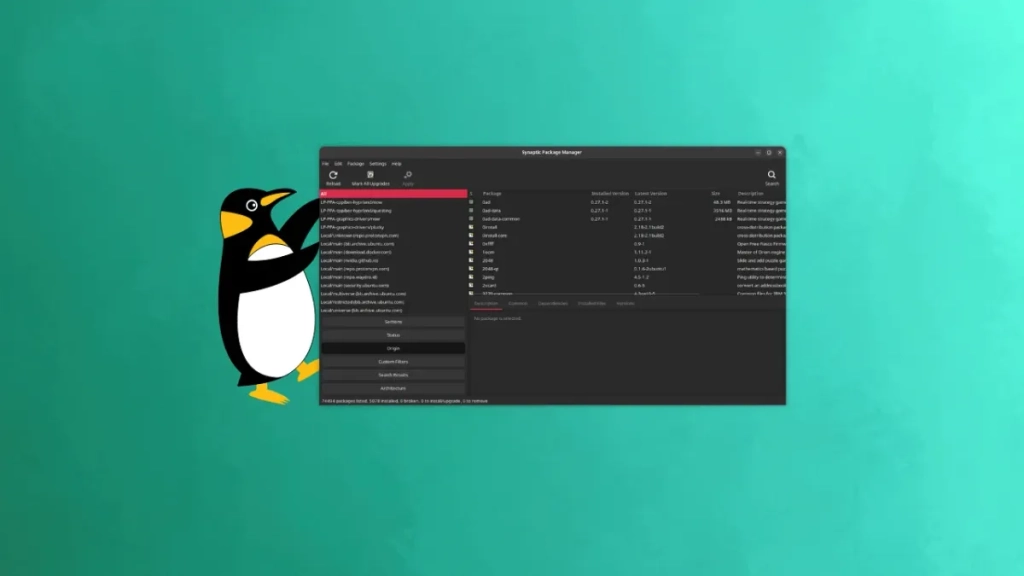
The Linux Desktop Is Losing Its Soul—Here’s Why We Need a Modern Synaptic Revival
Linux has come a long way. App stores have made software discovery and installation easier than ever, and you no longer need to understand what a repository is to install an app. With just a few clicks, you can grab almost any application in seconds—or minutes, depending on your connection.
But this convenience comes at a cost. We’ve lost some of the fine-grained control that once defined the Linux desktop experience. And that raises a bigger question: Is it time for a new era of Synaptic-style package managers?
What Made Synaptic and Similar Tools Special
Synaptic wasn’t just another package manager—it was a gateway to understanding how your Linux system worked. While modern app stores focus on the application experience—search, install, remove, update—Synaptic gave you visibility and control over the mechanics that keep a Linux system healthy over time.
Here’s what made it stand out:
- Dependency Relationships: See how packages are interconnected.
- Cleanup Tools: Remove unused packages that were pulled in automatically.
- Bulk Installs: Handle meta packages and recommended packages with ease.
- Version Control: Hold or lock package versions to prevent unwanted upgrades.
- Version Selection: Downgrade or temporarily fix issues by selecting specific versions.
- Source Transparency: Know exactly where your software is coming from before installing.
Synaptic didn’t just let you manage apps—it exposed the underlying system, giving you the power to fine-tune your Linux experience.
Why the App Store Model Took Over
The app store model became popular because it simplified software management. Instead of dealing with dependencies, conflicts, and system internals, users could focus on finding and installing the apps they needed. For the average user, this was a win—most people don’t want to think about libraries, dependencies, or complex package relationships. They just want an app, and they want it now.
Mobile devices played a big role in normalizing this approach. On mobile platforms, apps often ship with everything they need, and platform vendors enforce strict boundaries. This reduces dependency complexity for users. But on desktop Linux, things are different. Applications rely on shared system libraries, and these may not always be included in the base install. This shared model is efficient but brings challenges that app stores don’t always address.
Where the App Store Model Falls Short
While app stores handle dependency installation, they often stop there. They don’t always help you review what was installed automatically, what’s now unused, or what can safely be removed. They rarely expose advanced controls like holds, locks, or granular version management—tools that are essential for troubleshooting when an update causes regressions.
App stores also rarely surface the “non-app” components of a distribution in any useful way. Runtimes, libraries, development packages, optional components, data packages, command-line utilities, and the bits that make a Linux workstation usable for certain roles typically sit outside the app store mindset.
For Many, the Terminal Can’t Replace a GUI
People often say, “Power users can just use the terminal,” but this misses the point. Plenty of power users (myself included) prefer a graphical overview for system changes. Even non-power users become “power users” the moment they need to troubleshoot a broken update, free disk space, or remove something that dragged in half a desktop environment.
A proper GUI can make these tasks safer, not riskier, because it explains why something is installed in plain language, shows dependency chains visually, and cleanly separates simple and advanced actions. The problem isn’t that CLI tools like apt or dnf are bad—they’re just not built for staging and chaining actions together in the same manner. This is where a GUI shines: making system management a guided process and letting you plan out intended changes before taking action.
Why Synaptic Can’t Simply Return “As-Is”
Synaptic was built in an era where it was normal to handle system tasks through graphical tools by running them with full elevated privileges. But modern Linux desktops increasingly avoid this security model. In a Wayland-first world, running graphical apps as root is being phased out. While this doesn’t mean Synaptic’s capabilities are obsolete, it does mean it can fail to run smoothly under Wayland.
What we need is to bring back what Synaptic made possible—but built for the modern desktop.
My Proposition: Bridge the Gap
We don’t need to ditch the app store model whatsoever. I’m saying: let’s combine the best of both worlds and add a second layer that coexists with the newer model—a modern package manager, built for today’s security model, with greater ease-of-use for everyday tasks.
Here’s what it needs:
- Modern, Separated Privileges: Fix Synaptic’s greatest flaw by separating the GUI from the core, so the entire app doesn’t run as root.
- Sensible Safety by Design: Implement guardrails to prevent users from being accidentally reckless.
- Cleanups That Make Sense: Provide a simple map of where auto-installed dependencies came from.
- Undo Support: Keep a history log and allow for snapshots and rollbacks.
- First-Class System Packages: Enable holds, locks, version selection, and bulk installs.
- Respect Dev Packages: Handle
-devpackages with the same care as regular packages.
We Need Our Power Back, with Sense
The Linux desktop has evolved, and it’s high time for the “advanced package manager” experience to evolve with it—not to replace the app store model, but to give us our power back and remind us what underpins the Linux desktop at the end of the day. Let’s keep the friendly software catalogue experience, but when we need to “get our hands dirty” and manage packages in depth, give us “power users” a proper graphical solution that we can work with again.
Tags & Viral Phrases
- Linux desktop evolution
- Synaptic revival
- App store vs. package manager
- Dependency management
- System control
- Power user tools
- Wayland compatibility
- Modern Linux security
- GUI vs. CLI
- Linux troubleshooting
- Dev packages
- Version control
- System cleanup
- Linux app stores
- Terminal alternatives
- Linux efficiency
- Shared libraries
- Package dependencies
- Linux innovation
- User experience
- System transparency
- Linux customization
- Software discovery
- Linux workflows
- Advanced package managers
- Linux desktop health
- Dependency chains
- Linux stability
- System privileges
- Linux development
- Package holds
- Linux rollbacks
- System snapshots
- Linux meta packages
- Linux guardrails
- Linux undo support
- Linux version selection
- Linux bulk installs
- Linux source transparency
- Linux dependency cleanup
- Linux system overview
- Linux app installation
- Linux software management
- Linux system internals
- Linux troubleshooting tools
- Linux GUI solutions
- Linux power users
- Linux security models
- Linux efficiency tools
,

Leave a Reply
Want to join the discussion?Feel free to contribute!