
Adobe Firefly’s video editor can now automatically create a first draft from footage
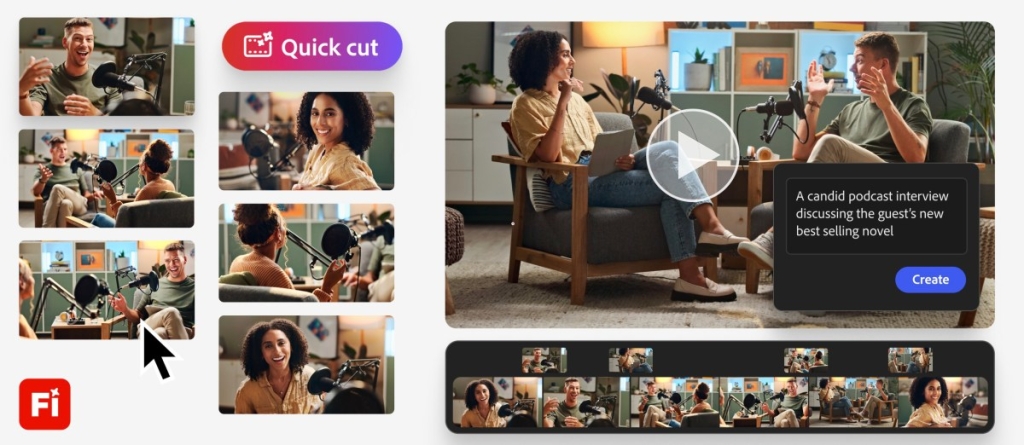
Adobe Firefly’s New Quick Cut Feature: AI-Powered Video Editing That Creates a First Draft in Seconds
Adobe is once again pushing the boundaries of creative technology with a groundbreaking new feature for its Firefly video editor called Quick Cut. Designed to dramatically accelerate the video editing process, Quick Cut leverages the power of artificial intelligence to automatically edit raw footage and B-roll into a polished first draft—simply based on user instructions.
This isn’t just another editing tool; it’s a complete paradigm shift for content creators, marketers, and video professionals who are constantly under pressure to deliver high-quality content in record time. Let’s dive deep into what Quick Cut is, how it works, and why it could be a game-changer for the creative industry.
The Problem Quick Cut Solves
Video editing has long been a time-consuming and often tedious process. Traditionally, editors must manually upload footage, sift through hours of raw material, arrange clips in sequence, and painstakingly add transitions and effects. Even for seasoned professionals, this can take hours—or even days—depending on the complexity of the project.
Adobe recognized that while creativity is where editors truly shine, much of their time is spent on repetitive, mundane tasks like organizing selects and sequencing clips. Enter Quick Cut, a feature designed to handle the heavy lifting so creators can focus on storytelling and artistic vision.
How Quick Cut Works
At its core, Quick Cut uses natural language processing to understand user intent. Instead of manually dragging and dropping clips, users can simply describe what they want their video to be. For example, you might type:
“Create a fast-paced promotional video for a new smartphone, with upbeat music and smooth transitions between product shots.”
Once the prompt is entered, Quick Cut’s AI engine analyzes the uploaded footage and B-roll, automatically:
- Trimming irrelevant content to keep only the most impactful moments.
- Sequencing clips in a logical and engaging order.
- Adding transitions using either existing B-roll or AI-generated frames from Firefly’s video models.
- Adjusting pacing and aspect ratio based on user preferences.
Users can also fine-tune the output by specifying settings like aspect ratio, transition speed, and optional B-roll inclusion. The tool is flexible enough to apply Quick Cut to an entire project, a specific timeline, or even just selected clips.
AI-Generated Transitions: A Creative Boost
One of the standout features of Quick Cut is its ability to generate AI-powered transitions. Users can select frames from their B-roll and choose from a variety of video models within Firefly to create short, dynamic transitions between scenes. This not only saves time but also adds a professional polish that might otherwise require advanced editing skills.
The Vision Behind Quick Cut
According to Mike Folgner, Product Lead for AI and Next-Generation Video Tools at Adobe, Quick Cut is all about speed and creative freedom.
“As we talk to our users—creators and marketers—the biggest problem they communicate is the need for fast turnaround and time-saving techniques that let them get to their creative vision as quickly as possible,” Folgner told TechCrunch.
He emphasized that Quick Cut is not meant to replace human editors but to accelerate the initial drafting process. Editors will still need to refine the output, adjust transitions, and add their personal touch to finalize the video.
“Some of the mundane parts of video editing, like just getting the selects in order, aren’t where creators find joy or differentiation. They find joy in putting their spin on it. Quick Cut is meant to help creators who have a set of media find the story very quickly and get to a story cut as fast as possible,” Folgner added.
Adobe’s Broader AI Video Strategy
Quick Cut is just the latest in a series of AI-powered innovations from Adobe aimed at revolutionizing video production. In December 2024, Adobe introduced a timeline-based video editor that brought layers and prompt-based editing to Firefly. This update allowed users to treat different objects as layers and edit them using simple text prompts or tools like resize and rotate.
More recently, Adobe added prompt-based editing capabilities to Firefly, enabling users to tell the video model how to edit video elements, colors, and camera angles. A new timeline view also makes it easier to adjust frames, sounds, and other characteristics with precision.
These updates reflect Adobe’s commitment to making video editing more accessible, intuitive, and efficient—without sacrificing creative control.
Why Quick Cut Matters
The implications of Quick Cut are significant for several reasons:
- Speed: What once took hours can now be accomplished in minutes.
- Accessibility: Non-professionals can create high-quality videos without extensive editing knowledge.
- Creativity: By automating the tedious parts, Quick Cut frees creators to focus on storytelling and innovation.
- Scalability: Marketers and content teams can produce more videos in less time, meeting the growing demand for video content across platforms.
What’s Next for Adobe Firefly?
Adobe has hinted at more updates to come, with a focus on enhancing AI capabilities, expanding model libraries, and improving user experience. As video continues to dominate digital content, tools like Quick Cut will likely become essential for anyone looking to stay competitive in the creative space.
Final Thoughts
Adobe’s Quick Cut feature represents a major leap forward in AI-assisted video editing. By combining natural language understanding with powerful AI models, Adobe is empowering creators to produce compelling videos faster than ever before. While it’s not a replacement for human creativity, it’s a powerful ally that can help bring ideas to life with unprecedented speed and efficiency.
Whether you’re a seasoned video editor, a marketer on a tight deadline, or a content creator looking to streamline your workflow, Quick Cut is a tool worth exploring. The future of video editing is here—and it’s powered by AI.
Tags:
Adobe Firefly, Quick Cut, AI video editing, natural language editing, video production, content creation, Adobe updates, AI tools, video transitions, B-roll editing, creative workflow, video marketing, timeline editing, prompt-based editing, video models, storytelling, Adobe AI, video technology, creative innovation
Viral Phrases:
“AI that edits for you,” “video editing in seconds,” “first draft in minutes,” “natural language video editing,” “AI-powered transitions,” “creative freedom meets automation,” “the future of video editing,” “speed up your storytelling,” “Adobe’s AI revolution,” “editing without the grind,” “transform raw footage instantly,” “video editing for everyone,” “AI meets creativity,” “the end of tedious editing,” “next-gen video tools,” “AI-assisted creativity,” “video editing reimagined,” “fast-track your vision,” “AI as your editing partner,” “Adobe Firefly’s game-changing update.”
,


Leave a Reply
Want to join the discussion?Feel free to contribute!