
Typhoon weather app clears up with Qt6 port
Breaking: Typhoon Weather App Embraces Qt6 in Major Under-the-Hood Overhaul
In a move that’s sending shockwaves through the Linux weather app ecosystem, the beloved open-source weather app Typhoon has officially ditched its GTK3 backend in favor of the more modern and robust Qt6 framework.
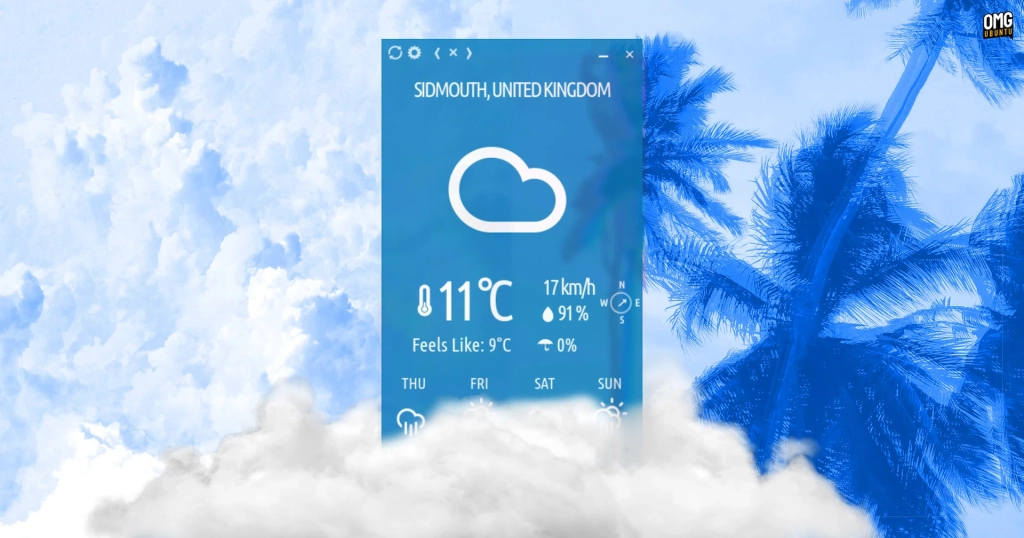
For those who’ve been living under a rock (or perhaps just checking the weather the old-fashioned way), Typhoon is the spiritual successor to the iconic GTK2 weather app Stormcloud. It’s been a staple for Linux users who appreciate its minimalist, borderless design and colorful, chameleon-like interface that changes based on current weather conditions.
The GTK3 Sunset: Why Change Was Inevitable
According to Archisman Panigrahi, the mastermind behind Typhoon, the transition was necessary due to GTK3’s impending deprecation. “GTK3 is being deprecated,” Panigrahi explains, “and rewriting the app in GTK4 was a non-starter given it ‘does not play well with simultaneously borderless and draggable windows’.”
This technical limitation would have forced Typhoon to abandon its signature aesthetic—something that clearly wasn’t an option for an app that prides itself on its unique visual identity.
Same Great Taste, New Recipe
Here’s the kicker that’s got weather enthusiasts buzzing: the user interface remains virtually unchanged. That’s right—Typhoon still sports its colorful, borderless window with optional transparency, and it still delivers weather forecast data through stark white text and glyphs that have become its trademark.
But don’t let the familiar appearance fool you. This Qt6 port is like giving Typhoon a high-performance engine while keeping the classic car body. The changes are all happening beneath the surface, and they’re significant.
The Devil’s in the Details: What’s New Under the Hood
Enhanced Resizing Capabilities: Remember the frustration of trying to resize Typhoon by aiming for that tiny arrow in the lower right-hand corner? Those days are gone. With the Qt6 port, you can now resize the window from any side—a small but mighty improvement that users are already celebrating.
Sharper Font Rendering: Thanks to the new Qt WebView integration, text appears crisper and more defined. For an app that relies heavily on text display, this enhancement makes a noticeable difference in readability.
Touchscreen Optimization: In our increasingly touch-centric world, Typhoon now offers improved touchscreen interaction. Whether you’re using a convertible laptop or a Linux tablet, the app responds more intuitively to touch gestures.
Advanced Visual Customization: For those who prefer setting a custom background color rather than relying on the chameleonic style (which, let’s be honest, is permanently blue if you’re in the UK), there’s now a sophisticated color picker for selecting your perfect hue.
Cross-Platform Blur Effects: If you’re running Typhoon on KDE Plasma, you can now enable background blur with transparency using KVantum or kwin-force-blur. GNOME users aren’t left out either—transparency remains available, and you can add background blur via the Blur My Shell extension.
The Windows Surprise: Qt6’s Cross-Platform Superpower
Perhaps the most exciting revelation is that Typhoon is now officially available on Windows. This wasn’t just an afterthought—it’s a direct benefit of Qt6’s excellent cross-platform support. Panigrahi confirms that “all features are supported in Windows including chameleonic background and extreme weather notifications.”
This expansion to Windows represents a significant milestone for an app that was previously Linux-exclusive. Weather enthusiasts on Windows can now enjoy the same sleek interface and features that Linux users have been raving about.
The Technical Backbone: How Typhoon Gets Its Data
For the curious minds wondering about the technical infrastructure, Typhoon relies on three key services:
- Open-Meteo for comprehensive weather data
- OpenStreetMap for location search functionality
- ipapi for location detection based on your IP address (only when you manually click the ‘Guess Location’ button in settings)
The best part? No API keys or login details are required to use these services, making Typhoon truly accessible to everyone.
Compatibility and Installation
Understanding that not all distributions may have packaged Qt6 in their repositories (Ubuntu 20.04 LTS users, we’re looking at you), Panigrahi ensured that Typhoon’s Qt port remains backwards compatible with Qt5.
For existing users, if you’re already using Typhoon from the official PPA, the new version is waiting in your software updates. New users can add the PPA on Ubuntu 22.04 LTS and newer, grab a DEB from GitHub (for 20.04 LTS), or use the Snap or Flatpak builds.
Why This Matters: The Bigger Picture
This transition represents more than just a technical upgrade—it’s a statement about the future of Linux desktop applications. By choosing Qt6 over GTK4, Panigrahi has demonstrated that sometimes the best path forward requires looking beyond the traditional Linux desktop ecosystem.
The fact that this change maintains Typhoon’s distinctive aesthetic while significantly improving its functionality and expanding its platform support is a masterclass in software development done right.
For weather enthusiasts, Linux users, and open-source advocates alike, Typhoon’s Qt6 transition is proof that thoughtful, user-centric development can push the boundaries of what’s possible while staying true to an app’s core identity.
Tags & Viral Phrases:
-
TyphoonWeatherApp
-
Qt6Revolution
-
LinuxWeatherApp
-
OpenSourceWeather
-
StormcloudSuccessor
-
CrossPlatformWeather
-
WeatherAppMakeover
-
GTK3ToQt6
-
WeatherAppWindows
-
MinimalistWeatherApp
-
ChameleonicWeather
-
WeatherApp2025
- “Same look, better performance”
- “Weather app gets a Qt6 upgrade”
- “Linux weather app goes cross-platform”
- “The weather app that doesn’t look like a weather app”
- “Borderless weather forecasting perfected”
- “Weather app development done right”
- “Open-source weather app expands to Windows”
- “GTK3 sunset forces weather app evolution”
- “Qt6 brings touchscreen weather to Linux”
- “Weather app maintains aesthetic while upgrading engine”
- “The future of Linux desktop apps?”
- “Weather forecasting meets modern UI framework”
- “Linux weather app surprises with Windows support”
- “Weather app development that puts users first”
,


Leave a Reply
Want to join the discussion?Feel free to contribute!