
Is 0patch legit? My verdict after months of testing on my outdated Windows 10 PC
0patch: The Lifeline for Windows 10 Users Facing the 2025 End-of-Support Cliff
By Cesar Cadenas | October 25, 2025
In a seismic shift for PC users worldwide, Microsoft’s decision to end Windows 10 support has sent shockwaves through the tech community. As of October 14, 2025, the operating system that dominated the computing landscape for a decade officially entered its End of Life phase, leaving millions of devices vulnerable and users scrambling for solutions.
The Perfect Storm: Windows 10’s Sudden Vulnerability Crisis
When Microsoft first announced Windows 10’s sunset date in early 2023, users had approximately two years to prepare. Fast forward to today, and that deadline has arrived with devastating consequences. The tech giant’s decision to cease regular security updates and patches has created what cybersecurity experts are calling a “digital security apocalypse.”
Some users have reluctantly upgraded to Windows 11, despite its hardware requirements and controversial design changes. Others have made the bold leap to Linux distributions, seeking the promise of eternal support and open-source freedom. A significant portion has invested in Microsoft’s Windows 10 Extended Security Updates (ESU), a $30-per-year lifeline that delivers official security fixes—but this too expires in October 2026, leaving users right back where they started.
Enter 0patch: The Third-Party Savior
This is where 0patch emerges as a game-changing solution. This European-based security company has positioned itself as the ultimate guardian for Windows 10 users, offering a service that could potentially protect systems for years beyond Microsoft’s abandonment.
What Makes 0patch Revolutionary?
At its core, 0patch delivers micropatches—tiny, surgical updates that address single, specific vulnerabilities. Unlike traditional security patches that can be bulky and system-wide, these micropatches are precisely targeted, incredibly lightweight, and remarkably effective.
Here’s the magic behind the technology: When security researchers discover new vulnerabilities, they publish their findings. 0patch’s team of experts then analyzes this information and creates targeted micropatches that neutralize the threat. The process is continuous and dynamic, with patches arriving as frequently as new vulnerabilities are discovered.
The Numbers Game: What to Expect
During my conversation with Mitja Kolsek, co-founder of 0patch, he revealed that the company’s patch release schedule is entirely dependent on the discovery of new vulnerabilities. On average, users can expect two to three micropatches per month, though this number fluctuates based on the security landscape.
In my personal testing period spanning four months, I received four patches on these dates:
- October 23, 2025
- December 26, 2025
- December 27, 2025
- January 13, 2026
Selective Protection: Not Every Vulnerability Gets Patched
It’s crucial to understand that 0patch doesn’t attempt to fix every single vulnerability. The company maintains strict criteria for which threats receive attention, focusing on vulnerabilities that meet specific conditions:
- Publicly known exploits that are actively being used by attackers
- Zero-day vulnerabilities with no official Microsoft fix
- Widely used software features that affect large user bases
- Critical security flaws that pose immediate danger
Tiered Protection: Free vs. Pro
0patch offers multiple service tiers to accommodate different user needs:
The Free Tier primarily delivers zero-day patches for critical vulnerabilities, providing essential protection without cost. However, Kolsek strongly advises against relying solely on the free version without also subscribing to Microsoft’s ESU service, as the free tier lacks crucial “legacy patches” needed for comprehensive Windows 10 22H2 protection.
The Pro Plan at approximately $30 per year includes everything in the free tier plus post-End of Service updates and legacy patches. This comprehensive protection ensures users remain secure even after Microsoft’s official support ends.
The Enterprise Plan at around $40 per year adds multi-user management tools, making it ideal for businesses protecting multiple devices.
Real-World Performance: My Testing Experience
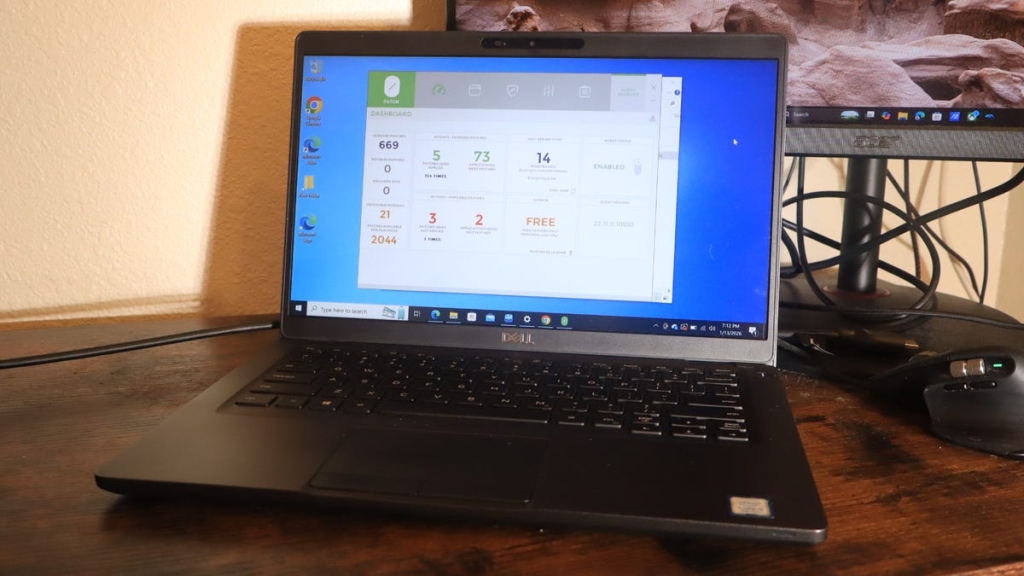
For this review, I installed the free version of 0patch on a Windows 10 laptop to evaluate its real-world performance. The installation process was remarkably straightforward—just like any standard application. Download, run the installer, and the service operates silently in the background without requiring constant attention or configuration.
The user interface is clean and informative, displaying key statistics at a glance:
- Active patches currently protecting your system
- Number of protected applications
- Patchable applications available
- Features included in your subscription tier
The Micropatch Advantage: Lightweight and Effective
One of 0patch’s most impressive features is how incredibly lightweight the patches are. To test this claim, I conducted multiple Geekbench 6 performance tests on my Windows 10 laptop. The results were conclusive: 0patch had virtually no impact on system performance, maintaining the same speed and responsiveness as before installation.
Potential Drawbacks: The Performance Trade-off
However, it’s important to acknowledge that 0patch updates can occasionally cause performance issues. These problems manifest in various ways, including:
- Compatibility conflicts with antivirus software (particularly Avast)
- Random system crashes
- Application instability
- System slowdowns
The good news is that if you experience issues, you can easily disable individual patches or the entire service through the dashboard. This flexibility allows users to troubleshoot problems without completely abandoning the protection.
The Uninstall Guarantee: Clean and Complete
If you decide that 0patch isn’t right for you, uninstalling the service is straightforward and complete. The uninstall process removes all patches and leaves no residual files or registry entries behind, ensuring a clean system restoration.
The Long Game: 0patch’s Extended Support Commitment
While 0patch has announced plans to end Windows 10 support in October 2030, the company remains flexible based on user demand. Kolsek indicated that if sufficient users require continued support, the company could extend protection well beyond 2030, potentially out to 2035 or even longer.
ZDNET’s Buying Advice: Making the Right Choice
0patch Pro represents exceptional value at approximately $30 per year, especially considering the comprehensive protection it provides. The included 30-day free trial allows users to test the service risk-free before committing.
For most individual users, the Pro plan offers the best balance of features and cost. The Enterprise plan is specifically designed for businesses managing multiple devices and user accounts.
The Bottom Line: Is 0patch Right for You?
I should be transparent: while I thoroughly tested 0patch for this review, I don’t personally use the service. I chose to upgrade to Windows 11 despite my reservations about the platform, preferring Microsoft’s official support over third-party solutions.
However, for users who absolutely refuse to upgrade to Windows 11, 0patch represents the most viable path forward. The service provides comprehensive security protection that could keep Windows 10 systems safe for years beyond Microsoft’s official support timeline.
For those considering alternatives, switching to Linux remains the most future-proof solution. Linux distributions offer eternal support, regular security updates, and the freedom from corporate end-of-life decisions.
Tags: Windows 10 end of support, 0patch review, micropatches, Windows 10 security, Microsoft ESU, Windows 11 upgrade, Linux alternative, cybersecurity 2025, Windows 10 vulnerabilities, third-party security solutions
Viral Phrases: “digital security apocalypse,” “millions of devices vulnerable,” “lifeline for Windows 10 users,” “game-changing solution,” “revolutionary micropatches,” “third-party savior,” “comprehensive protection,” “future-proof solution,” “security protection for years,” “most viable path forward”
Viral Sentences: “Microsoft’s decision to end Windows 10 support has sent shockwaves through the tech community.” “0patch emerges as a game-changing solution.” “These micropatches are precisely targeted, incredibly lightweight, and remarkably effective.” “The uninstall process removes all patches and leaves no residual files behind.” “For users who absolutely refuse to upgrade to Windows 11, 0patch represents the most viable path forward.”
,


Leave a Reply
Want to join the discussion?Feel free to contribute!