
Adobe Firefly can take your random clips and and stitch them together like an expert
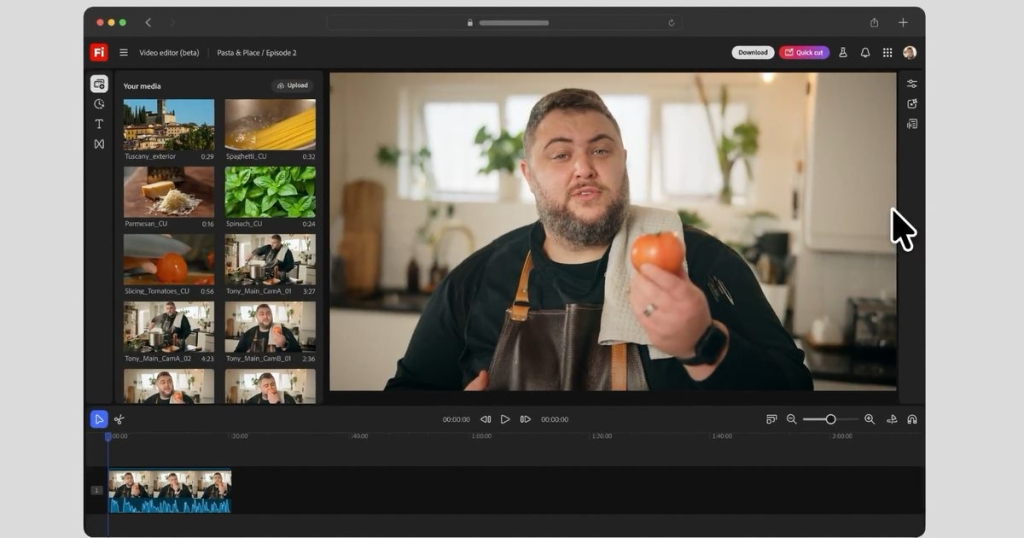
Adobe Unleashes Firefly’s Quick Cut: A Revolutionary AI Video Editing Feature That’s Changing the Game
In a groundbreaking move that’s sending shockwaves through the video editing industry, Adobe has once again pushed the boundaries of artificial intelligence with its latest Firefly update. The creative software giant has introduced Quick Cut, a powerful new feature that promises to revolutionize how we approach video editing by automating the most tedious part of the process: creating that initial rough cut.
From Timeline Views to Quick Cut: Firefly’s Evolution
Adobe’s journey toward creating a comprehensive AI video editing suite has been nothing short of remarkable. Just a few months ago, the company introduced timeline views and text prompt editing to Firefly, allowing users to manipulate video content through simple textual commands. Now, with Quick Cut, Adobe is taking another giant leap forward, transforming Firefly from a novel AI tool into what many are calling the future of video editing.
The Time-Consuming Problem Quick Cut Solves
As any video editor—amateur or professional—will tell you, one of the most time-consuming aspects of video production is sifting through hours of raw footage to create that initial rough cut. This process, which can take anywhere from several hours to multiple days depending on the project’s complexity, is often repetitive, monotonous, and creatively draining.
Adobe Firefly’s Quick Cut feature addresses this pain point head-on by automatically generating a clean first cut from your uploaded footage. The implications are enormous: what once took hours can now be accomplished in minutes, freeing editors to focus on the creative aspects of their projects rather than the mechanical process of cutting and arranging clips.
Real-World Applications That Will Blow Your Mind
Adobe has provided several compelling use cases that demonstrate Quick Cut’s versatility and power:
Product Reviewers Rejoice: Imagine being a tech reviewer who records hours of footage testing a new smartphone or laptop. Instead of spending half a day creating a rough cut, you can now upload your footage to Firefly, describe what you’re looking for, and receive a professionally structured first draft in minutes. The AI can even use your audio narration to guide the editing process, ensuring that the most important points are highlighted.
Podcasters and Journalists Get a Boost: For those working with long-form interviews, Quick Cut can be a game-changer. Instead of manually scrubbing through hour-long conversations to find key moments, the AI can automatically identify and extract the most relevant segments, dramatically reducing post-production time.
Vloggers and Content Creators: Whether you’re creating daily vlogs, travel recaps, or educational content, Quick Cut can help you quickly organize your footage into a coherent narrative structure, allowing you to focus on adding your unique creative touch.
How Quick Cut Actually Works
The genius of Quick Cut lies in its simplicity. Here’s how it works:
Upload Your Footage: Start by uploading your raw video files to Adobe Firefly. There’s no limit on the amount of footage you can work with, making it suitable for everything from short social media clips to feature-length documentaries.
Provide Context with Text Prompts: Next, you’ll describe what type of video you’re working with—is it an interview, a product demo, a vlog, or a recap? This context helps the AI understand the structure and pacing you’re likely aiming for.
Generate Your First Draft: With your description in place, Firefly will analyze your footage, identify key moments, and create a first rough cut based on your specifications. The AI considers factors like audio quality, visual interest, and narrative flow to create a compelling initial edit.
Refine and Perfect: The magic doesn’t stop there. You can provide follow-up text prompts to refine the cuts, add or remove specific segments, or adjust the pacing. If your footage is lacking in certain areas, you can even use Adobe Firefly’s generative capabilities to create video content from photos to fill gaps.
For those who want even more control, you can upload a script to guide the editing process, ensuring that the final product aligns perfectly with your vision.
The Technology Behind Quick Cut
While Adobe hasn’t revealed all the technical details, Quick Cut leverages advanced machine learning algorithms that can analyze video content, understand context, and make intelligent editing decisions. The system can identify speech patterns, detect visual quality, recognize scene changes, and even understand the emotional tone of different segments to create a cohesive narrative flow.
What This Means for Video Editors
It’s important to understand that Adobe Firefly isn’t designed to replace human video editors. Instead, it’s positioned as a powerful tool that enhances their capabilities and streamlines their workflow. Adobe has been clear that Quick Cut and other Firefly features are intended for ideation, experimentation, and creating first drafts.
The real value proposition is that AI handles the tedious, time-consuming aspects of video editing, allowing human editors to focus on what they do best: storytelling, creative decision-making, and adding that irreplaceable human touch that makes content truly compelling.
This shift represents a significant change in how we think about video editing. Rather than spending hours on mechanical tasks, editors can now dedicate their energy to creative choices, pacing, emotional impact, and narrative structure. The result is not just faster production times but potentially higher-quality content as well.
The Future of AI in Video Editing
Quick Cut is just the beginning. As AI technology continues to advance, we can expect even more sophisticated features that further streamline the video editing process. The goal isn’t to eliminate human creativity but to remove the barriers that prevent creators from fully realizing their vision.
For hobbyists, Quick Cut makes professional-quality editing accessible without years of training. For professionals, it represents a powerful tool that can dramatically increase productivity and allow for more ambitious projects. For businesses and content creators, it means faster turnaround times and the ability to produce more content without sacrificing quality.
Quick Cut represents a significant milestone in the evolution of video editing technology. By automating the most time-consuming part of the process, Adobe Firefly is democratizing access to professional video editing tools and empowering creators to focus on what truly matters: telling compelling stories through video.
Whether you’re a seasoned video editor looking to streamline your workflow or a content creator who’s been intimidated by the complexity of video editing, Quick Cut offers an exciting glimpse into the future of content creation. As AI continues to evolve, tools like Quick Cut will likely become standard features in every video editor’s toolkit, fundamentally changing how we approach video production.
The question isn’t whether AI will transform video editing—that transformation is already underway. The question is how quickly creators will embrace these tools and what new forms of creative expression will emerge as a result.
AdobeFirefly #QuickCut #AIVideoEditing #VideoEditingRevolution #ContentCreation #AIInCreativity #AdobeUpdate #VideoProduction #DigitalTrends #TechNews
Viral Tags:
AI Editing Game Changer, Video Editing Revolution, Adobe Firefly Update, Quick Cut Feature, Content Creation Made Easy, Future of Video Editing, AI Tools for Creators, Time-Saving Technology, Video Production 2.0, Creative Workflow Revolution
Viral Phrases:
“Editing in minutes, not hours”
“AI handles the boring stuff, you handle the creativity”
“The future of video editing is here”
“Revolutionizing content creation one cut at a time”
“Democratizing professional video editing”
“From hours to minutes: The Quick Cut revolution”
“AI-powered creativity unleashed”
“The end of tedious video editing”
“Transforming how we tell visual stories”
“Empowering creators, not replacing them”
,


Leave a Reply
Want to join the discussion?Feel free to contribute!