
CyberGhost VPN review | TechRadar
CyberGhost VPN Review: Fast, Affordable, and Reliable, but Lacks Innovation
CyberGhost has been a veteran in the VPN industry since 2011, building a solid reputation with a reliable set of core VPN tools. Despite its impressive speed testing results and unblocking performance, it doesn’t quite make the cut for our list of the best VPNs overall. In this comprehensive review, we’ll dive into the good, the bad, and the ugly to see where CyberGhost stands among today’s competition.
Features
CyberGhost won’t be winning any awards for new and novel VPN features, but the tools it does offer are all solid and secure. Let’s start with the basics:
– Kill Switch: CyberGhost has its own kill switch that cuts the internet connection if the VPN drops out, preventing IP leaks. It works well in tandem with DNS leak protection as a safety net. However, unlike NordVPN’s kill switch, it’s not configurable, which may disappoint power users looking to tailor their VPN experience.
– Wi-Fi Protection: This feature pairs nicely with the kill switch. It’s a simple on/off toggle that alerts you to changes in your internet connection and warns you if you’re not connected to a VPN server. You can also set rules for different network security statuses, such as prompting CyberGhost to ask before connecting to a server if the network is secure, or always joining a server if it’s unsecure.
– Split Tunneling: CyberGhost’s split tunneling functionality, called Exceptions, allows you to list sites that don’t use the VPN’s encrypted tunnel. They’ll be routed through your original internet connection instead. This can be useful for online banking or streaming services you use to keep up with local sports.
– Connect-on-Launch: This tool allows you to select the server that the VPN automatically connects to and even nominate an app that’ll launch as well. It’s a nice time-saver that worked flawlessly in our testing.
– Ad, Malware, and Tracker Blocking: CyberGhost’s built-in ad, malware, and tracker blocking tool was surprisingly effective in our real-time testing. It blocked 83% of ads and 149 out of 156 common trackers. While not as powerful as a full-fledged ad-blocking solution, it’s still useful for day-to-day browsing.
However, CyberGhost falls behind in other cybersecurity areas. Unlike ExpressVPN, which boasts its own password manager, or NordVPN, which has an identity theft protection service, CyberGhost doesn’t bring any features of this caliber to the table.
Server Network
CyberGhost offers 124 server locations spread over 100 countries, putting it near the top of the pile when it comes to global coverage. While competitors like NordVPN might serve a wider variety of countries (118), CyberGhost certainly isn’t lacking in global coverage.
Most of these servers are based in Europe, with 11 locations in the USA. CyberGhost also covers Central and South America, Asia, and Africa. We were pleasantly surprised to see servers in regions that are often neglected by other providers, such as Kenya, Bolivia, and Costa Rica. The fact that CyberGhost boasts server coverage in censorship-heavy countries like China and Russia is especially noteworthy.
However, CyberGhost does make use of a lot of virtual servers, and they don’t appear to be specifically flagged in the apps, so you don’t always know if you’re connecting to a server that’s actually where it appears to be. For example, CyberGhost appears to host its Cyprus and Egypt locations in Romania, which is significantly further away than we see with most providers, who typically use a Mediterranean location such as Marseille.
Apps
CyberGhost’s apps straddle a fine line between sleek and somewhat threadbare. The VPN is compatible with pretty much every platform out there – Windows, Mac, Android, iOS, Linux, smart TV, and consoles included. However, the Linux edition of the CyberGhost app is command-line only, and there’s no indication of whether a GUI upgrade is in the cards.
The desktop offering is intuitive and easy to navigate. Basic tools and settings are clearly labeled, and there are only three extra features to take note of – the ad blocker, DNS leak protection, and kill switch. The mobile VPN apps look even better in our opinion, especially when using them in the portrait orientation. They’re just as easy to navigate as their desktop counterparts, though they are somewhat on the small side.
Unfortunately, the iOS and Android apps are light on features, especially compared to NordVPN and PIA’s feature-rich and customizable offerings.
We were particularly irked by CyberGhost’s device limit. Unlike ExpressVPN, CyberGhost doesn’t issue a certain number of simultaneous connections, and instead limits the number of devices, total, that you can install the service on. Users have 7 device slots, and installing the VPN on a device consumes a slot. If you reach the 7-device limit, you’ll need to unlink a device before you can install it on another, which is an extra bit of legwork that the majority of the competition just don’t make you do.
Ease of Use
CyberGhost’s apps might not be full to bursting with a cavalcade of tools, but they’re nice and easy to use. For some folks, this will be more important, and we had no trouble getting the VPN set up on our Windows 11 test machine and iPhone 13 mobile.
We found that it was easier to create a CyberGhost account and select a plan as the first step in the process, then download the corresponding app for the device you’re using after logging in to the My Account page on the CyberGhost site.
Once we’d logged into the app, which is compact and stylish, we were greeted by a big one-click connect button, which is exactly what we like to see. A lot of VPN users won’t need to explore any further than this homepage, as hitting the button will pair you with a speedy local server, allowing you to go about your day-to-day browsing with increased peace of mind.
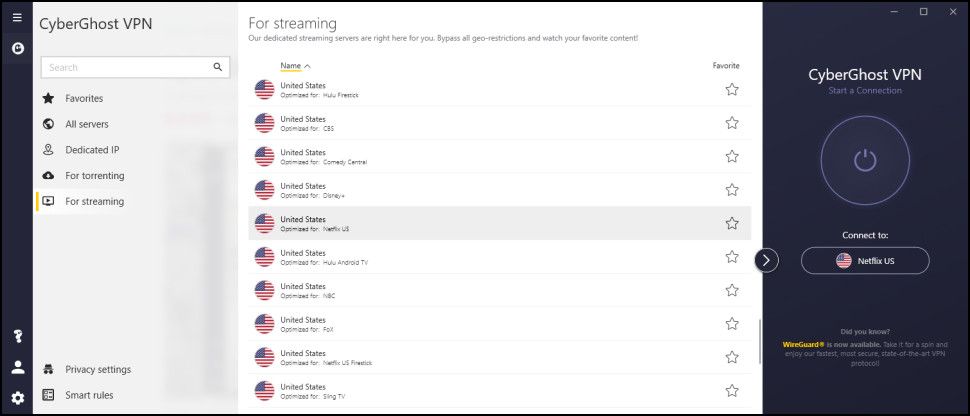
On the other hand, we found that it was easy to dictate which server CyberGhost connects to when clicking the connect button, and the full server list expands into a larger window with a single click. From here, we were able to favorite locations and check out the full roster of specialized streaming, torrenting, and gaming servers.
Our sole quibble with the CyberGhost Windows UI is that the settings are split into three discreet menus, each with a different icon in a different part of the app. We believe that it’d be better to merge these options into a single tab, reducing the amount of clicking around required to find specific tools and configurations.
Speed and Performance
CyberGhost blew us away during our last round of speed testing, achieving a blistering 950+ Mbps when using the WireGuard protocol. However, its average speeds have dropped in our latest tests.
CyberGhost’s UK WireGuard performance was consistent with download speeds of 672Mbps in our first session and 676Mbps in our second, for an average of 674Mbps. CyberGhost’s Ireland to US WireGuard testing gave us download speeds of 407 Mbps in our first test, then 405 Mbps in the second, for an average of 406 Mbps.
CyberGhost’s OpenVPN speeds have suffered as well, dropping from 460 Mbps in our last set of tests to 199 Mbps. This is still a decent speed compared to its competitors, with Proton VPN returning slightly faster results at 202 Mbps and NordVPN 179 Mbps.
We did find that CyberGhost’s connection times remain brisk, clocking in at about a second, and its connections are both consistent and stable.
Unblocking
We put VPNs through the wringer when it comes to unblocking streaming services, and part of that testing involves determining whether the VPN in question can access various Netflix libraries in the US, UK, Japan, Canada, and Australia, Disney+, Prime Video, BBC iPlayer, 10Play, 9Now, and Channel 4. It’s a tall order – but CyberGhost achieved a perfect score.
We didn’t encounter a single obstacle when investigating these streaming platforms. Netflix loaded instantly, every time, and we were able to catch up on multiple WWE replays without a single buffering hiccup or drop out. This kind of reliability is seriously impressive, and makes CyberGhost a solid VPN for Netflix.
We’re also glad to see that CyberGhost has its own Smart DNS service. This allows folks with consoles and smart TVs to enjoy the VPN’s unblocking power, too, though it’s worth noting that the Smart DNS tool won’t encrypt your traffic like a full-blooded VPN.
CyberGhost is a decent torrenting VPN, but not at the top of our recommendations. The provider doesn’t make a big song and dance about it, but it does offer P2P-optimized servers, listed under the “For downloading” tab in the server menu. These servers span 80 countries, which is plenty to choose from, and should help you find a nearby connection point to help maximize performance. Unfortunately, unlike PIA, CyberGhost doesn’t come with port forwarding, which reduces the number of seeders you can connect with.
Privacy and Security
CyberGhost users have three VPN protocols to choose from – OpenVPN, WireGuard, and IKEv2. As we touched on earlier, OpenVPN is your go-to if you value security over speed, whereas the speedy WireGuard protocol is a favorite of gamers and avid streamers. IKEv2, on the other hand, is ideal for mobile users, as it can handle changes in network connections without disrupting the VPN connection.
In addition to DNS and IP leak protection, which help keep your identifiable details out of the hands of third-party snoopers, CyberGhost lets you choose a random port. This makes it easier to use the VPN in airports and hotels, for example, as they usually restrict traffic to HTTPS.
CyberGhost is headquartered in Romania, which will register as an immediate green flag for privacy purists, as the country has no mandatory data retention laws and isn’t a part of the notorious Five Eyes Alliance. Because Romanian law doesn’t force CyberGhost to record or store user data, it means that, if pressed by the authorities to hand that data over, the VPN couldn’t, as it wouldn’t have any data to fork over in the first place.
CyberGhost doubles down on its commitment to user privacy with a solid no-logs policy that ensures that no records are stored that could link users to their network activity. We investigated the policy and found that it was refreshingly easy to follow. It’s not stuffed with techno-babble, and it takes the time to explain each term in plain, parsable language.
The provider even invited cybersecurity firm Deloitte to comb through this no-logs policy back in January 2024. Deloitte gave CyberGhost a big thumbs up, confirming that the VPN doesn’t have an appetite for identifiable details and logs.
Track Record
In addition to the 2024 Deloitte audit, CyberGhost claims to be the very first VPN to publish a quarterly transparency report way back in 2011. These reports are published in the spirit of transparency and detail how many DMCA complaints the VPN has received, as well as the number of police requests for user information.
The reports can be difficult to find, but CyberGhost does an excellent job of cutting through the statistics for the layperson, highlighting figures that have risen or fallen in the period between reports.
CyberGhost’s owner, formerly known as Crossrider, has raised concerns over the years. The company acquired CyberGhost in 2011 and was previously associated with malware distribution – essentially the antithesis of a VPN service. Crossrider rebranded as Kape Technologies in 2017 and has since brought PIA and ExpressVPN into the fold. This murky past has deterred more than a handful of users but, since then, Kape Technologies has taken steps to promote transparency and trust with its continued transparency reports and independent audits.
Finally, on a brighter note, we love to see that CyberGhost launched a bug bounty program in 2022. Any expert who sniffs out a vulnerability in the service can earn up to $1,250 for their trouble.
Customer Support
Right off the bat, we were glad to see that CyberGhost offers 24/7 live chat support. This means that, if you do encounter a hiccup here and there, you won’t have to wait until business hours to begin troubleshooting the issue with in-house experts. Alternatively, there’s the option to raise an email ticket via the support page.
If you prefer doing your own problem-solving, you’ll be glad to see that CyberGhost has a well-stocked library of guides, tutorials, and articles. The setup guides are some of the best we’ve come across. They’re illustrated with up-to-date screenshots, have simple and easy-to-follow steps, and cover most platforms.
Pricing and Plans
CyberGhost is a budget-friendly provider and, in fact, with prices on par with Surfshark, one of the best cheap VPNs on the block. Of course, you’ll bag the biggest bargain by picking up a multi-year plan and paying upfront.
A 2-year CyberGhost subscription comes in at $2.19 – identical to Surfshark – and includes an extra 2 months of coverage for free. You’ll be billed $56.94 for 2 years, then yearly from then on out.
If you’re looking for a shorter-term commitment, you can opt for the 6-month plan at $6.99 ($12.99 upfront), or a one-month plan at $12.99. All CyberGhost subscriptions are covered by an especially generous 45-day money-back guarantee, giving you over a month to put the provider through its paces to see whether it’s the right service for you.
We’re impressed by the number of trials CyberGhost serves up, too. In fact, it has some of our favorite VPN free trials. Windows users can enjoy a 24-hour trial, Android users get a 3-day free trial, and iOS loyalists win big with a 7-day free trial. Better yet, none of these trials demand that you hand over any financial details.
Should You Use CyberGhost?
There are plenty of good things about CyberGhost. It’s wickedly fast, unblocks every streaming platform you can think of, and is one of the cheapest providers in today’s market. So, if you’re an avid streamer, or spend a log of time plugged into online games, CyberGhost could be your holy grail – if you don’t mind dealing with the pesky 7 device limit.
However, if you’re looking for a VPN that’s on the cutting edge of cybersecurity ingenuity, then CyberGhost won’t cut it. Its basics are in order, but its functionality doesn’t extend far beyond basic, and it doesn’t seem like that’s going to change any time soon.
NordVPN and Proton VPN, on the other hand, continue to innovate and release new tools and features, and may be better alternatives for true advocates of internet privacy.
Tags: #CyberGhost #VPN #Review #Privacy #Security #Streaming #Torrenting #Speed #Performance #Apps #Features #ServerNetwork #Unblocking #CustomerSupport #Pricing #Plans #TrackRecord #Alternatives
Viral Phrases:
– “CyberGhost VPN Review: Fast, Affordable, and Reliable, but Lacks Innovation”
– “CyberGhost has been a veteran in the VPN industry since 2011”
– “CyberGhost won’t be winning any awards for new and novel VPN features”
– “CyberGhost offers 124 server locations spread over 100 countries”
– “CyberGhost’s apps straddle a fine line between sleek and somewhat threadbare”
– “CyberGhost blew us away during our last round of speed testing”
– “CyberGhost achieved a perfect score in our unblocking tests”
– “CyberGhost is a decent torrenting VPN, but not at the top of our recommendations”
– “CyberGhost doubles down on its commitment to user privacy with a solid no-logs policy”
– “CyberGhost claims to be the very first VPN to publish a quarterly transparency report”
– “CyberGhost offers 24/7 live chat support”
– “CyberGhost is a budget-friendly provider and, in fact, with prices on par with Surfshark”
– “There are plenty of good things about CyberGhost”
– “However, if you’re looking for a VPN that’s on the cutting edge of cybersecurity ingenuity, then CyberGhost won’t cut it”,


Leave a Reply
Want to join the discussion?Feel free to contribute!