
Gemini overlay redesign on Android adds full Tools menu
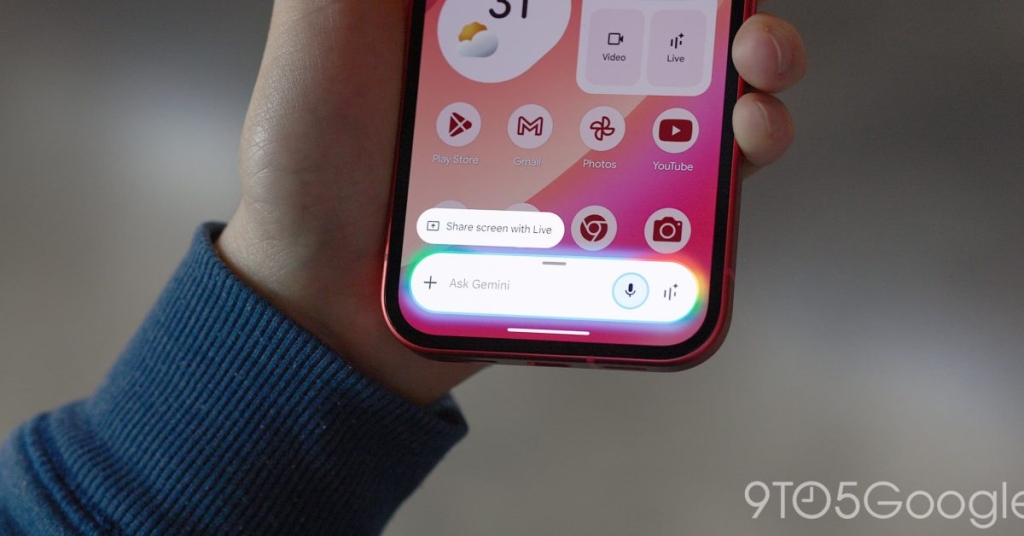
Google Unveils Major Gemini Overlay Redesign for Android: Bigger Prompt Box and Enhanced Tool Access
In a significant update rolling out to Android users, Google has completely redesigned the Gemini overlay interface, dramatically improving usability and accessibility. The new design expands the prompt box and brings the full suite of Gemini Tools directly into the overlay interface, making AI assistance more seamless than ever.
Bigger Prompt Box: More Room to Think
The most immediately noticeable change is the expanded prompt box. The pill-shaped overlay has been widened and now features centered text (“Ask Gemini”) with significantly more room for typing. This seemingly simple change has a profound impact on user experience, allowing for more complex queries without feeling constrained.
When users begin typing, the overlay morphs from its compact pill shape into a larger, two-line rounded rectangle that provides even more space for crafting detailed prompts. This dynamic resizing responds intuitively to user input, expanding as needed to accommodate longer questions or instructions.
Tools Menu Integration: Everything at Your Fingertips
The standout feature of this redesign is the integration of the Gemini Tools menu directly into the overlay. Located to the right of the familiar ‘+’ attachment icon, the new Tools button provides instant access to Gemini’s full capabilities without leaving whatever you’re doing on your Android device.
Tapping the Tools icon reveals a comprehensive menu with descriptions for each function:
- Create image: Visualize and edit your ideas
- Create video: Bring concepts to life with video generation
- Create music: Make music with Gemini’s AI capabilities
- Canvas: Vibe code apps or create documents
- Deep research: Get detailed, comprehensive reports
- Guided learning: Study and learn new things with AI assistance
This integration mirrors the functionality found within the standalone Gemini app but adds the crucial benefit of on-screen descriptions, making it easier for users to discover and understand each tool’s capabilities.
Google AI Premium Features
For subscribers of Google AI’s premium service, the redesign includes a Personal Intelligence toggle within the Tools menu, providing access to enhanced, personalized AI capabilities that leverage your Google account data and preferences.
Current Availability and Testing
The redesign is rolling out with the latest Google app beta (version 17.7), though availability varies by Google Account. The staggered rollout suggests Google is still fine-tuning the experience based on user feedback.
This update comes alongside other Gemini interface experiments, including a new floating pill design for Gemini Live that Google began testing earlier this month, indicating an aggressive push to refine and enhance the user experience across all Gemini touchpoints.
Why This Matters
This redesign represents Google’s commitment to making AI assistance more accessible and intuitive. By expanding the prompt box and integrating tools directly into the overlay, Google has eliminated friction points that previously required multiple taps to access Gemini’s full capabilities. The result is a more fluid, productive experience that keeps users in their workflow while providing powerful AI assistance exactly when needed.
For Android users, this update transforms Gemini from a separate app experience into a truly integrated system feature, blurring the lines between traditional app usage and AI assistance in ways that could fundamentally change how we interact with our devices.
Tags: #Google #Gemini #Android #AI #Redesign #PromptBox #ToolsMenu #TechNews #Mobile #ArtificialIntelligence #GoogleUpdate #BetaTesting #UserExperience #Overlay #Prompt #Tools #AIAssistant #TechUpdate #AndroidUpdate #GoogleAI
Viral: “Game-changer for Android users”, “Google’s AI just got smarter”, “The future of mobile interaction”, “Seamless AI integration”, “Bigger is better”, “Tools at your fingertips”, “Redesign revolution”, “Beta testing excitement”, “Morphing interface magic”, “AI assistance reimagined”, “Workflow transformation”, “Frictionless experience”, “Google’s aggressive AI push”, “Blurred lines between apps and AI”, “Productivity powerhouse”, “Dynamic resizing delight”, “Intuitive design wins”, “Enhanced accessibility”, “Personalized AI capabilities”, “Comprehensive tool suite”, “User experience elevated”, “Android’s new AI superpower”, “Google’s commitment to innovation”, “Mobile AI evolution”, “The pill that expands”, “Descriptions make discovery easy”, “Premium features unlocked”, “Staggered rollout strategy”, “Fine-tuning based on feedback”, “Aggressive enhancement push”, “Fundamental interaction change”, “Integrated system feature”, “Powerful assistance exactly when needed”
,


Leave a Reply
Want to join the discussion?Feel free to contribute!