
After a few weeks with the HP OmniBook 7 Aero, I was impressed by its performance and portability
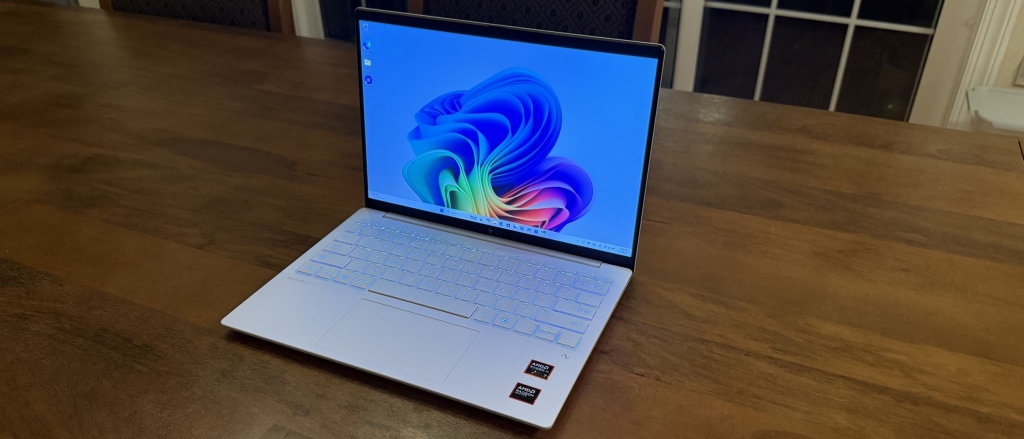
HP OmniBook 7 Aero Two-Minute Review: The Lightweight Powerhouse That Won’t Break the Bank
If you’re hunting for a Windows laptop that’s ultra-portable, surprisingly powerful, and doesn’t try to be a MacBook clone, the HP OmniBook 7 Aero might just be your new best friend. After spending a couple of weeks with this sleek machine, I can confidently say it punches well above its weight class—both literally and figuratively.
Design: Small But Mighty
Right out of the box, the HP OmniBook 7 Aero feels different. Its Ceramic White finish is fresh and modern without screaming “Apple wannabe.” The build is sturdy plastic, not metal, but don’t let that fool you—it feels durable enough for daily commutes and coffee shop sessions. At just over two pounds and less than an inch thick, this laptop practically disappears in your bag.
The 13.3-inch screen is bright and sharp, with excellent color accuracy (0.29 delta E) and 112% sRGB coverage. It’s not quite perfect for HDR photo editing, but for everyday work and streaming, it’s impressive. The keyboard has a short travel that might tire you out during marathon writing sessions, but the trackpad is responsive and handles gestures well.
One pleasant surprise: the port selection. Most ultrabooks limit you to USB-C only, but the OmniBook 7 Aero gives you two USB-A ports, HDMI, and a headphone jack alongside its USB-C connections. The only downside? Both USB-C ports are on the same side, which can be annoying when charging from the opposite side.
Performance: More Than Meets the Eye
Here’s where the OmniBook 7 Aero really surprised me. Despite being in the lightweight category, it handles multitasking like a champ. I had 20 tabs open simultaneously with no lag—switching between them was instantaneous.
Gaming performance was unexpectedly decent. I ran Indiana Jones and the Great Circle at low settings without any hiccups, and even Cyberpunk 2077 was playable at reduced settings. It’s not a gaming laptop by any means, but it’s nice to know you have options when you need them.
The AMD AI 5 340 or AI 7 350 CPUs (depending on your configuration) provide solid performance for productivity work, and the integrated Radeon graphics handle casual gaming surprisingly well. Just be prepared for fan noise and some keyboard heat when pushing it hard—temperatures can reach up to 103.8°F during intense tasks.
AI Capabilities: Ready for the Future
The OmniBook 7 Aero comes equipped with AI features that actually work well. The 50 NPU TOPS on the CPU means CoPilot+ and other AI functions run smoothly. Image generation was limited more by server speed than laptop performance, which is exactly what you want to see.
Battery Life: Good, Not Great
With just under 9 hours of battery life in our tests, the OmniBook 7 Aero falls short of some competitors that push past 15 hours. However, 8.5+ hours is still enough for a full workday without hunting for an outlet. The real winner here is the fast charging—50% in just 30 minutes when the laptop is off. That’s a game-changer for road warriors.
Price and Value: Worth Every Penny
Starting at $949.99, the OmniBook 7 Aero sits in a competitive price range. It’s not the cheapest option, but it’s far from overpriced. HP frequently offers discounts (it was 44% off during our review), making it an even better value.
Compared to the Dell Inspiron 14 Plus at the same starting price, the HP offers better portability. Against the Apple MacBook Air M4, you’re getting similar performance but with Windows flexibility and often better pricing.
Should You Buy It?
Buy it if:
– You need a lightweight Windows laptop for travel
– You want good performance without the MacBook price tag
– You appreciate unique design over generic looks
– You need versatile port options
– You want AI-ready hardware
Don’t buy it if:
– You need all-day battery life (15+ hours)
– You’re a hardcore gamer needing dedicated graphics
– You prefer metal builds over plastic
– You need extensive keyboard travel for typing comfort
Also Consider:
– Dell Inspiron 14 Plus: Similar price, slightly better battery, higher resolution display
– Apple MacBook Air M4: Superior performance and battery, but macOS ecosystem and higher price
Final Verdict: 4.5/5
The HP OmniBook 7 Aero succeeds where many lightweight laptops fail—it delivers solid performance without sacrificing portability or breaking the bank. It’s not perfect (battery life could be better, keyboard travel is short), but its combination of design, performance, and value makes it one of the best Windows ultrabooks you can buy right now.
Whether you’re a digital nomad, student, or professional who values portability above all else, the OmniBook 7 Aero delivers exactly what you need—and maybe a little more than you expected.
#HP #OmniBook7Aero #TechReview #WindowsLaptop #Ultrabook #LightweightLaptop #PortableComputing #TechRadarReview #AMDProcessor #AIReady #DigitalNomadGear #BudgetFriendlyTech #WorkFromAnywhere #LaptopReview2025
Ultraportable powerhouse that won’t break the bank
Lightweight Windows laptop with surprising performance
HP’s answer to MacBook without the Apple tax
Best value ultrabook of the year
9-hour battery life with 30-minute fast charging
Gaming-capable lightweight laptop
AI-ready hardware in a portable package
Unique design stands out from MacBook clones
Two pounds of pure productivity
Port selection that actually matters
Ceramic White finish that looks premium
AMD Ryzen processor delivers desktop-like performance
Perfect for digital nomads and road warriors
Fast charging saves the day
Keyboard compromise worth the portability gain
Not just another MacBook wannabe
Surprising gaming performance in a thin laptop
HP’s best ultrabook yet
Value-packed portable computing
The laptop that overdelivers on expectations,


Leave a Reply
Want to join the discussion?Feel free to contribute!