
Alogic Clarity Touch 6K monitor review: When a $2,500 display is considered cheap
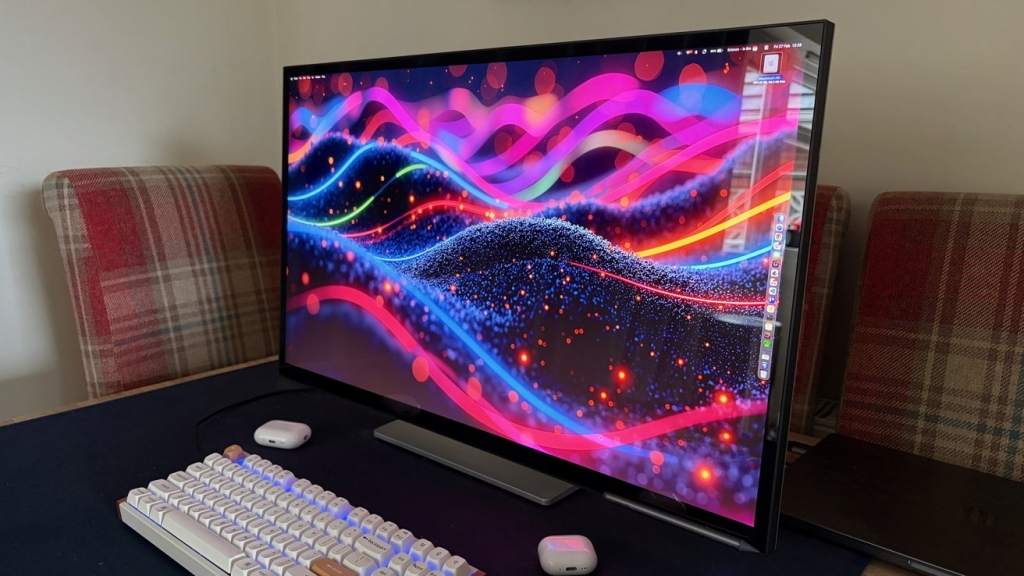
Alogic Clarity Touch 6K: The $2,500 6K Monitor That Rivals Apple’s Pro Display XDR
For creative professionals and power users, the quest for the perfect display is never-ending. Apple’s Pro Display XDR has long been considered the gold standard for high-end Mac setups, but its $4,999 price tag (before adding a stand) puts it firmly in the realm of luxury purchases. Enter Alogic’s Clarity Touch 6K—a 32-inch 6K monitor that delivers comparable specs at roughly half the price, challenging the notion that you need to spend five figures for premium display performance.
The Spec Sheet Showdown
At first glance, the Alogic Clarity Touch 6K and Apple’s Pro Display XDR appear remarkably similar on paper. Both feature 32-inch diagonal measurements, creating a substantial workspace that’s ideal for multitasking, video editing, and detailed creative work. The 6K resolution on both displays translates to a pixel density of 216 pixels per inch, resulting in that coveted Retina-like sharpness where individual pixels become virtually invisible at normal viewing distances.
However, the similarities largely end there. Where Apple’s display boasts mini-LED backlighting with 576 local dimming zones and a peak brightness of 1,600 nits, Alogic’s offering takes a different approach. The Clarity Touch 6K utilizes traditional IPS panel technology, which means wider viewing angles and more consistent color reproduction across the screen, but it lacks the HDR capabilities and extreme brightness of its Apple counterpart.
Design and Build Quality: Premium Without the Premium Price
The Alogic Clarity Touch 6K presents a surprisingly premium aesthetic that belies its sub-$2,500 price point. The monitor features a sleek, minimalist design with ultra-thin bezels that maximize screen real estate. The stand offers excellent stability and a range of adjustments including height, tilt, swivel, and pivot functionality—allowing users to switch between landscape and portrait orientations with ease.
The build quality is notably robust, with a solid aluminum construction that feels substantial without being overly heavy. The rear housing features a subtle textured finish that resists fingerprints and dust, maintaining a clean appearance even in busy workspaces. Cable management is thoughtfully integrated, with channels that run through the stand to keep your desk tidy.
The Touch Factor: A Game-Changing Feature
Where the Alogic Clarity Touch 6K truly distinguishes itself is in its touch capabilities. Unlike the Pro Display XDR, which remains steadfastly traditional, Alogic has integrated a 10-point multi-touch interface directly into the display. This capacitive touch layer responds with impressive accuracy and minimal latency, making it genuinely useful for creative workflows, presentations, and general navigation.
The touch functionality works seamlessly with macOS, supporting gestures like pinch-to-zoom, three-finger swipes, and tap-to-click. For artists and designers, the ability to interact directly with on-screen content—whether sketching in Procreate, adjusting timelines in Final Cut Pro, or navigating complex spreadsheets—adds a dimension of productivity that traditional monitors simply cannot match.
Color Accuracy and Professional Features
Alogic has clearly targeted creative professionals with the Clarity Touch 6K’s color specifications. The display covers 99% of the Adobe RGB color space and 100% of sRGB, making it suitable for photo editing, graphic design, and content creation. Factory calibration ensures accurate color reproduction out of the box, with a typical Delta E value of less than 2.
The 16-bit internal processing and 10-bit color depth support billions of colors, providing smooth gradients and eliminating banding in subtle tonal transitions. While it may not achieve the extreme contrast ratios of mini-LED displays, the IPS panel delivers excellent black levels for its category and maintains color accuracy even at off-angles—crucial for collaborative work environments.
Connectivity and Mac Integration
Understanding its target audience, Alogic has equipped the Clarity Touch 6K with comprehensive connectivity options. The monitor includes multiple USB-C ports with 96W power delivery, capable of charging even the most power-hungry MacBook Pro models while simultaneously driving the display. Traditional HDMI 2.1 and DisplayPort 1.4 inputs ensure compatibility with a wide range of devices beyond just Macs.
The USB-C implementation supports DisplayPort Alternate Mode, meaning a single cable can handle video, data, and power—reducing cable clutter significantly. The included remote control provides convenient access to on-screen display settings, though most users will likely rely on the intuitive touch interface for adjustments.
Performance in Real-World Use
In daily use, the Alogic Clarity Touch 6K delivers a compelling experience that challenges the value proposition of more expensive alternatives. The 6K resolution on a 32-inch panel creates an expansive workspace where users can comfortably view multiple applications simultaneously without sacrificing readability. Text appears crisp and clear, while fine details in photographs and videos remain sharp and well-defined.
The touch interface proves surprisingly addictive once you adapt to it. Simple tasks like scrolling through documents, resizing windows, or navigating web pages feel more intuitive with direct manipulation. Creative professionals will appreciate the precision offered by touch when working with timeline-based applications or making fine adjustments to digital artwork.
Value Proposition: The Bottom Line
At approximately $2,500, the Alogic Clarity Touch 6K represents significant value compared to Apple’s Pro Display XDR. While it may lack some of the extreme performance characteristics of Apple’s mini-LED technology—including HDR capabilities, higher refresh rates, and superior brightness—it delivers 90% of the visual experience at roughly half the price.
The inclusion of touch functionality alone could justify the price difference for many users, particularly those in creative fields or anyone who appreciates the efficiency gains of direct interaction. When you factor in the included stand (versus Apple’s $999 optional accessory), comprehensive connectivity, and professional-grade color accuracy, the Alogic monitor emerges as a genuinely compelling alternative.
Who Should Consider This Monitor?
The Alogic Clarity Touch 6K is ideally suited for creative professionals who need excellent color accuracy and a large workspace but don’t require the absolute cutting edge of display technology. It’s perfect for photographers, graphic designers, video editors, and anyone who spends significant time in front of a screen and values both productivity and visual quality.
The touch functionality makes it particularly appealing for users who frequently give presentations, conduct collaborative work, or simply prefer the immediacy of direct interaction. Students and professionals in fields like architecture, engineering, and data visualization will also find the combination of size, resolution, and touch capability highly beneficial.
The Verdict
The Alogic Clarity Touch 6K successfully demonstrates that premium display performance doesn’t require premium pricing. While it may not completely replace the need for Apple’s Pro Display XDR in the most demanding professional environments, it offers an attractive middle ground that balances performance, features, and value.
For Mac users seeking a large, high-resolution display with unique capabilities like touch integration, the Alogic Clarity Touch 6K represents one of the most compelling options available today. It proves that thoughtful engineering and targeted feature selection can create a product that satisfies the needs of most users without requiring them to empty their wallets.
Tags: 6K monitor, Alogic Clarity Touch, Pro Display XDR alternative, Mac display, touch screen monitor, 32-inch 6K, professional monitor, color accurate display, USB-C monitor, creative workspace, high resolution display, budget 6K monitor, IPS panel technology, Adobe RGB monitor, macOS compatible display
Viral Sentences:
“This $2,500 monitor might make you question why you’d ever spend $5,000 on a display”
“The touch feature that makes Apple’s Pro Display XDR feel like it’s from the last decade”
“32 inches of 6K glory that won’t require you to take out a second mortgage”
“When ‘good enough’ actually means ‘professionally excellent'”
“The monitor that proves you don’t need Apple’s logo to get Apple-level quality”
“Touch functionality that transforms how you interact with your Mac”
“Why pay double when you can get 90% of the performance for half the price?”
“The display that’s making creative professionals seriously reconsider their upgrade paths”
“Finally, a 6K monitor that understands Mac users actually use their computers”
“The best argument for not buying Apple’s Pro Display XDR in 2024”
,

Leave a Reply
Want to join the discussion?Feel free to contribute!