
Google Photos for Android adds an overdue feature to cure your iPhone FOMO
Google Photos Unleashes AI-Powered Sticker Creation on Android—Here’s How It Works
Google Photos is stepping up its game once again, transforming from a simple photo storage app into a full-fledged creative powerhouse. In its latest Android update, Google has rolled out a highly anticipated feature: the ability to create custom stickers directly from your photos using AI. This functionality, which iPhone users have enjoyed for months, is now making its way to Android devices, and it’s already causing a stir among tech enthusiasts and casual users alike.
What You Need to Know
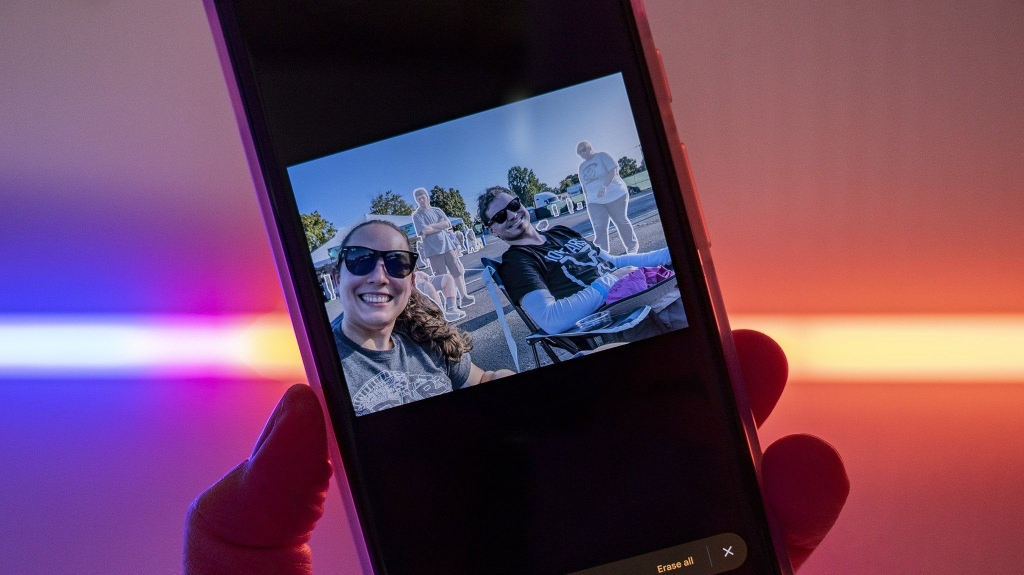
The feature is designed to be intuitive and seamless. When you open a compatible photo in Google Photos, the app’s AI automatically detects the main subject and highlights it with a subtle, shimmering effect. This shimmer acts as a visual cue, letting you know that the image is ready to be transformed into a sticker. A simple tap on the shimmering subject activates the AI, which then isolates the object from its background with impressive precision—even handling tricky details like fur, hair, or complex edges.
Once the subject is extracted, you’re presented with a preview of your new sticker and a “Copy sticker” button. This streamlined process eliminates the need for manual cropping or editing, making sticker creation faster and more accessible than ever. The stickers are saved as PNG files with transparent backgrounds, ensuring they look great when used in messaging apps like WhatsApp, Telegram, or Google Messages. Just open your keyboard’s sticker menu, and your custom creations are ready to share.
A Seamless Integration with Messaging Apps
One of the standout aspects of this update is how effortlessly the stickers integrate with your favorite messaging platforms. Because they’re saved as high-quality PNGs, there are no awkward white borders or jagged edges—just clean, professional-looking stickers that add a personal touch to your conversations. Whether you’re sending a funny meme, a heartfelt message, or just spicing up a group chat, these stickers let you express yourself in new and creative ways.
The AI’s Strengths and Limitations
While the AI behind this feature is impressively capable, it’s not without its quirks. In most cases, the subject isolation is spot-on, but there are instances where the AI might struggle—especially with cluttered backgrounds or flat lighting. If the AI isn’t confident in its ability to isolate the subject, the shimmer won’t appear, and the sticker creation option won’t be available. Unfortunately, there’s no manual brush tool to fine-tune the cutout, so you’ll have to work with the AI’s first attempt.
Android Central’s Take
This update marks a significant shift in how we view Google Photos. What was once primarily a backup and storage tool is now a creative hub, empowering users to turn their personal photos into shareable, expressive stickers with just a few taps. The convenience and speed of this feature make it a standout addition, encouraging users to engage more deeply with their photo libraries.
The real magic lies in how this feature leverages AI to enhance everyday interactions. Instead of generating entirely new images from scratch, Google Photos uses your own photos as the foundation, making the experience feel personal and authentic. It’s a perfect example of AI done right—practical, user-friendly, and genuinely fun.
Why This Matters
In a world where digital communication is increasingly visual, tools like this make it easier than ever to add personality and flair to your messages. Whether you’re a social media enthusiast, a meme lover, or just someone who enjoys sharing moments with friends, this feature opens up new avenues for creativity. It’s also a testament to Google’s commitment to continuously improving its ecosystem, ensuring that Android users have access to the latest and greatest features.
Final Thoughts
Google Photos’ new sticker creation feature is more than just a gimmick—it’s a meaningful enhancement that brings a new level of interactivity to the app. By combining powerful AI with a user-friendly interface, Google has made it possible for anyone to create custom stickers in seconds, without the need for specialized editing skills or third-party apps. As this feature continues to roll out, it’s likely to become a favorite among Android users, further solidifying Google Photos’ position as a must-have app for anyone who loves capturing and sharing memories.
Tags: #GooglePhotos #AndroidUpdate #AICreation #CustomStickers #TechNews #GoogleAI #MessagingApps #CreativeTools #AndroidCentral #TechInnovation
Viral Sentences:
- “Google Photos just turned your gallery into a sticker factory—no editing skills required!”
- “AI-powered stickers are here, and they’re about to make your chats way more fun.”
- “Why use generic stickers when you can turn your own photos into personalized masterpieces?”
- “Google Photos is no longer just a backup tool—it’s your new creative playground.”
- “The shimmer is real, and it’s about to revolutionize how you communicate.”
- “Android users, your sticker game just got a major upgrade—thanks, Google!”
- “From snapshots to stickers in seconds—Google Photos makes it effortless.”
- “This AI feature is the ultimate blend of practicality and creativity.”
- “Say goodbye to boring messages and hello to custom stickers made from your own photos.”
- “Google Photos is proving that AI can be both powerful and personal.”
,
Leave a Reply
Want to join the discussion?Feel free to contribute!