
Google finally adds custom icon support to Pixel, but it’s AI-only
Google Finally Adds Custom Icons to Pixel—But There’s a Catch
In a move that’s been years in the making, Google is finally bringing custom icon support to its Pixel lineup with the latest Pixel Drop update. For the first time, Pixel users can break free from the monotony of standard app icons and inject some personality into their home screens. But while this is undoubtedly a win for customization enthusiasts, there’s a significant caveat that might leave some users wanting more.
The Long-Awaited Customization Upgrade
Since the Pixel 6 debuted in 2021, one of the most common criticisms of Google’s smartphone experience has been its lack of customization options. While competitors like Samsung and OnePlus have offered robust theming tools for years, allowing users to download third-party icon packs, apply custom themes, and tweak virtually every aspect of their device’s appearance, Pixel users have been largely stuck with Material You’s dynamic color system and a handful of basic theming options.
That changes today. With the March 2026 Pixel Drop, Google is rolling out custom icon support to all Tensor-powered Pixel devices from the Pixel 6 onwards. The update brings five distinct AI-generated icon styles that transform your app icons into something entirely new.
Meet the New AI-Generated Icon Packs
Google’s approach to custom icons is decidedly different from what you might find on other Android devices. Rather than opening the floodgates to third-party icon packs from the Play Store, Google has opted for a more curated, AI-driven experience. Here’s what’s available:
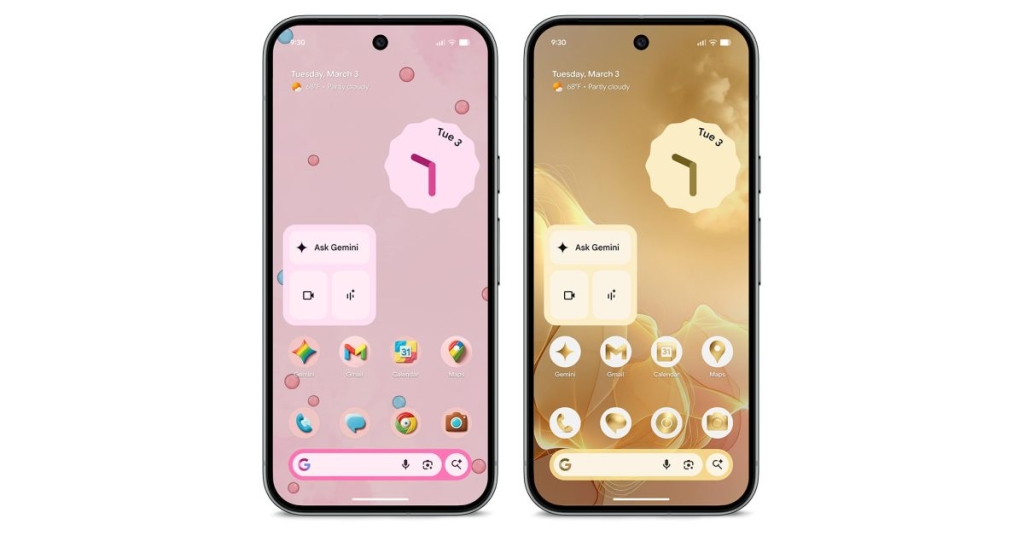
Cookies – This playful 3D style features rainbow-themed icons with wallpaper-matching backdrops that give your home screen a whimsical, almost toy-like appearance. The icons appear to have depth and texture, creating a fun, casual vibe.
Treasure – For those who prefer something more sophisticated, Treasure offers all-gold icons centered on white circles. This premium-looking style adds a touch of elegance to your device.
Scribbles – A hand-drawn aesthetic that makes your icons appear as if they were sketched with markers or crayons, perfect for users who want a casual, artistic feel.
Easel – This painterly style mimics the look of artwork on a canvas, with brush strokes and artistic textures that transform your apps into miniature masterpieces.
Stardust – A cosmic-themed collection featuring sparkling, star-like effects that give your icons a celestial quality.
Each style comes with matching wallpapers and app-specific backgrounds, creating a cohesive look across your entire home screen experience.
The AI Angle: Google’s Vision for Personalization
This move represents Google’s continued push into AI-driven personalization. We first caught wind of these icon packs last summer when they appeared in Android Canary builds, and the company has been gradually building up to this release ever since.
The decision to use AI-generated icons rather than supporting third-party icon packs is telling. Google appears to be betting heavily on artificial intelligence as the future of device personalization, creating experiences that are unique to the Pixel ecosystem and showcase the capabilities of its Tensor chips.
This approach has both advantages and drawbacks. On the positive side, the AI-generated icons are well-designed, cohesive, and optimized for the Pixel experience. They’re not just flat PNGs but appear to be rendered with depth, lighting effects, and smart background generation that adapts to your wallpaper.
However, the limitation to only five styles (at least for now) is a significant constraint. The Play Store offers thousands of icon packs covering virtually every aesthetic imaginable—from minimalist line art to hyper-detailed illustrations, from vintage designs to futuristic concepts. By restricting users to only AI-generated options, Google is essentially saying, “This is what personalization looks like on Pixel,” rather than allowing users to define it for themselves.
What About Third-Party Icon Packs?
If you were hoping that Google would finally open up the Pixel launcher to third-party icon packs, you’ll be disappointed. Despite the long-standing demand from the Pixel community, there’s no indication that the company plans to support the thousands of icon packs available on the Play Store.
This decision aligns with Google’s broader strategy of maintaining tight control over the Pixel experience. While the company has become more willing to embrace personalization in recent years, it still wants to ensure that any customization happens on its own terms—and right now, those terms are heavily influenced by AI.
It’s worth noting that Google recently updated its Developer Distribution Agreement to include language about auto-themed icons, suggesting the company is thinking carefully about how app icons are displayed and themed across the Android ecosystem.
SpongeBob Takes Over: The Second Theme Pack Arrives
In addition to the AI icon packs, today’s Pixel Drop introduces Google’s second official theme pack, following last year’s “Wicked: For Good” collection. This time, Google has partnered with Nickelodeon for a SpongeBob SquarePants-themed extravaganza.
Available through early May, the SpongeBob theme pack includes three unique themes with matching wallpapers, ringtones, icons, saved GIFs, and more. It’s a fun, lighthearted addition that shows Google is willing to experiment with pop culture partnerships for its Pixel devices.
The inclusion of themed content like this demonstrates that Google is thinking beyond just visual customization. By offering ringtones, notification sounds, and other multimedia elements, the company is creating more immersive, themed experiences that go beyond simple icon changes.
Device Compatibility and Limitations
The custom icon feature is coming to all devices from the Pixel 6 onwards, with one notable exception: the Pixel Tablet. Google has confirmed that the tablet won’t receive this update, though the reasoning isn’t entirely clear. It could be due to the different use case and interface of tablets, or perhaps technical limitations related to the larger screen format.
For phones, the feature is available on all Pixel 6 and later devices. However, it’s worth noting that older Pixel models (Pixel 5 and earlier) won’t be getting this update, as they use different processors and don’t support the same level of AI processing.
The Bigger Picture: Pixel’s Evolution
This update represents a significant shift in Google’s approach to the Pixel experience. For years, Pixel phones have been praised for their clean software, timely updates, and excellent camera performance, but criticized for their lack of customization options compared to competitors.
By introducing AI-generated icons and themed content, Google is acknowledging that users want to personalize their devices while still maintaining the cohesive, polished experience that Pixel is known for. It’s a delicate balance between offering freedom and maintaining control.
The move also highlights how AI is becoming central to Google’s vision for Android and Pixel devices. Rather than simply offering static customization options, Google is using AI to create dynamic, adaptive experiences that can evolve over time.
What Users Are Saying
Early reactions to the new icon packs have been mixed. Some users are thrilled to finally have more customization options on their Pixels, appreciating the high-quality design and cohesive aesthetic of the AI-generated styles.
Others, however, feel that Google missed an opportunity by not supporting third-party icon packs. Many Pixel users have long relied on the Play Store for customization, and the restriction to only five AI-generated styles feels limiting in comparison.
There’s also some debate about whether AI-generated icons truly represent the future of personalization. While they’re certainly innovative and well-executed, some argue that true personalization comes from allowing users to choose exactly what they want, rather than being limited to AI-curated options.
Looking Ahead
As Google continues to evolve the Pixel experience, it will be interesting to see how the company balances customization with control. Will we see more AI-generated themes in the future? Will Google eventually open up to third-party icon packs? Or will the company continue down its current path of curated, AI-driven personalization?
One thing is clear: Google is finally taking customization seriously on Pixel, even if its approach is different from what many users might have expected. Whether this AI-centric strategy will satisfy the Pixel community remains to be seen, but it’s certainly a step in a new direction for Google’s smartphone lineup.
For now, Pixel users can enjoy their new AI-generated icons and SpongeBob themes, knowing that Google is at least listening to demands for more personalization—even if it’s on the company’s own terms.
Tags: Google Pixel, Pixel Drop, custom icons, AI-generated icons, Material You, Android customization, SpongeBob theme, Pixel 6, Pixel 7, Pixel 8, Tensor chip, home screen customization, app icons, themed content, Google AI, smartphone personalization
Viral Phrases: “Finally, Pixel gets custom icons!”, “Google goes all-in on AI customization”, “No more boring Pixel icons”, “SpongeBob takes over your phone”, “The future of Android theming?”, “Pixel users rejoice (but with caveats)”, “AI-generated icons: Innovation or limitation?”, “Google’s bold move in smartphone personalization”, “The end of third-party icon packs?”, “Pixel’s customization revolution starts now”
,

Leave a Reply
Want to join the discussion?Feel free to contribute!