
Linux Mint shows off its new lock screen/screensaver
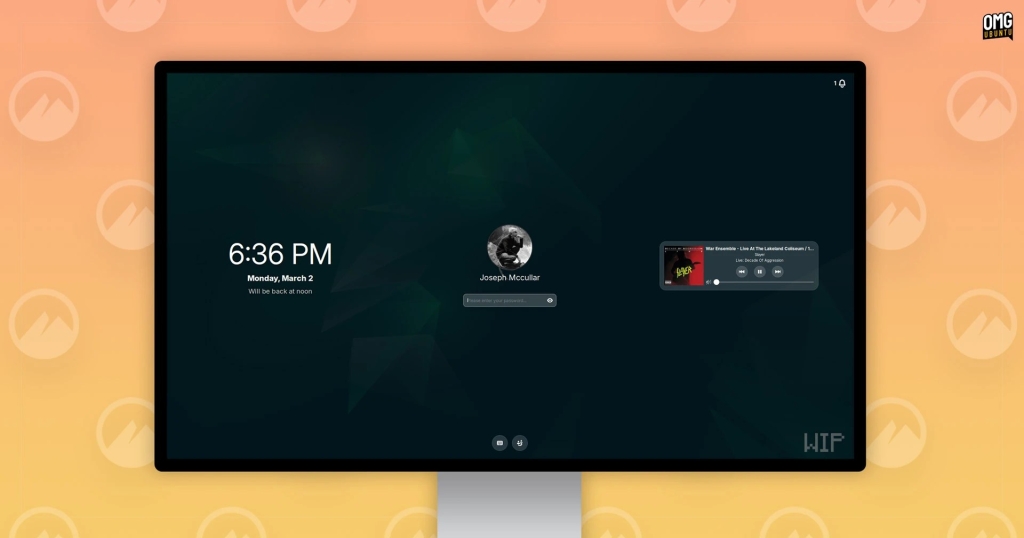
Linux Mint Unveils Stunning New Screensaver and Lock Screen for Cinnamon Desktop
In a bold move that’s sending shockwaves through the Linux community, Linux Mint is gearing up to revolutionize the user experience with a completely redesigned screensaver and lock screen for its beloved Cinnamon desktop environment. This isn’t just a minor facelift; it’s a comprehensive overhaul that promises to blend functionality, aesthetics, and security in a way that’s never been seen before in the Linux world.
For those who might think “screensaver” is a relic of the past, reminiscent of flying toasters or mesmerizing star fields, think again. In the modern computing era, particularly within the Cinnamon desktop, the screensaver serves a dual purpose: it’s both a visual treat when your system is idle and a crucial security feature that locks your screen, protecting your privacy and data from prying eyes.
The new lock screen, as revealed by Linux Mint, is a masterclass in information design. At a glance, users will be able to see a wealth of information without needing to unlock their devices. This includes real-time battery level indicators, the current time and date, media player controls for those who love to jam out while they work, and even unread notification counts. It’s a level of at-a-glance information that rivals, and in some ways surpasses, what you’d find on mainstream operating systems.

But the innovation doesn’t stop at information display. The new system introduces several user-friendly features that were previously either cumbersome or non-existent. Users will now be able to toggle the on-screen keyboard with ease, a boon for those with touchscreens or accessibility needs. Fingerprint unlocking is also on the menu, bringing Linux Mint’s security features up to par with the latest smartphones. And for those who share their devices or need to switch accounts quickly, a user switcher is just a tap away.
The Why Behind the Revamp
You might be wondering, “Why fix what isn’t broken?” The answer lies in Linux Mint’s commitment to continuous improvement and future-proofing. Until now, Cinnamon’s screen locking was handled by a separate package, cinnamon-screensaver, which ran alongside Cinnamon as its own process. This separation, while functional, introduced a layer of complexity and potential for inconsistency.
The new approach bakes the screensaver functionality directly into Cinnamon itself, using the same UI toolkit and widgets as the rest of the desktop. This native integration brings several benefits:
-
Wayland Support: While Linux Mint defaults to Xorg/X11, the Cinnamon desktop’s Wayland session is rapidly improving. This redesign ensures that users on the cutting edge of display server technology won’t be left behind.
-
Visual Polish: A native approach resolves the slightly jarring transition between the desktop and the lock screen, creating a more seamless user experience.
-
Codebase Simplification: By starting fresh, developers can avoid the complexities of an outdated codebase inherited from the GNOME 2 era, making future maintenance and feature additions more manageable.
Clement Lefebvre, the founder of Linux Mint, emphasized the importance of this change in a recent blog post: “Screensavers are very important. They need to look good, they need to work well, and they cannot under any circumstance fail to protect the user’s privacy.” This statement underscores the delicate balance between form and function that the Linux Mint team is striving to achieve.
The development team is leaving no stone unturned in their quest for perfection. The new native screen lock/saver will undergo rigorous testing in both Xorg and Wayland sessions to ensure that no niche edge-cases emerge that could potentially leave screen contents accessible. This level of thoroughness is a testament to Linux Mint’s commitment to user security and privacy.
In a move that showcases their cautious yet progressive approach, the next Cinnamon release will maintain compatibility with the older screensaver system while introducing the new one. This dual approach allows for a smooth transition and gives users the option to stick with what they know if they prefer. However, the release after that is set to go “all-in” on the new version, signaling Linux Mint’s confidence in their redesign.
For those eagerly awaiting this upgrade, you won’t have to wait long. The new screensaver is slated to “wake up” your device with Linux Mint 23, which is due for release later this year based on Ubuntu 26.04 LTS. Moreover, this isn’t just a Linux Mint exclusive – any Linux distribution that packages the next Cinnamon desktop release will benefit from these improvements.
As we look to the future of desktop computing, it’s clear that Linux Mint is not content to rest on its laurels. By reimagining something as fundamental as the lock screen and screensaver, they’re demonstrating a commitment to user experience that rivals even the biggest players in the tech industry. It’s a bold statement that says, “Linux isn’t just for enthusiasts and developers; it’s for everyone who values security, customization, and a touch of beauty in their digital lives.”
So, Linux Mint users, what do you think of these designs? Are you excited about the prospect of a more informative, secure, and visually appealing lock screen? The Linux Mint team is listening, and your feedback could shape the final product. After all, in the world of open-source software, the community’s voice is just as important as the developers’ vision.
Tags: Linux Mint, Cinnamon Desktop, Screensaver, Lock Screen, Wayland, Xorg, Desktop Environment, Open Source, Linux, Ubuntu, User Interface, Security, Privacy, Clement Lefebvre, OMG! Ubuntu!
Viral Phrases:
- “Revolutionizing the Linux desktop experience”
- “Security meets style in Linux Mint’s bold redesign”
- “The future of Linux lock screens is here”
- “Linux Mint’s screensaver: More than just eye candy”
- “Breaking barriers: Linux Mint embraces Wayland”
- “From flying toasters to fingerprint unlocking: The evolution of screensavers”
- “Linux Mint’s lock screen: Information at your fingertips”
- “The delicate balance between form and function in open-source design”
- “Community-driven innovation: How user feedback shapes Linux Mint”
- “Linux Mint 23: The release that’s changing everything”
,


Leave a Reply
Want to join the discussion?Feel free to contribute!