
Is 8GB of RAM really enough for a Mac in 2026? Short answer: Yes
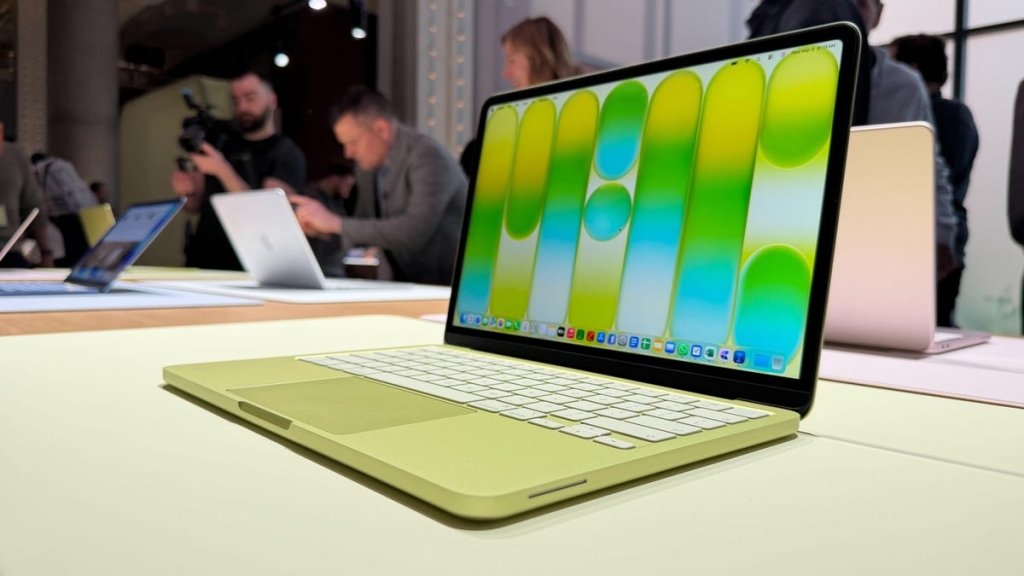
The MacBook Neo’s 8GB RAM: Enough for 2026 or Falling Behind?
In the ever-evolving world of laptops, one question keeps popping up among tech enthusiasts and casual users alike: Is 8GB of RAM still enough in 2026? With Apple’s new entry-level MacBook Neo starting at just $599 and packing 8GB of RAM, the debate is hotter than ever. Let’s dive deep into whether this configuration is a smart buy or a compromise you’ll regret.
The MacBook Neo: Affordable, But Is It Enough?
Apple’s latest budget-friendly MacBook Neo is turning heads—not just for its price, but for its surprisingly modest specs. For $599, you get 8GB of RAM and 256GB of storage. In an era where many Windows laptops ship with 16GB as standard, some are questioning if 8GB is already outdated.
But here’s the twist: I use a 2022 MacBook Air with the same 8GB of RAM and 256GB storage, and it’s been a workhorse for me. Right now, I have Chrome open with 11 tabs, plus Finder, Slack, Canva, Notes, Messages, and more—all running smoothly. Even after a full morning of work, my battery is still at 65%. So, is 8GB really that bad?
Why 8GB Still Works for Many Mac Users
Apple’s macOS is optimized to make the most of limited RAM. Thanks to memory compression and intelligent disk swapping, a Mac with 8GB can often outperform a similarly specced Windows PC. For everyday tasks—browsing, writing, video calls, light photo editing—8GB is more than enough.
Workloads That Shine on 8GB:
- Basic productivity: Emails, documents, spreadsheets
- Web browsing: Moderate tab usage
- Light creative work: Canva edits, simple photo touch-ups
- Students and budget-conscious buyers: Perfect for those who need reliability without breaking the bank
When You Might Need More:
- Heavy multitasking: Dozens of tabs, multiple large apps
- Professional creative work: Photoshop, video editing, 3D rendering
- Running virtual machines or development environments
The Future-Proofing Debate
Many tech experts now recommend 16GB as the new baseline for a laptop you want to keep for years. But here’s a personal confession: I used to be a “future-proofer,” always maxing out specs. Over time, I realized I was wasting money—my MacBook Air handled everything I threw at it.
Now, as a busy parent and professional, I’m all about buying what I actually need. For me, 8GB is still plenty. But if you’re a heavy multitasker or plan to keep your laptop for 5+ years, 16GB might be worth the investment.
How Windows and Chromebook Users Compare
Windows 11 laptops are increasingly shipping with 16GB as standard, especially in the new Copilot+ PC category. Windows tends to be more RAM-hungry, so 8GB can feel limiting if you run multiple apps or games.
Chromebooks, on the other hand, are built for efficiency. ChromeOS manages memory aggressively, so 8GB is often more than enough—even for moderate multitasking. Google’s own Chromebook Plus program sets 8GB as the baseline.
Quick Decision Table: Is 8GB Right for You?
| Use Case | Is 8GB Enough? | When It Works | When You Need More |
|---|---|---|---|
| Basic tasks | Yes | Email, docs, streaming | Heavy multitasking |
| Web browsing | Yes | Normal tabs | Dozens of tabs + web apps |
| Corporate work | Sometimes | Emails, meetings, docs | Large spreadsheets, heavy multitasking |
| AI work | Sometimes | ChatGPT, Gemini in browser | Local models, dev tools |
| Photo editing | Sometimes | Light edits, small files | Large images, AI tools |
| Gaming | Usually not | Casual/cloud gaming | AAA games, streaming |
| Video editing | Rarely | Light HD edits | 4K editing, effects, exports |
| Specialized software | Usually not | Basic tools | VMs, CAD, engineering software |
Should You Buy an 8GB Laptop in 2026?
It depends on your needs. For many Mac and Chromebook users, 8GB is still a smart, budget-friendly choice. But for Windows users or those with demanding workloads, 16GB is becoming the safer bet.
If you’re a student, casual user, or just want a reliable machine for everyday tasks, the MacBook Neo’s 8GB configuration is a compelling option. But if you’re a power user or want to future-proof your investment, you might want to look at higher-spec models.
TL;DR: 8GB is fine for most everyday users, especially on Mac and Chromebook. But for heavy multitaskers, creatives, or Windows users, 16GB is the new standard.
Viral Tags & Phrases:
-
MacBookNeo
-
8GBvs16GB
-
TechDebate2026
-
BudgetLaptop
-
FutureProofing
-
MacOSvsWindows
-
ChromebookEfficiency
-
EverydayComputing
-
TechSavvy
-
LaptopBuyerGuide
- “Is 8GB enough in 2026?”
- “MacBook Neo review”
- “RAM requirements 2026”
- “Budget-friendly tech”
- “Everyday laptop performance”
- “Tech for students”
- “Light vs heavy workloads”
- “Memory compression explained”
- “Copilot+ PC requirements”
- “Chromebook Plus specs”
,


Leave a Reply
Want to join the discussion?Feel free to contribute!