
Top 10 Mac Studio setups
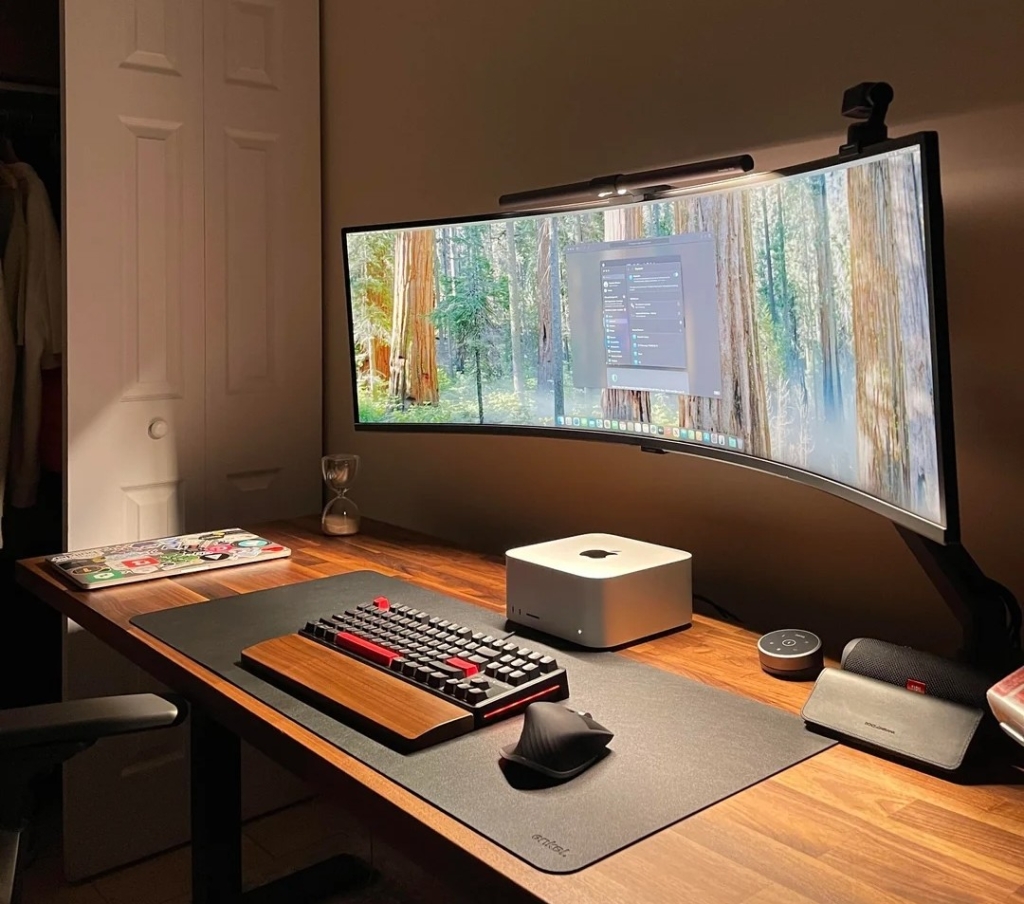
Top 10 Mac Studio Setups That Will Make You Want to Upgrade Immediately
Since Apple unveiled the Mac Studio in spring 2022, this powerful and compact desktop powerhouse has become the centerpiece of choice for ambitious computer workstations everywhere. It’s not hard to understand why—this machine combines stunning design with incredible computing performance. But choosing the best Mac Studio setups we’ve encountered? That’s a real challenge. We’ve tackled it anyway, bringing you the top 10 Mac Studio setups that showcase what this incredible machine can do.
This post contains affiliate links. Cult of Mac may earn a commission when you use our links to buy items.
Top 10 Mac Studio Setups
Whether configured with the older M1 Max or M2 Ultra chips, or the newer M4 Max or M3 Ultra chips in the 2025 models, the Mac Studio sits comfortably in Apple’s lineup as the desktop of choice for creative professionals, video editors, audio engineers, developers, and anyone who simply wants a lot of computer without needing a full Mac Pro. The Mac Studio packs desktop-class performance into a surprisingly small form factor—with formidable GPU capabilities, vast port selection, and whisper-quiet operation to boot.
Cult of Mac has showcased dozens of Mac Studio-powered workstations in its Setups section over the years. Below, we round up 10 of the best—spanning a wide range of uses, aesthetics, and price points—to inspire your own dream desk.
10. Modern-Classic USB Mic Serves Up Audio to Mac Studio
Not many USB microphones favored by streamers and podcasters eclipse the big names like Shure, Sennheiser, and Rode. But one example that comes close is the Blue Yeti USB mic. Once a rising mainstay in a quirky startup’s lineup, now it’s a mainstay for peripherals giant Logitech. And it remains popular and even award-winning.
This Mac Studio rig relies on a Blue Yeti mic. Its main gear is an M1 Ultra Mac Studio (20-core CPU, 48-core GPU, 32-core Neural Engine, 64GB unified memory, 2TB SSD) and a bunch of external displays, including three Dells and a Samsung G5 Odyssey.
Read the full Setups article: Modern-classic USB mic serves up audio to Mac Studio
9. Powerful Mac Studio Rig Brings the Symmetry
Symmetry is a recurring obsession among Mac enthusiasts who post their setups online. And this M1 Ultra Mac Studio workstation delivers it in spades. Dual 27-inch Dell UltraSharp 4K displays flank the desk in perfect balance, matched by a pair of Audioengine A2+ Bluetooth bookshelf speakers at either end.
A Keychron Q1 Pro mechanical keyboard and Logitech MX Master 3S mouse sit centered on a desk mat. A Loupedeck Live control surface—a rare sighting in any setup—adds a creative production edge.
The M1 Ultra Mac Studio, which the user called “my absolute dream computer,” keeps the whole rig humming through a CalDigit Thunderbolt 3 dock. It’s a setup that proves you don’t need the latest silicon to build something truly beautiful and deeply functional.
Read more: Powerful Mac Studio rig brings the symmetry
8. Badass Mac Studio Drives Dual Studio Displays
Redditor FaithlessnessDry387 kicked off a colorful debate about mice—Magic Mouse versus Logitech MX Master 3—but the real star of the post was the main hardware. It’s an M2 Ultra Mac Studio with a 24-core CPU and 60-core GPU powering two 27-inch Studio Displays.
When pressed on specs, the user described their machine as “just the regular 60 core,” delivered with enviable nonchalance. Even at base configuration, the M2 Ultra Mac Studio is a formidable machine. We singled it out as the best Mac for music production and photo editing. A BenQ monitor light and Logitech peripherals complete a handsome, well-balanced professional workstation.
Read more: Badass Mac Studio drives dual Studio Displays
7. Mac Studio Rig Pairs LG 5K Monitor with Studio Display
Apple’s Studio Display commands a premium price, which makes pairing one with a second Studio Display financially painful for many users. This Mac Studio setup offers a clever alternative: the LG 5K UltraFine display alongside a single Studio Display. The user explains why the LG is a near-perfect companion—matching 5K resolution means consistent pixel density and color across both screens.
A hidden gem in the setup is a pair of Bowers & Wilkins MM-1 Hi-Fi Computer Speakers, a beloved but rarely seen 2010-era desktop speaker system that the British brand no longer manufactures. They still deliver exceptional sound and add a vintage audiophile touch that sets this Mac Studio workstation apart from the crowd.
Read more: LG 5K monitor pairs beautifully with Studio Display
6. Mac Studio Drives 4 Big Displays
If the previous entry pushed the limits of computing complexity, this one challenges the very definition of “enough screen.” A Mac Studio powers a four-display arrangement that is staggering in its scale: two massive 57-inch curved Samsung ultra-wide panels stacked vertically, flanked on either side by 32-inch Samsung monitors in portrait (vertical) orientation.
The result is a wall of screens that would not look out of place in a NASA mission control room. Our headline says it all—this just might be too much screen space. But for anyone dealing with dense data, multi-stream video work, or simply anyone who refuses to compromise on real estate, it’s an object lesson in what Apple’s Mac Studio can actually drive when pushed to the limit.
Read more: How much is too much screen space? This, maybe.
5. Mac Studio Among 5 Computers in Workstation
This one might be the most technically dense setup in the entire roundup. A between-jobs digital marketer learning local large language models runs a five-computer workstation anchored by a 57-inch curved Samsung G95NC display. The Samsung’s 7680 x 2160 resolution is equivalent to two 27-inch 4K monitors placed side by side, but with no bezel in the middle.
The Mac Studio (an M1 Ultra model with 64GB of memory) sits alongside an M4 Pro Mac mini, an older Mac Pro and two Windows PCs. A pair of Cable Matters USB-4 switches handles KVM-style switching between machines. It’s a sprawling rig that doubles as an AI research station, music setup, and daily driver—proof that some Mac Studio users really do need every computer they own.
Read more: Five-computer workstation boasts gargantuan 57-inch display
4. Affordable Aune Open-Back Headphones Steal Mac Studio’s Thunder
Not every standout Mac Studio setup wins on sheer screen real estate or computing horsepower. Sometimes it’s a peripheral that nobody’s seen before that makes the difference. In this compact workstation, the user runs an M4 Max Mac Studio with a 32-inch Dell 4K display provided by their employer—clean and functional, if not flashy.
But what turned heads were the Aune AR5000 open-back over-ear headphones: a pair of hi-fi cans with a large 50mm dynamic driver and detachable cable that retails for only around $300, yet looks and performs like something that costs six or seven times as much. A Wobkey 80 mechanical keyboard rounds out a no-frills yet genuinely interesting setup for anyone who cares about audio quality on a budget.
Read more: Affordable Aune open-back headphones thrill for the price
3. I Want Everything in This Mac Studio Workstation
This setup, posted by Redditor DMG41 under the modest title “My office setup,” practically screams envy-inducing from top to bottom. An M1 Max Mac Studio—hidden away in a drawer or mounted under the desk—drives Apple’s coveted 32-inch Pro Display XDR, one of the finest monitors money can buy.
Alongside the Mac Studio, a powerful M4 MacBook Pro and an iPad Pro round out the computing muscle. But what really stole the show was a pair of Nanoleaf desktop pegboard docks: illuminated stands that hold accessories and glow in customizable colors. A set of Audioengine A5+ bookshelf speakers pumping 150 watts of audio completes a setup that really does seem to have it all.
Read more: I want everything in this Mac Studio workstation
2. Mac Studio-Wielding Designer Adores Dual Studio Displays
A web designer and video editor showed off a Mac Studio driving a pair of gorgeous 27-inch 5K Studio Displays, and the post sparked lively debate about whether dual Studio Displays are worth the considerable outlay. The user was unequivocal: a second screen is a total game changer for editing work. There was also a spirited exchange defending Mac Studio against commenters who suggested the M4 Mac mini might offer equivalent value. The user wasn’t persuaded.
A nifty Twelve South MagicBridge tray—increasingly rare but still findable on eBay—keeps the Magic Keyboard and Magic Trackpad perfectly aligned. The result is an elegant, cohesive workstation that would make any designer’s jaw drop.
Read more: Mac Studio-wielding designer adores dual Studio Displays
1. Powerful Mac Studio Drives Epic Ultra-Wide Display
When a user posted a photo of their workstation under the title “Mac Studio x Ultrawide Setup,” it immediately grabbed attention. The centerpiece is a 2025 M4 Max Mac Studio configured with 36GB of unified memory and a 512GB SSD.
It drives a massive 49-inch curved Samsung gaming monitor at DQHD resolution (5120 x 1440). The user graduated to the single ultra-wide from dual 27-inch 4K displays and says the experience feels more like having three screens side by side, but without the distracting bezels in between.
Apple billed its 2025 Mac Studio as the most powerful Mac ever made at launch. And this setup lets it stretch its legs in style, pairing formidable silicon with a display that truly matches its ambitions.
Read more: Powerful Mac Studio drives epic ultra-wide display
Tags: Mac Studio, Apple Silicon, M1 Ultra, M2 Ultra, M4 Max, M3 Ultra, Studio Display, LG 5K, Samsung Odyssey, Ultra-Wide Monitor, Creative Workstation, Audio Production, Video Editing, Developer Setup, RGB Lighting, Mechanical Keyboard, Hi-Fi Audio, Thunderbolt 3, Thunderbolt 5, KVM Switch, AI Workstation, Pro Display XDR, Nanoleaf, Audioengine, Blue Yeti, Logitech MX Master, Keychron, Bowers & Wilkins, Aune Headphones, Wobkey Keyboard
Viral Phrases: “mind-blowing setup,” “game changer for editing work,” “absolute dream computer,” “too much screen space,” “envy-inducing from top to bottom,” “most powerful Mac ever made,” “NASA mission control room,” “staggering in its scale,” “formidable silicon,” “audiophile touch,” “hidden gem,” “no-frills yet genuinely interesting,” “stretch its legs in style,” “jaw-dropping workstation,” “financially painful,” “rare sighting,” “sprawling rig,” “creative production edge,” “formidable GPU chops,” “whisper-quiet operation,” “wall of screens,” “dream desk,” “compact powerhouse,” “high-end performance,” “acres of screen real estate,” “affordable Aune,” “massive firepower,” “incredible power,” “budget audiophile,” “vintage audiophile touch,” “perfect companion,” “clever alternative,” “colorful debate,” “modest title,” “immediately grabbed attention,” “object lesson,” “technical density,” “class-leading noise cancellation,” “top noise cancellation,” “premium price,” “massive firepower,” “top 10 Mac Studio setups”
,


Leave a Reply
Want to join the discussion?Feel free to contribute!