
Budgie 10.10.2 Brings Improved Labwc Wayland Compositor Integration
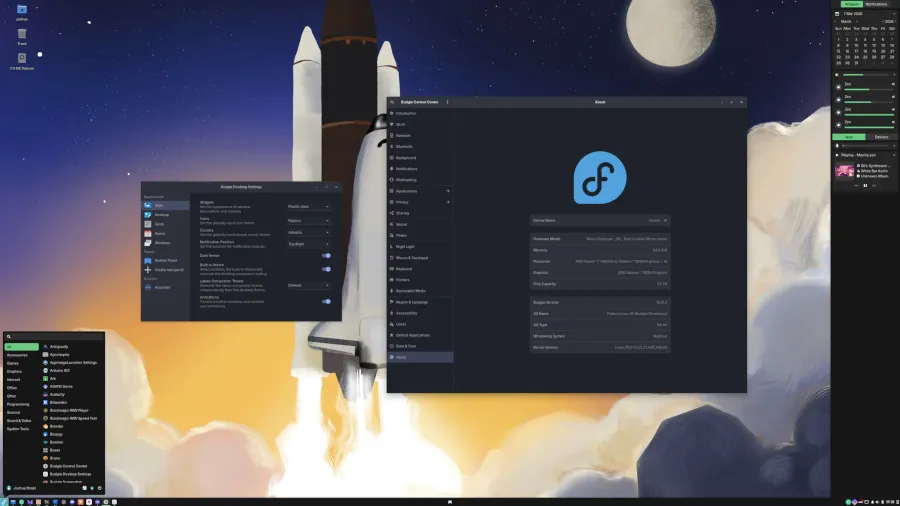
Budgie 10.10.2 Arrives with Enhanced Wayland Support and Labwc Integration
The Budgie desktop environment, a beloved and polished interface originally born within the Solus Linux ecosystem, has just rolled out its latest minor update: Budgie 10.10.2. This release may be incremental in version number, but it packs a meaningful punch in terms of refinements, stability, and expanded compatibility—particularly for users venturing into the Wayland world.
A Brief Recap: Budgie’s Journey to 10.10
Before diving into what’s new, it’s worth recalling that Budgie 10.10 was a milestone release. It introduced native Wayland support, a major leap forward for the desktop environment. For years, Budgie thrived on the X11 display server, but with the Linux desktop’s gradual migration toward Wayland for improved security, performance, and modern graphics handling, Budgie had to evolve. Version 10.10 laid that groundwork, and now 10.10.2 builds upon it with polish and expanded hardware/software compatibility.
Labwc Compositor Integration: A New Frontier
One of the headline features in Budgie 10.10.2 is the enhanced integration with the Labwc compositor through Budgie’s bridge layer. Labwc (a lightweight Wayland compositor) is gaining traction among users who want a minimal, fast, and flexible graphical stack. With this update, Budgie can now run seamlessly atop Labwc, unlocking several usability improvements:
- Independent Window Decoration Themes: Users can now set window decoration themes separately from Budgie’s main desktop settings. This means greater visual customization without being locked into a single aesthetic.
- Improved Keyboard and Locale Handling: Typing in multiple languages or managing international keyboard layouts is now smoother, with better detection and switching mechanisms.
- Touchpad Configuration Enhancements: For laptop users, the touchpad settings have been refined, offering more precise control over gestures, sensitivity, and behavior.
These tweaks may seem small in isolation, but together they contribute to a more cohesive and user-friendly experience—especially for those who value both aesthetics and functionality.
Under-the-Hood Refinements
Budgie 10.10.2 isn’t just about flashy new features; it’s also about making the desktop more reliable and responsive. Here’s what’s been improved under the hood:
- Reworked Application Matching Code: The system that determines which applications appear where and how they behave has been optimized. This leads to fewer mismatches, smoother multitasking, and a more predictable desktop environment.
- Budgie Menu Sizing Improvements: The application menu now adapts better to different screen sizes and resolutions, ensuring that it’s neither too cramped nor excessively large.
- Enhanced “Show Desktop” Functionality: The feature that minimizes all windows to reveal the desktop has been fine-tuned for better responsiveness and fewer visual glitches.
- Crystal Dock Background Support for wlroots Compositors: For users running Budgie with docks like Crystal on wlroots-based compositors (common in Wayland setups), background transparency and rendering have been improved.
Bug Fixes and Stability
As with any mature software project, bug fixes are a crucial part of each release. Budgie 10.10.2 addresses a wide variety of reported issues, from minor visual quirks to more significant stability problems. While the full changelog is detailed on the project’s blog, users can expect a more stable and polished experience overall.
Why This Matters
For longtime Budgie fans, this update is a welcome refinement that makes an already excellent desktop environment even better. For newcomers, it’s a sign that Budgie is maturing rapidly, especially as it embraces Wayland and modern Linux desktop trends.
The Budgie team, now an independent community project (no longer solely tied to Solus), continues to demonstrate that a focus on usability, elegance, and reliability can coexist with technical innovation. With each release, Budgie becomes a more compelling choice for anyone seeking a desktop that “just works” without sacrificing customization or visual appeal.
Get Budgie 10.10.2
If you’re running Budgie, updating to 10.10.2 is straightforward via your distribution’s package manager. For those interested in trying Budgie for the first time, it’s available in major Linux distributions such as Ubuntu, Fedora, and Manjaro, as well as in the Solus OS.
For the full details, changelog, and download links, visit the official announcement on BuddiesOfBudgie.org.
Tags & Viral Phrases:
- Budgie 10.10.2
- Wayland desktop environment
- Labwc compositor integration
- Linux desktop innovation
- Open-source desktop polish
- Enhanced touchpad support
- Independent window themes
- Crystal Dock Wayland support
- Budgie menu improvements
- Show desktop functionality fix
- Linux usability upgrade
- Solus desktop evolution
- Minimal Linux desktop
- Modern Linux interface
- Desktop environment bug fixes
- Keyboard and locale handling
- wlroots compositor compatibility
- Budgie 10.10 Wayland
- Linux desktop customization
- BuddieOfBudgie.org release
- Seamless Linux desktop experience
- Lightweight compositor support
- Linux desktop environment 2024
- Open-source Wayland desktop
- Budgie desktop refinement
- Linux touchpad configuration
- Window decoration themes
- Linux desktop stability
- Budgie 10.10.2 download
- Linux desktop enthusiasts
- Enhanced Linux desktop
- Budgie desktop community
- Linux Wayland migration
- Desktop environment updates
- Linux desktop performance
- Budgie 10.10.2 changelog
- Linux desktop features
- Budgie desktop enhancements
- Linux desktop environment news
- Budgie Wayland support
- Linux desktop usability
- Budgie 10.10.2 improvements
- Linux desktop reliability
- Budgie desktop development
- Linux desktop customization options
- Budgie 10.10.2 release notes
- Linux desktop experience
- Budgie desktop features
- Linux desktop interface
- Budgie 10.10.2 announcement
,


Leave a Reply
Want to join the discussion?Feel free to contribute!