
FreeBSD 15.1 On Track With Better Realtek WiFi & KDE Desktop Install Option
FreeBSD 15.1 Revolutionizes Laptop Experience with KDE Plasma 6, Enhanced WiFi, and Linux-Graphics Integration
In a bold leap forward for open-source computing, FreeBSD is redefining what it means to run a full-featured, modern operating system on laptops. The FreeBSD Foundation’s relentless push to make FreeBSD a viable, high-performance laptop OS has reached a fever pitch in 2026, with the upcoming FreeBSD 15.1 release poised to deliver a transformative experience for both new users and long-time BSD enthusiasts.
KDE Plasma 6 Now Available Directly from Installer
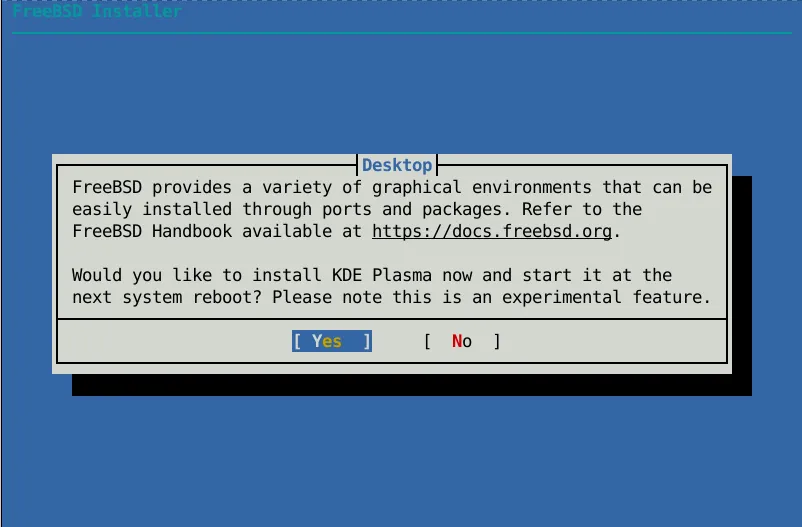
After missing the FreeBSD 15.0 deadline, the FreeBSD team is now on track to debut a seamless KDE Plasma 6 desktop installation option as part of the FreeBSD 15.1 installer. This marks a monumental shift in how FreeBSD is deployed on laptops. No longer will users need to install the base system and then manually configure a desktop environment—now, a fully-featured, modern KDE Plasma 6 desktop can be selected with a few clicks during the initial setup.
This integration is more than just a convenience; it’s a statement of intent. By offering a polished, user-friendly desktop experience right out of the box, FreeBSD is positioning itself as a serious contender in the desktop and laptop OS space, appealing to both power users and newcomers seeking an alternative to mainstream operating systems.
Realtek WiFi Support Takes a Quantum Leap
FreeBSD 15.1 is also set to dramatically improve wireless networking on laptops, with robust support for Realtek’s RTW88 and RTW89 WiFi 4 and WiFi 5 chipsets. For years, WiFi compatibility has been a stumbling block for FreeBSD adoption on modern laptops, but the FreeBSD Foundation’s dedicated work is finally closing that gap.
Developers are also pushing forward on WiFi 6 support, with the goal of bringing the latest wireless standards to FreeBSD users. While this work is ongoing and not yet ready for the 15.1 release, the commitment to supporting cutting-edge hardware is clear. These improvements mean FreeBSD users can expect faster, more reliable wireless connections and broader compatibility with the latest laptops hitting the market.
Graphics Drivers Get a Linux-Powered Boost
In a move that underscores FreeBSD’s commitment to modernity and performance, the team is actively porting Linux 6.11’s open-source graphics drivers to the FreeBSD platform. This cross-pollination of driver code is a game-changer, promising to unlock better support for a wide range of GPUs, including the latest integrated and discrete graphics hardware found in today’s laptops.
By leveraging the maturity and breadth of Linux’s graphics stack, FreeBSD users can look forward to smoother video playback, improved 3D performance, and enhanced support for high-resolution displays and multi-monitor setups. This is a crucial step in making FreeBSD a viable option for creative professionals, gamers, and anyone who demands top-tier graphics performance from their laptop.
Power Management and Modern Standby Support
Battery life and power efficiency are critical for laptop users, and FreeBSD 15.1 is addressing these needs head-on. The development team is making significant strides in implementing modern standby (s0ix) support, which allows laptops to enter ultra-low power states while still being instantly responsive when awakened. This feature, common on Windows and Linux laptops, is now coming to FreeBSD, promising a more seamless and energy-efficient user experience.
Additionally, FreeBSD is enhancing S4 hibernation support, enabling users to save their system state to disk and resume quickly after a full shutdown. These power management improvements are essential for making FreeBSD a practical choice for users who rely on their laptops for productivity on the go.
Looking Ahead: The Future of FreeBSD on Laptops
With FreeBSD 15.1 slated for a June 2026 stable release, the FreeBSD Foundation is already looking beyond this milestone. The February 2026 monthly update, available on GitHub, details ongoing work on WiFi 6, further graphics driver refinements, and deeper integration with modern laptop hardware.
The FreeBSD community’s dedication to making the operating system a first-class citizen on laptops is evident in every line of code and every new feature. By combining the stability, security, and flexibility of FreeBSD with the polish and compatibility of modern desktop environments and hardware support, the project is opening the door to a new era of open-source computing.
Conclusion: FreeBSD 15.1—A Turning Point for Laptop Users
FreeBSD 15.1 is shaping up to be more than just another incremental update; it’s a turning point for the operating system’s role in the laptop ecosystem. With KDE Plasma 6, enhanced WiFi, Linux-powered graphics drivers, and advanced power management, FreeBSD is poised to offer a compelling, modern experience for laptop users who value openness, performance, and control.
Whether you’re a developer, student, creative professional, or simply someone looking for a powerful, privacy-respecting alternative to mainstream operating systems, FreeBSD 15.1 promises to deliver. As the June release date approaches, the excitement within the FreeBSD community—and among tech enthusiasts worldwide—is palpable.
Tags & Viral Phrases:
- FreeBSD 15.1 release date
- KDE Plasma 6 on FreeBSD
- Realtek WiFi support FreeBSD
- Linux graphics drivers FreeBSD
- Modern standby FreeBSD
- FreeBSD laptop project
- Open-source operating system
- FreeBSD Foundation news
- Best OS for laptops 2026
- FreeBSD vs Linux desktop
- Power management FreeBSD
- WiFi 6 support FreeBSD
- FreeBSD desktop environment
- Next-gen FreeBSD features
- Open-source laptop OS
- FreeBSD gaming support
- FreeBSD creative professionals
- Best BSD for laptops
- FreeBSD 15.1 beta
- FreeBSD installer improvements
- Linux graphics stack FreeBSD
- FreeBSD battery life
- FreeBSD WiFi 5 support
- FreeBSD 15.1 June release
- KDE Plasma 6 installer
- FreeBSD modern hardware
- FreeBSD 15.1 download
- FreeBSD open-source innovation
- FreeBSD laptop compatibility
- FreeBSD 15.1 features
- FreeBSD 15.1 upgrade
- FreeBSD 15.1 review
- FreeBSD 15.1 performance
- FreeBSD 15.1 stability
- FreeBSD 15.1 desktop
- FreeBSD 15.1 graphics
- FreeBSD 15.1 power management
- FreeBSD 15.1 WiFi
- FreeBSD 15.1 KDE
- FreeBSD 15.1 Linux drivers
- FreeBSD 15.1 hibernation
- FreeBSD 15.1 standby
- FreeBSD 15.1 Realtek
- FreeBSD 15.1 modern laptop
- FreeBSD 15.1 open-source
- FreeBSD 15.1 desktop OS
- FreeBSD 15.1 best OS
- FreeBSD 15.1 2026
- FreeBSD 15.1 innovation
,

Leave a Reply
Want to join the discussion?Feel free to contribute!