
Studio Display XDR review roundup: Pro display hardware, with a few caveats
Apple Studio Display XDR Review Roundup: Pro Display Hardware with a Few Caveats
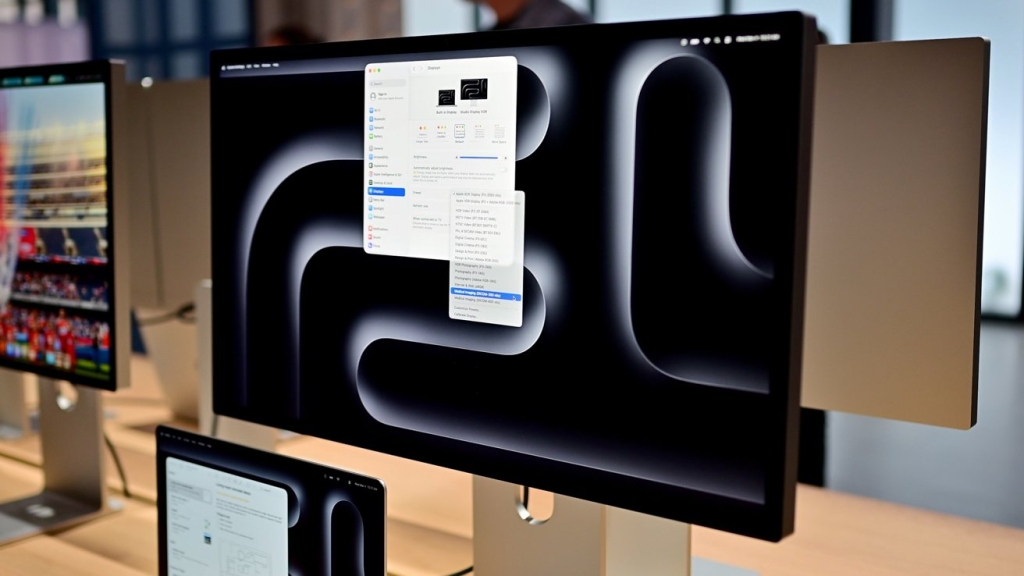
The tech world is buzzing with the first wave of reviews for Apple’s latest flagship display, the $3,299 Studio Display XDR, which officially launched on March 3 to replace the aging Pro Display XDR. With Apple’s embargo lifted, reviewers have been diving deep into what promises to be a game-changer for creative professionals and power users alike. The consensus? Stunning hardware that pushes boundaries, but not without a few notable caveats that potential buyers should consider.
The Hardware That Wows
Right out of the gate, reviewers are unanimous in their praise for the Studio Display XDR’s impressive specifications. The 32-inch 6K Retina display with miniLED backlighting and ProMotion technology supporting up to 120Hz refresh rates has left many breathless. “This is the kind of display that makes you question why you ever settled for anything less,” noted one reviewer from a major tech publication.
The miniLED technology delivers exceptional brightness—up to 1,600 nits peak HDR and 1,000 nits sustained full-screen brightness—with local dimming across 2,300 zones. This translates to deep blacks, brilliant highlights, and an overall dynamic range that rivals professional reference monitors. The P3 wide color gamut coverage is essentially perfect, and the 10-bit color depth ensures smooth gradients without banding.
Build quality, as expected from Apple, is impeccable. The aluminum chassis feels substantial without being unwieldy, and the stand options—including the controversial $1,400 nano-texture glass with tilt-adjustable stand—exude premium craftsmanship. The three-port USB-C hub with Thunderbolt 5 connectivity provides ample expansion for peripherals, though some reviewers noted that the placement of these ports on the back could be more accessible.
Where It Shines Brightest
Several aspects of the Studio Display XDR have particularly impressed reviewers:
The XDR Experience: The extreme dynamic range truly shines when viewing HDR content. Whether it’s editing 8K video, color-grading photographs, or simply watching HDR movies, the display delivers a visual experience that borders on transcendent. “I found myself gasping at the vibrancy and depth,” shared one professional video editor in their review.
120Hz ProMotion: The adaptive refresh rate isn’t just for gaming—it makes the entire macOS experience feel incredibly fluid. Scrolling through complex timelines in Final Cut Pro or navigating massive Photoshop canvases feels instantaneous, reducing fatigue during long editing sessions.
Reference-Quality Accuracy: Out of the box, the display achieves exceptional color accuracy (ΔE < 1), meaning it requires minimal calibration for professional work. For photographers, videographers, and designers, this can save hours of setup time.
Thermal Management: Despite the powerful backlight system, the Studio Display XDR runs remarkably cool thanks to Apple’s advanced thermal architecture. No distracting fan noise, no heat-related performance throttling—just consistent, reliable performance.
The Caveats That Give Pause
However, no product is perfect, and the Studio Display XDR has its share of criticisms that reviewers keep returning to:
The Price of Premium: At $3,299 for the base model, this is a significant investment. When you add the nano-texture glass ($300) and the tilt-adjustable stand ($1,400), you’re looking at a nearly $5,000 display. “It’s hard to justify this cost for anyone who isn’t earning their living from creative work,” noted one reviewer, though they added that for professionals, the price might actually represent good value compared to competing pro-grade monitors.
Limited Adjustability: The base model comes with a tilt-only stand, and while it’s well-designed, many reviewers found themselves wishing for height adjustment without the $1,400 upgrade. The VESA mount option is available but requires purchasing a separate adapter.
Port Selection: While three USB-C ports with Thunderbolt 5 is generous, some reviewers would have appreciated at least one USB-A port for legacy peripherals, or perhaps an HDMI input for console gaming or secondary device connectivity.
Ecosystem Lock-in: Like many Apple products, the Studio Display XDR works best within the Apple ecosystem. Windows users reported occasional compatibility issues with certain features, and some HDR functionality is limited outside of macOS.
The Verdict
Despite these caveats, the overwhelming sentiment among reviewers is that the Apple Studio Display XDR represents a significant leap forward in display technology. “This isn’t just an incremental upgrade over the Pro Display XDR—it’s a generational shift,” wrote one respected tech journalist.
For creative professionals who demand the absolute best and have the budget to match, the Studio Display XDR appears to deliver on its promise of reference-quality visuals in a sleek, integrated package. However, for more casual users or those with tighter budgets, the standard Studio Display or even high-quality third-party options might represent better value.
As one reviewer aptly summarized: “The Studio Display XDR isn’t for everyone, but for those it’s designed for, it’s hard to imagine a better tool for the job.”
Apple Studio Display XDR
Pro Display XDR replacement
miniLED display technology
120Hz ProMotion refresh rate
6K Retina display
$3299 Apple monitor
Professional display review
Thunderbolt 5 connectivity
HDR reference monitor
Apple display ecosystem
Premium monitor pricing
Creative professional hardware
Display calibration out of the box
USB-C hub integration
VESA mount adapter
Nano-texture glass display
Thermal management technology
P3 wide color gamut
10-bit color depth
Local dimming zones
Professional video editing monitor
macOS exclusive features
Display stand options
High-end monitor investment
Reference-quality visuals
Apple Silicon optimization
DisplayPort over USB-C
Professional photography monitor
Color accuracy professional
Adaptive refresh rate
Extreme dynamic range
Creative workflow enhancement
Premium aluminum construction
Limited port selection
Ecosystem compatibility issues
Professional monitor upgrade
Display technology generational shift
Creative industry standard
Visual editing experience
Monitor thermal architecture
Professional display value proposition
,

Leave a Reply
Want to join the discussion?Feel free to contribute!