
‘Claude’ AI is coming to Microsoft 365
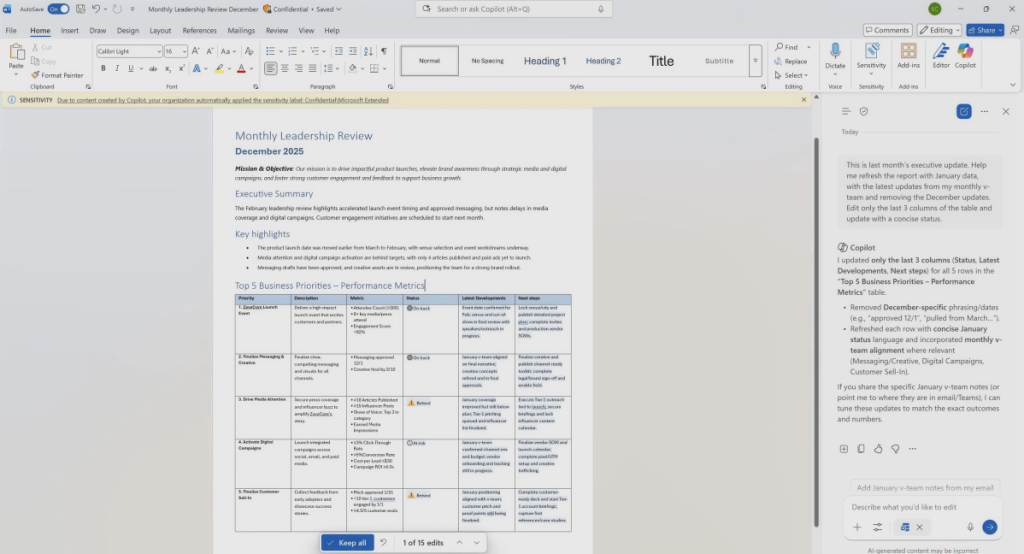
Microsoft Unleashes AI Agents: The Future of Work Just Got a Major Upgrade
In a bold move that signals the next phase of workplace automation, Microsoft is rolling out a sweeping set of AI-powered features across its Office suite—bringing the long-promised “agentic” future to life. From Word to Excel to PowerPoint, the tech giant is embedding intelligent agents that don’t just assist—they act, analyze, and even make decisions on your behalf.
This isn’t just another incremental update. It’s a fundamental shift in how we interact with productivity software. Gone are the days of manually formatting slides, crunching numbers, or drafting documents from scratch. Now, with a few well-crafted prompts, Microsoft’s AI agents will handle the heavy lifting—leaving you to focus on strategy, creativity, and high-level thinking.
The Agentic Revolution Arrives
Microsoft’s vision of an “agentic” world—where AI agents autonomously perform tasks—has been teased for months. Now, it’s becoming a reality. The company is integrating advanced AI models, including Anthropic’s Claude, directly into its Office apps. This means users can choose between OpenAI’s models and Claude, depending on their needs and preferences.
The rollout is happening in two phases. First, enterprise customers in Microsoft’s “Frontier” program will get early access to these capabilities. Then, the features will trickle down to everyday consumers using Microsoft 365 and Office applications.
Word: Your New AI Writing Partner
Microsoft Word is getting a major AI upgrade that transforms it from a simple word processor into a dynamic co-author. The new features allow AI to perform major edits, restructure sections, and rewrite content according to company guidelines. But here’s where it gets really interesting: Word can now read your files, emails, and meeting notes in the background to create context-aware documents.
Imagine this: You need to create a project brief. Instead of starting from scratch, you simply prompt Word: “Create a project brief for [project title] using information from my meetings, files, and emails from the past [timeframe]. Include an Executive Summary at the top. Structure the document using Heading 1 and Heading 2 styles where appropriate. Include these sections: Current status, Key decisions and progress, Next steps, Unresolved issues or risks, Recommendations. Keep it factual and flag any missing inputs as questions at the end.”
In seconds, Word delivers a polished, professional document tailored to your needs. It’s like having a personal assistant who knows your work inside and out.
Excel: From Spreadsheets to Strategic Insights
Excel has long been the go-to tool for data analysis, but Microsoft is taking it to the next level with AI-powered insights. The new features allow you to go beyond basic calculations and unlock deeper strategic insights.
For example, you can prompt Excel to create a P&L forecast using the latest data in your operating model. It will build out a 12-month projection starting January 2026, complete with month-by-month growth, retention, and unit economics. You can even design the model with adjustable assumptions, making it easy to test different scenarios.
But that’s not all. Excel can now pull in custom data from the web to create tailored valuations or analyses. Whether you’re a private equity firm evaluating a company or a business leader assessing market trends, Excel’s AI agents have you covered.
PowerPoint: The End of Manual Slide Creation
Let’s face it: creating PowerPoint presentations is a chore. Microsoft is betting that you’ll be happy to hand off this task to AI. The new features in PowerPoint allow you to generate entire presentations with a single prompt.
For instance, you can ask PowerPoint to create an executive presentation on the major market pressures and trends shaping your industry. It will include a high-level competitive analysis of leading players, outlining their strengths, weaknesses, and strategic focus areas. The presentation will conclude with implications for industry leaders.
And it’s not just about creating new slides. You can also make editing changes, apply your company’s branding, and ensure consistency across all your presentations. These features are rolling out to Windows and Mac subscribers, with Claude integration coming soon.
The Bigger Picture: What Does This Mean for Work?
Microsoft’s AI agents are more than just a convenience—they’re a paradigm shift. By automating routine tasks, they free up time for higher-value work. But they also raise important questions about the future of work.
What happens when AI agents disagree with human decision-makers? How do we ensure that AI-generated insights are accurate and unbiased? And what does this mean for jobs that rely heavily on tasks like data analysis, document creation, and presentation design?
Microsoft is betting that the benefits outweigh the risks. By empowering workers with AI agents, they’re enabling faster decision-making, more strategic thinking, and greater productivity. But it’s clear that this is just the beginning. As AI continues to evolve, the line between human and machine collaboration will blur even further.
What’s Next?
Microsoft’s AI agents are rolling out now, with more features and capabilities on the horizon. Whether you’re an enterprise customer or a casual Office user, you’ll soon have access to these powerful tools.
The question is: Are you ready to embrace the agentic future? Microsoft thinks you are. And with these new AI agents, the future of work just got a whole lot brighter.
Tags: Microsoft, AI agents, Office 365, Word, Excel, PowerPoint, Anthropic Claude, OpenAI, productivity, automation, workplace, future of work, data analysis, document creation, presentation design, strategic insights, enterprise software, tech innovation, viral technology, AI trends, digital transformation.
Viral Phrases: “The future of work just got a major upgrade,” “AI agents that act, analyze, and decide,” “Say goodbye to manual slide creation,” “Unlock deeper strategic insights with Excel’s AI,” “Word’s new AI writing partner,” “Microsoft’s agentic revolution,” “Embrace the agentic future,” “The line between human and machine collaboration is blurring,” “AI-powered productivity tools,” “Transform your workflow with Microsoft’s AI agents.”
,

Leave a Reply
Want to join the discussion?Feel free to contribute!