
Google wants Gemini to read your mind at work
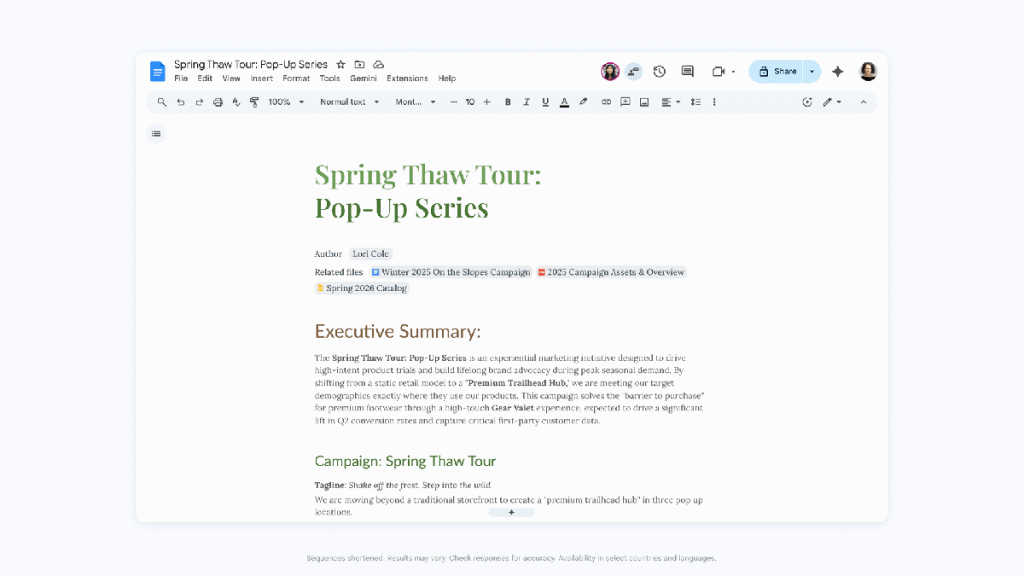
Google’s Gemini AI Transforms Workspace: From Dumb Assistant to Autonomous Knowledge Engine
Google’s Gemini AI has evolved from a basic productivity tool into something far more sophisticated—a contextual knowledge engine that fundamentally changes how we interact with our digital workspace. The transformation represents a significant leap forward in artificial intelligence integration, moving beyond simple command-response interactions to a more autonomous, context-aware system that understands and synthesizes your work patterns.
The Evolution from Manual Input to Autonomous Synthesis
When Google first introduced Gemini into its Workspace suite—encompassing Gmail, Docs, Sheets, Slides, and Drive—users found themselves in a familiar pattern: manually feeding the AI every piece of information they wanted incorporated into their documents. Want a report on Q3 sales? You’d need to copy-paste the data, explain the context, specify the format, and guide the tone. It was like having a highly capable intern who needed everything explained in excruciating detail.
That approach has been completely reimagined. Now, Gemini operates with what Google calls “autonomous synthesis”—a capability that allows the AI to draw from your existing Workspace data, understand the context, and generate content that aligns with your established patterns and preferences. This shift mirrors Microsoft’s recent Copilot for Microsoft 365 announcement, suggesting the industry is converging on similar visions for AI-enhanced productivity.
The difference is profound. Instead of saying, “Write a summary of our Q3 sales using this data,” you can now simply prompt, “Create a Q3 sales report,” and Gemini will scour your Workspace—emails, spreadsheets, documents, presentations—to gather relevant information and craft something appropriate. It’s the difference between dictating every word and having a skilled colleague who already understands your business.
Docs Gets a Creative Overhaul
Google Docs has received particularly impressive enhancements. The new AI capabilities function almost like having a professional editor and copywriter working alongside you. You can highlight any block of text and prompt Gemini to adjust its style and tone—transforming a casual email into a formal proposal, or making technical documentation more accessible.
The visual editing tools have also been enhanced. While not explicitly detailed, the implication is that Gemini can help smooth out inconsistencies in documents created by multiple contributors, ensuring tonal consistency throughout. This addresses a common pain point in collaborative environments where different writers’ voices can create jarring transitions.
Perhaps most impressively, Docs now allows you to ensure that content meets corporate guidelines automatically. This suggests Gemini has learned your organization’s preferred terminology, formatting standards, and even regulatory requirements, applying them consistently across all documents.
Slides: From Template-Based to Context-Aware Presentations
The updates to Google Slides represent a fundamental shift in how presentations are created. Previously, AI-generated slides were essentially sophisticated template-fillers—you’d provide bullet points, and the system would arrange them attractively. Now, the system can generate entire presentations by synthesizing information from across your Workspace.
Google promises “beautiful layouts that balance hierarchy, spacing, and visual weight while matching the style of your other slides.” This suggests Gemini isn’t just arranging text—it’s understanding visual design principles and maintaining brand consistency across your entire presentation deck.
The capability to “funnel Workspace data into a prompt” means you could potentially generate a comprehensive sales presentation by simply asking Gemini to analyze your Q3 performance and create slides that highlight key metrics, trends, and recommendations. The AI would pull from your emails, spreadsheets, and previous presentations to create something contextually appropriate.
Drive: Your Cloud Storage Becomes a Queryable Database
Google Drive’s transformation might be the most revolutionary. Instead of treating your cloud storage as a digital filing cabinet—a collection of documents you must manually search through—Google is positioning it as a queryable knowledge base.
This builds on existing features like document summarization but takes them to the next level. Rather than providing a list of potentially relevant documents, Gemini can extract the specific information you need. Ask it, “What were our biggest customer complaints last quarter?” and it will analyze support tickets, customer emails, and relevant documents to provide a synthesized answer.
This approach fundamentally changes how we think about information retrieval. It’s the difference between using a card catalog and having a research librarian who knows exactly where to find what you need.
Sheets: From Formula-Based to Question-Based Analysis
Google Sheets has historically been the domain of power users who could craft complex formulas to extract insights from data. Gemini aims to democratize this capability by allowing users to ask questions in natural language.
The three-pronged approach includes: building spreadsheets from data collected across emails and documents; filling empty cells by inferring missing information; and, most impressively, allowing users to query their data conversationally. Instead of writing a complex VLOOKUP or pivot table formula, you could ask, “Which product line had the highest growth in the Western region?” and Gemini would handle the analysis.
This capability addresses a significant barrier in data-driven decision making: the gap between those who understand the data and those who need to make decisions based on it. Marketing managers, sales directors, and executives who might struggle with complex spreadsheet functions can now extract insights directly.
However, there’s a notable limitation: it’s unclear whether the charts generated by Gemini are dynamic. Previous AI-generated charts in Workspace were static images, which significantly limits their utility in ongoing analysis. If the new charts maintain this limitation, users will still need to manually update visualizations as underlying data changes.
The Price of Intelligence
All these advanced features come with a significant caveat: they’re locked behind premium subscriptions. Google AI Pro costs $19.99 per month, while the Ultra tier runs $124.99 per month—prices that put these capabilities out of reach for many individual users and small businesses.
For enterprise customers, there’s Gemini Alpha, an optional feature that can be enabled for Workspace business accounts. This creates a tiered system where the most powerful AI capabilities are reserved for those willing to pay premium prices, potentially widening the productivity gap between well-funded organizations and those operating on tighter budgets.
The Road Ahead
Google emphasizes that these features aren’t available immediately but will roll out over the coming months, with English as the initial language. This gradual deployment suggests Google is taking a cautious approach, likely gathering user feedback and refining the AI’s performance before broader release.
The autonomous synthesis approach represents a philosophical shift in how we think about AI assistance. Rather than being tools we direct with precise commands, these systems are evolving into collaborative partners that understand context, learn from our patterns, and anticipate our needs.
Tags & Viral Phrases
- Google Gemini AI workspace revolution
- Autonomous synthesis transforms productivity
- AI that actually understands your work
- Goodbye manual data entry, hello intelligent automation
- Google vs Microsoft AI battle heats up
- Workspace becomes your personal knowledge engine
- Natural language queries replace complex formulas
- AI presentation generation that actually works
- Context-aware document creation
- The future of work is here, and it’s expensive
- Gemini Ultra $124.99/month—worth it?
- Google Drive becomes searchable database
- Sheets gets ChatGPT treatment
- Docs AI editor that maintains your voice
- Slides AI that designs like a pro
- Enterprise AI features locked behind paywall
- English-only rollout delays global adoption
- Gradual feature deployment suggests cautious approach
- AI collaboration vs AI command
- The end of manual workplace drudgery?
- Knowledge workers get AI superpowers
- Small businesses left behind by premium pricing
- Google Workspace AI transformation complete
- Microsoft Copilot who?
- Autonomous AI synthesis explained
- Your cloud storage just got smarter
- Natural language data analysis arrives
- AI-generated presentations that don’t suck
- Tonal consistency across collaborative documents
- Corporate guideline enforcement by AI
- The $19.99/month question
- Dynamic charts still a mystery
- Gradual rollout means patience required
- AI that learns your work patterns
- The new AI assistant arms race
- Context-aware content generation
- Workspace data becomes AI fuel
- The $124.99/month AI premium
- Enterprise features trickle down slowly
- AI transforms how we think about productivity
- The end of the copy-paste era
- Google’s AI vision finally realized
- Workspace becomes intelligent ecosystem
- The $19.99 question every professional faces
- AI that understands context, not just commands
- The future of workplace AI is autonomous
- Google’s Gemini evolution complete
- AI that actually makes work easier
- The great AI productivity divide
- Workspace AI features worth the price?
- The new era of intelligent collaboration
- Google’s AI assistant finally grows up
,


Leave a Reply
Want to join the discussion?Feel free to contribute!