
OBS Studio 32.1 Released With WebRTC Simulcast Support
OBS Studio 32.1 Unleashes Revolutionary WebRTC Simulcast Support — The Ultimate Streaming Upgrade!
OBS Studio, the world’s most beloved open-source broadcasting software, has just dropped its groundbreaking version 32.1, and the streaming community is losing its collective mind! This isn’t just another incremental update—this is a quantum leap forward that’s about to completely transform how creators, gamers, and professionals approach live streaming and content creation.
The Game-Changer: WebRTC Simulcast Support Arrives
Let’s cut straight to the chase—the headline feature that’s sending shockwaves through the streaming world is WebRTC Simulcast support. For those who’ve been living under a rock (or maybe just focusing on their flawless gameplay), WebRTC Simulcast is essentially the holy grail of adaptive streaming technology.
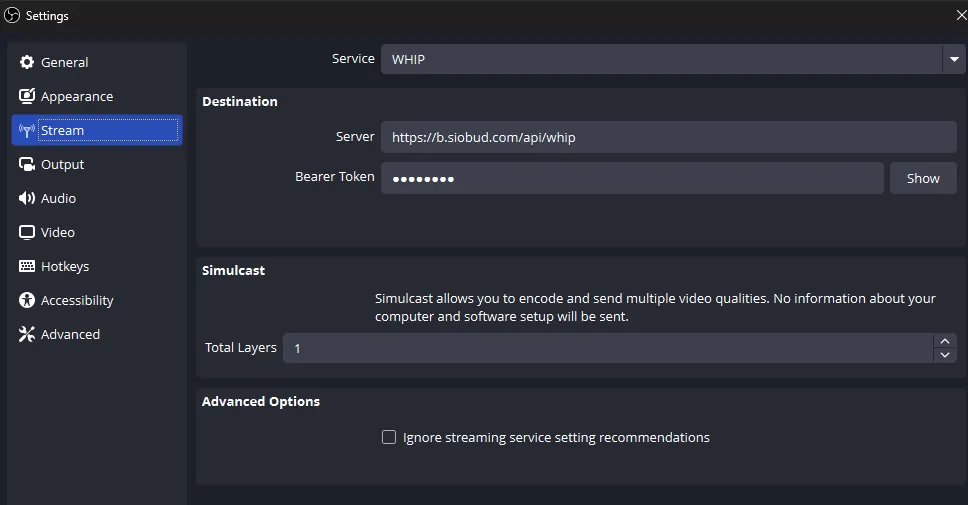
Here’s the magic: OBS Studio 32.1 now allows you to broadcast multiple quality levels simultaneously over a single track in WebRTC/Whip protocols. What does this mean for you? Imagine your audience members each getting the perfect video quality tailored to their specific internet connection, device capabilities, and viewing preferences—all from ONE stream you’re sending out. It’s like having a personal video concierge for every single viewer!
The technical wizardry behind this comes from the obs-webrtc output module, which has been supercharged to handle this complex multiplexing. No more choosing between quality and accessibility—you get both, automatically. Your 4K viewers get their crisp, detailed experience while someone on a mobile connection in rural areas gets a smooth, buffer-free stream. It’s streaming democracy in action!
Under the Hood: What Else Makes 32.1 Special
But wait, there’s more! OBS Studio ‘t just about one feature (though that one feature is pretty spectacular). The development team has been busy bees, implementing a slew of improvements that collectively make this release feel like a complete platform evolution.
The New Audio Mixer: A Symphony of Sound
OBS Studio 32.1 introduces a completely redesigned audio mixer that’s not just prettier—it’s smarter, more intuitive, and packed with functionality that audio engineers will absolutely adore. The interface has been streamlined to give you unprecedented control over your audio landscape, making it easier than ever to balance game audio, microphone input, music, and sound effects.
The light theme now features an enabled palette for the audio mixer, giving it a fresh, modern aesthetic that’s easier on the eyes during those marathon streaming sessions. Trust us, your retinas will thank you.
Undo/Redo Actions: Because Mistakes Happen
Remember that moment when you accidentally deleted your perfectly arranged scene and had to rebuild it from scratch? Those days are over! OBS Studio 32.1 adds missing undo/redo actions for scene items, bringing a level of workflow protection that professionals have been begging for. Now you can experiment fearlessly, knowing you can always step back if things go sideways.
Canvas Support: Partial But Promising
The development team has also added partial support for canvases to obs-websocket, opening up exciting possibilities for remote control and automation. While it’s not complete yet, this is clearly laying the groundwork for some seriously powerful integrations down the road.
Bitrate Boost: Default to 6000 kbps
In a move that shows confidence in modern internet infrastructure, OBS Studio 32.1 now sets the default bitrate to 6000 kbps. This higher baseline ensures that new users start with quality that’s actually watchable, rather than the pixelated mess that used to be the default experience.
Dock Position Redesign: Workflow Optimization
The team has also rearranged default dock positions based on user feedback and workflow studies. Everything is now where you’d intuitively expect it to be, reducing the cognitive load during those critical moments when you’re trying to manage a live stream.
The Bigger Picture: Why This Matters
OBS Studio has been the backbone of the creator economy for years, powering everything from amateur Twitch streams to professional esports broadcasts. With version 32.1, it’s clear that the project isn’t resting on its laurels—it’s actively pushing the boundaries of what’s possible in open-source broadcasting software.
The WebRTC Simulcast feature alone represents months, if not years, of development work. It’s the kind of feature that typically takes corporate-backed projects with massive budgets to implement. That OBS Studio—a community-driven, open-source project—has managed to integrate this technology is nothing short of remarkable.
Get Your Hands on It Now
Ready to experience the future of streaming? OBS Studio 32.1 is available right now! You can download it directly from the official GitHub releases page or through your operating system’s package manager.
Whether you’re a seasoned streaming veteran or just starting your content creation journey, version 32.1 offers something that will make your life easier, your streams better, and your audience happier.
Tags: OBS Studio, WebRTC, Simulcast, streaming, broadcasting, live streaming, OBS 32.1, screen recording, game streaming, open source, obs-webrtc, audio mixer, bitrate, dock positions, undo redo, canvas support, Whip protocol, content creation, Twitch, YouTube streaming, esports broadcasting, multimedia software
Viral Phrases: “game-changing update,” “streaming revolution,” “WebRTC magic,” “multiple quality levels,” “quantum leap forward,” “streaming democracy,” “personal video concierge,” “workflow protection,” “creator economy backbone,” “open-source wizardry,” “broadcasting evolution,” “buffer-free streaming,” “crisp detailed experience,” “marathon streaming sessions,” “experiment fearlessly,” “pixelated mess banished,” “intuitive workflow,” “critical moments management,” “community-driven innovation,” “future of streaming,” “seamless adaptive streaming”
,


Leave a Reply
Want to join the discussion?Feel free to contribute!