
Channel Surfer lets you watch YouTube like it’s old-school cable TV
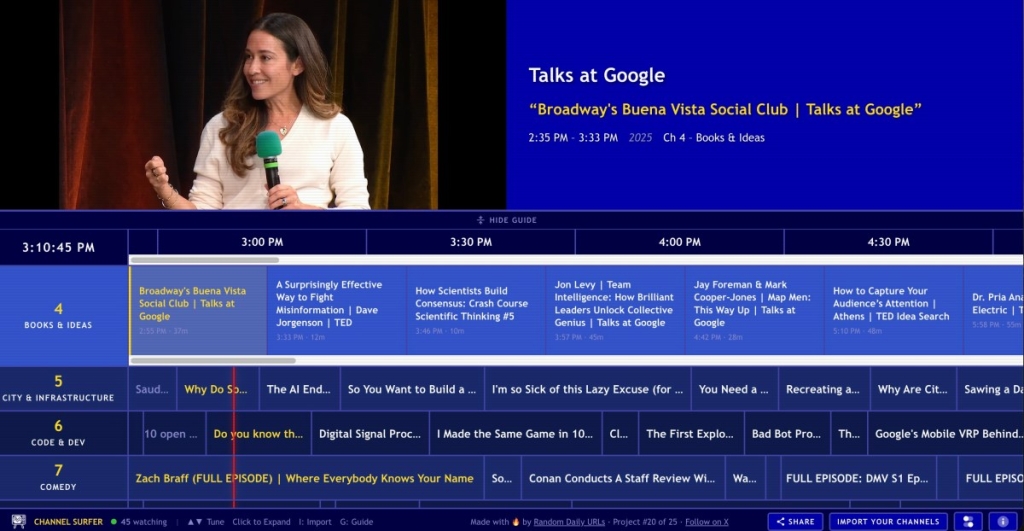
Channel Surfer: The Retro YouTube TV Guide That’s Taking the Internet by Storm
In a world dominated by endless scrolling and algorithm-driven content, a London-based developer has just launched a web app that’s turning YouTube into a nostalgic, channel-surfing experience straight out of the cable TV era. Meet Channel Surfer, the brainchild of Steven Irby, a 40-year-old tech industry veteran who’s tired of indecision fatigue and wants to bring back the simplicity of flipping through channels—only this time, it’s all YouTube.
A Blast from the Past, Reimagined for the Digital Age
Channel Surfer is a web app that presents YouTube videos in an interface that looks and feels like a retro TV guide. Think of it as your digital cable box, but instead of flipping through 500+ channels, you’re browsing through 40 custom-built “channels” focused on topics like news, politics, sports, lifestyle, music, and tech. Whether you’re into AI & ML, coding, space exploration, retro tech, gadgets, or gaming, there’s a channel for you.
The app’s design is a love letter to the golden age of television. As you move between channels, you join the video mid-stream, just like you would if you were channel surfing on a lazy Sunday afternoon. The guide informs you of upcoming content on all channels, complete with air times, and you can even scroll ahead to see what’s playing over the next 24 hours. It’s like having a TV guide for YouTube, and it’s oddly comforting.
The Comfort of Shared Viewing
One of the most charming features of Channel Surfer is the small counter at the bottom of the screen that tracks how many other people are currently watching YouTube with you. It’s a subtle reminder that you’re not alone in your viewing experience, and it adds a sense of community to the app. As Irby puts it, “It’s weirdly comforting to know I’m watching with other people.”
The Story Behind the App
Irby came up with the idea for Channel Surfer because he was tired of the endless algorithms and indecision fatigue that come with modern streaming. “I miss channel surfing and not having to decide what to watch,” he told TechCrunch. “I want to just sit and tune into what’s on and not think about what to watch next.”
Inspired by his boomer mom’s love for cable TV, Irby wanted to recreate that same experience but with YouTube channels instead. The result is a free service that offers access to 175 YouTube channels and 25 music playlists, all curated by Irby himself.
Built for the Modern Web
Under the hood, Channel Surfer is a static Next.js site that uses PartyKit and is hosted on Cloudflare. The channels and music are from Irby’s hand-picked list, and GitHub Actions is used to run a script that refreshes the data daily. There’s no back end yet, but the app is already a hit, with over 10,000 views on its first day.
While Claude assisted in the coding process, the site is not “vibe-coded,” Irby says. The channels themselves are essentially playing YouTube embeds, including YouTube’s ads, so the app should not be violating policy. Irby has big plans for the future, including bringing the app to TV platforms like Fire TV and Google TV.
A Nod to the Old Web
Channel Surfer is more than just a fun experiment—it’s a reminder of the web’s earlier days, filled with creativity and innovation. For Irby, that’s the point. “I’m obsessed with showing the world that the old web is still alive and well,” he says. “It’s just buried under a mountain of slop.”
How to Get Started
Getting started with Channel Surfer is easy. The app is free to use, and if you subscribe to Irby’s newsletter, you can even import your own YouTube subscriptions into the app. The process is quick and dirty: you drag a “Channel Surfer” bookmarklet to your bookmarks bar, open your YouTube subscriptions, and click the bookmarklet. The process begins, directing you back to the app where you paste the copied JSON text into a box and click an “import” button. This adds your own channels to Channel Surfer’s existing lineup, potentially giving you hundreds more channels to watch in this format.
The Future of Channel Surfing
As Channel Surfer continues to grow, it’s clear that there’s a demand for this kind of nostalgic, low-stress viewing experience. In a world where content is king, Channel Surfer is a refreshing reminder that sometimes, the best way to watch is to just sit back, relax, and let the channels roll. So, grab your remote (or your mouse), and start channel surfing—YouTube style.
Tags: Channel Surfer, YouTube, retro TV guide, Steven Irby, tech innovation, nostalgia, channel surfing, YouTube channels, free streaming, web app, Next.js, PartyKit, Cloudflare, GitHub Actions, Claude, AI & ML, coding, space, retro tech, gadgets, gaming, music playlists, old web, creativity, innovation, streaming services, Plex, Pluto TV, Tubi, Fire TV, Google TV, mobile devices, tablets, JSON, bookmarklet, newsletter, import, YouTube subscriptions, algorithms, indecision fatigue, cable TV, live television, community, shared viewing, tech industry, veteran, London, developer, free service, ads, policy, TV platforms, mobile, tablets, creativity, innovation, nostalgia, low-stress viewing, content, king, remote, mouse, channel surfing, YouTube style.
Viral Phrases: “Channel Surfer is taking the internet by storm,” “A blast from the past, reimagined for the digital age,” “The comfort of shared viewing,” “Built for the modern web,” “A nod to the old web,” “How to get started with Channel Surfer,” “The future of channel surfing,” “Grab your remote (or your mouse), and start channel surfing—YouTube style.”
,


Leave a Reply
Want to join the discussion?Feel free to contribute!