
With the Deco BE65 Pro, I finally found a mesh Wi-Fi 7 router that I like
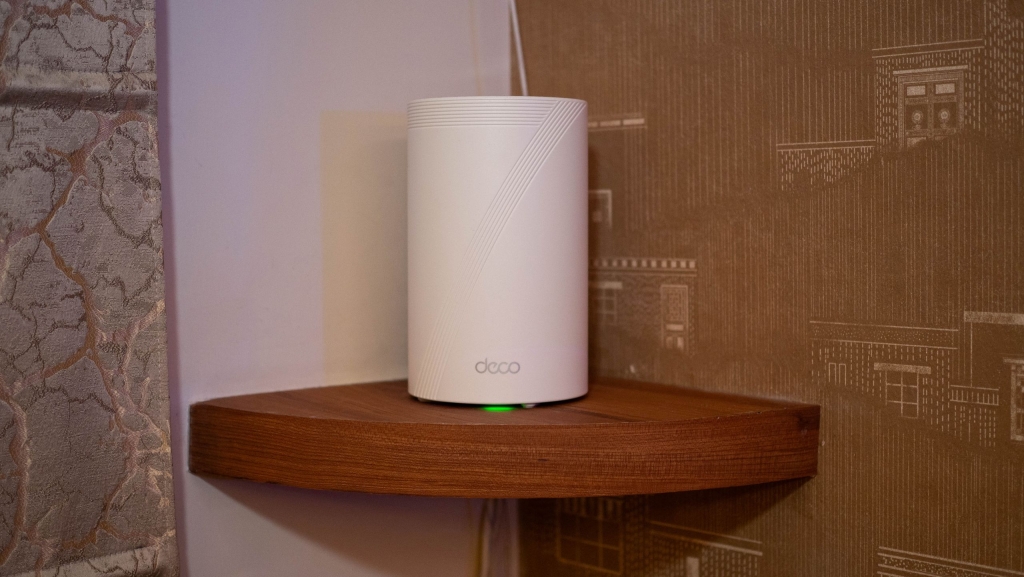
TP-Link Deco BE65 Pro: The Wi-Fi 7 Mesh System That Finally Won Me Over
After years of avoiding mesh Wi-Fi systems in favor of standalone routers, I’ve finally found a mesh solution that ticks all the right boxes. The TP-Link Deco BE65 Pro isn’t just another Wi-Fi 7 system—it’s the one that made me reconsider my entire stance on mesh networking.
Why I’ve Been Anti-Mesh (Until Now)
My frustration with mesh routers has never been about coverage or connectivity. It’s always been about the compromises: limited Ethernet ports, missing advanced configuration options, and the inability to set up custom DNS or static IPs. As someone who needs granular control over their network, most mesh systems felt like a step backward.
That all changed when I moved to a larger home last year and realized my trusty standalone router couldn’t quite reach every corner. Rather than adding Wi-Fi extenders (which create their own headaches), I decided to give Wi-Fi 7 mesh another chance.
The Deco BE65 Pro: Value Meets Performance
TP-Link has consistently delivered value-focused networking products, and the BE65 Pro continues that tradition. At $299 for a two-pack (router + satellite), or $399 for a three-pack, this Wi-Fi 7 system delivers flagship features without the flagship price tag.
What immediately stands out:
- Elegant, compact design that actually blends into modern decor
- Three 2.5GbE Ethernet ports per node (most mesh systems offer just one multi-Gig port)
- USB-A port on each node for connecting external drives and creating a home streaming server
- Clean, intuitive Deco app with extensive customization options
Setup and Configuration: Surprisingly Powerful
The setup process is refreshingly straightforward. The Deco app guides you through everything with a modern interface, but here’s where it gets interesting: unlike most mesh systems, the BE65 Pro doesn’t lock you out of advanced features.
I was able to configure:
- Custom DNS settings
- Static IP assignments
- Port forwarding
- VLAN tagging (for those who need it)
This level of configurability is rare in the mesh world, and it’s exactly what converted me from skeptic to believer.
Performance That Delivers
As a Wi-Fi 7 system, the BE65 Pro delivers impressive speeds:
- 6GHz band: Up to 5,765 Mbps
- 5GHz band: Up to 4,324 Mbps
- 2.4GHz band: Standard coverage (the only minor limitation)
The real magic happens with Multi-Link Operation (MLO), which combines all three bands into a single SSID, automatically routing devices to the optimal frequency and maximizing both coverage and bandwidth. This worked flawlessly with my Wi-Fi 7 devices, including the Vivo X300 Pro and Oppo Find X9 Pro.
Coverage and Reliability
In my multi-story home, the two-pack configuration provided rock-solid coverage throughout, with no dead zones or connection drops. The system intelligently manages device handoffs between nodes, and I never experienced the “sticky client” issues that plague some mesh systems.
Smart Features Without the Upsell
TP-Link includes meaningful features without immediately pushing you toward paid subscriptions:
- Built-in parental controls with content filtering and scheduling
- Security+ intrusion prevention (free tier monitors IoT devices)
- Guest network support with isolated VLAN options
- Device prioritization for gaming or streaming
The paid Security+ plan exists if you want advanced threat protection, but the free features are genuinely useful.
The Bottom Line
After six months of daily use as my primary router, the TP-Link Deco BE65 Pro has completely changed my perspective on mesh networking. It delivers the coverage and ease of use that make mesh attractive, while maintaining the configurability and port selection that power users demand.
At roughly half the price of premium competitors like the Netgear Orbi 970, it’s difficult to find a better value in the Wi-Fi 7 space right now.
TP-Link Deco BE65 Pro – $299 (2-pack) / $399 (3-pack)
Tags & Viral Phrases:
- Wi-Fi 7 mesh system
- 2.5GbE Ethernet ports
- Multi-Link Operation (MLO)
- Home network customization
- Value-focused networking
- Mesh router with USB-A
- Parental controls built-in
- Security+ intrusion prevention
- Best Wi-Fi 7 value
- TP-Link Deco BE65 Pro review
- Changed my mind about mesh
- Finally a mesh I can recommend
- Flagship features, budget price
- Power user mesh solution
- Six months of flawless performance
- The mesh router that won me over
- Network configurability matters
- Elegant design that blends in
- USB storage server capability
- Static IP and custom DNS support
,

Leave a Reply
Want to join the discussion?Feel free to contribute!