
The best external hard drives of 2026: Expert tested
The Best External Hard Drives of 2026: Tested, Reviewed, and Ranked
In an era where cloud storage is king, you might think external hard drives are obsolete. Think again. These trusty devices remain essential for freeing up space on your computer, providing offline storage, and offering a one-time purchase without pesky subscription fees. Whether you’re a photographer, videographer, student, or just someone drowning in digital clutter, there’s an external hard drive built for your needs.
After hundreds of hours of hands-on testing, poring over online reviews, and stress-testing drives in real-world conditions, we’ve narrowed down the top performers of 2026. Here’s what you need to know before clicking “buy.”
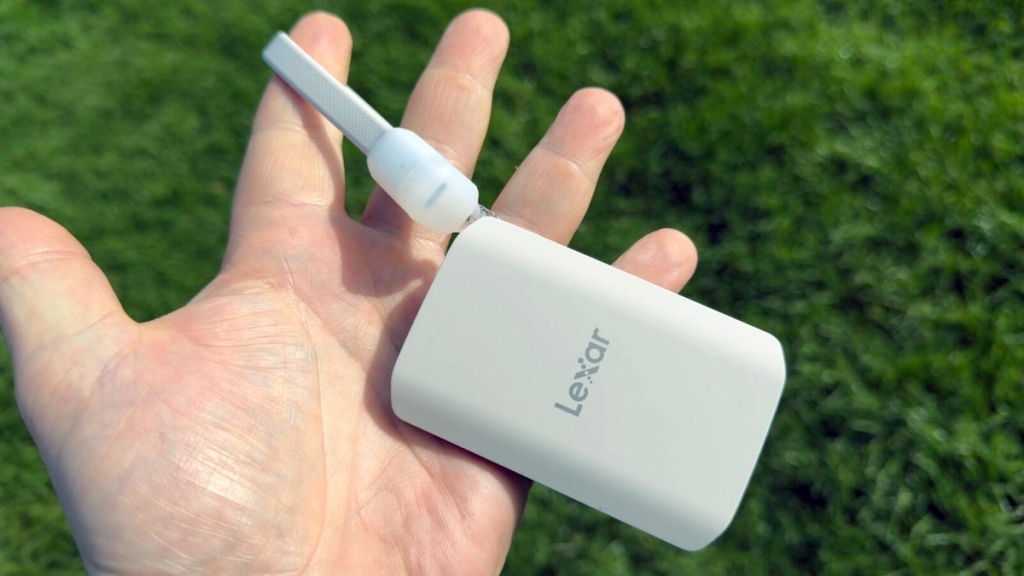
The Best Overall: Lexar SL500
Why it stands out: The Lexar SL500 is a powerhouse wrapped in a credit-card-thin aluminum shell. It’s fast—clocking in at up to 2,000 MB/s read and 1,800 MB/s write speeds—making file transfers lightning quick. It’s also durable, with a sleek unibody design that shrugs off bumps and drops.
Who it’s for: Perfect for photographers, videographers, and editors who need speed and portability. Plus, with a magnetic kit, you can snap it to the back of your phone or laptop for ultra-convenient access.
The catch: To unlock its full speed potential, your computer needs a USB-C 3.2 Gen 2×2 port. Without it, you’ll still get solid performance—just not headline-grabbing speeds.
Best for Windows Users: WD My Passport Ultra
Why it stands out: Western Digital’s My Passport Ultra is all about reliability and simplicity. With 256-bit AES encryption, your files are locked down tight. It’s plug-and-play, ready to go right out of the box, and available in capacities from 1TB to 6TB.
Who it’s for: Ideal for Windows users who want a no-fuss, dependable drive for backups, schoolwork, or office use.
The downside: It’s not the fastest drive on the market, and it lacks extra bells and whistles like hardware encryption or advanced software.
Best for Travelers: Samsung T9 Portable SSD
Why it stands out: The Samsung T9 is built like a tank. Its rubberized exterior can survive drops from up to three meters, and it’s rated to withstand temperatures from -40°C to 85°C. Plus, it includes Samsung’s Magician software for drive health monitoring.
Who it’s for: Content creators who need rugged, fast storage they can take anywhere—whether you’re shooting in the desert or editing on a plane.
The trade-off: It’s pricey (starting at $225 for 1TB), and the rubberized finish is a magnet for dust and lint.
Best for Maximum Security: iStorage DiskAshur Pro 3
Why it stands out: If security is your top priority, the iStorage DiskAshur Pro 3 is unmatched. It features AES-XTS 256-bit encryption and is encased in layers of epoxy resin—so even if someone cracks it open, your data is still safe.
Who it’s for: Businesses, IT admins, and government workers handling sensitive information.
The catch: It’s expensive (starting at $345 for 512GB) and not the fastest drive available.
Best for iPhone Users: Lexar ES5
Why it stands out: The Lexar ES5 is tailor-made for iPhone owners. It supports Apple ProRes video recording, lets you shoot directly to the drive in up to 4K at 60fps, and features MagSafe compatibility for easy attachment to your iPhone.
Who it’s for: iPhone users and content creators who need extra storage for videos and photos without carrying a bulky drive.
The downside: It’s not cheap (starting at $200 for 1TB), and while it works with Android, it’s optimized for iPhone.
Best for Massive Storage: WD Elements
Why it stands out: If you need to hoard terabytes of data, the WD Elements is your best bet. Capacities range from 6TB to a whopping 26TB, and it’s surprisingly cost-effective—about $25 per terabyte.
Who it’s for: Data hoarders, video editors, drone pilots, and anyone managing huge file libraries.
The trade-off: It’s big, noisy, and requires a power adapter—so it’s not exactly portable.
Best Budget Option: Toshiba Canvio Basics
Why it stands out: The Toshiba Canvio Basics is as basic as it gets—and that’s a good thing. It’s affordable, compact, and ready to use right out of the box.
Who it’s for: Students and budget-conscious users who need reliable, no-frills storage.
The catch: It lacks encryption, backup software, and a long warranty (just one year).
Best for Data Protection: WD My Book Duo
Why it stands out: The WD My Book Duo is a desktop powerhouse with dual drives that can either double your storage or mirror your data for added protection (RAID support).
Who it’s for: Professionals and content creators who can’t afford to lose data.
The downside: It’s big, expensive, and not portable.
How to Choose the Right External Hard Drive
Reliability
Stick with trusted brands like Seagate, Western Digital, Samsung, and Lexar. Most drives last 5-7 years with proper care. Always back up your data and monitor drive health.
Features
Consider what matters most: hardware encryption for security, water/dust resistance for rugged use, or RAID for data redundancy.
Capacity
- 500GB–2TB: Good for documents, photos, and light video work.
- 4TB+: Essential for 4K/8K video, large backups, or multiple devices.
Desktop vs. Portable
- Portable (2.5″): Lightweight, USB-powered, great for travel.
- Desktop (3.5″): Larger, needs external power, best for stationary use.
Encryption
- No encryption: Basic, unsecured drives.
- Software encryption: Requires an app to lock files.
- Hardware encryption: Automatically secures all data—best for sensitive info.
Performance
SSDs are faster and more durable but cost more. HDDs offer more storage for less money but are slower and more fragile.
Price
Balance your budget with your needs. Premium drives cost more but often include advanced features.
Other Top Contenders
- Lexar TouchLock Portable SSD: Uses NFC for security—no passwords needed.
- Orico Mecha O20: A rugged SSD with alloy heat dissipation and silicone shock resistance.
Latest News
Western Digital recently announced two new technologies—High Bandwidth Drive Technology (HBDT) and Dual Pivot—that could boost hard drive performance up to four times. If implemented, these could bring HDD speeds closer to SSDs at a lower cost.
Quick Comparison Table
| Drive | Price | Capacity | Interface | Form Factor | Encryption | Warranty |
|---|---|---|---|---|---|---|
| Lexar SL500 | $200–$590 | 1–4TB | USB 3.2 Gen 2×2 | 3.3 x 2.1 x 0.3″ | 256-bit AES | 5 years |
| WD My Passport Ultra | $75–$190 | 1–6TB | USB 3.1 Gen 1 | 4.33 x 3.21 x 0.55″ | 256-bit AES | 3 years |
| Samsung T9 | $225–$800 | 1–4TB | USB 3.2 Gen 2×2 | 3.5 x 2.4 x 0.6″ | 256-bit AES | 5 years |
| iStorage DiskAshur Pro 3 | $345–$2,359 | 512GB–8TB | USB 3.0 | 5.2 x 3.3″ | 256-bit AES XTS | 3 years |
| Lexar ES5 | $200–$400 | 1–8TB | USB 3.2 Gen 2×2 | 3.34 x 2.12 x 0.43″ | 256-bit AES | 5 years |
| WD Elements | $185–$656 | 6–26TB | USB 3.2 Gen 1 | 5.31 x 5.31 x 1.89″ | None | 2 years |
| Toshiba Canvio Basics | $75–$145 | 1–4TB | USB 3.0 | 4.3 x 3.1 x 0.55″ | None | 1 year |
| WD My Book Duo | $631–$1,284 | 20–44TB | USB 3.1 | 6.3 x 3.94 x 7.09″ | 256-bit AES | 3 years |
SSD vs. HDD: Which Should You Choose?
- SSD: Faster, more durable, lighter, but pricier.
- HDD: Cheaper, higher capacity, but slower and more fragile.
Choose SSD for speed and portability; choose HDD for bulk storage on a budget.
Can I Use One Drive on Both Windows and Mac?
Yes—just format it to exFAT. This file system works on both platforms without the 4GB file size limit of FAT32. Remember: formatting erases all data, so back up first.
Final Thoughts
External hard drives are far from obsolete. Whether you need speed, security, capacity, or portability, there’s a drive that fits your life. Our top pick, the Lexar SL500, strikes the best balance of performance, durability, and price—but your perfect match depends on your specific needs.
Tags: #ExternalHardDrive #Storage #SSD #HDD #DataSecurity #TechReview #2026 #Lexar #Samsung #WD #iStorage #PortableStorage #Backup #TechNews
Viral Phrases:
- “The best external hard drive of 2026 is here”
- “Fast, durable, and ready for anything”
- “Your data deserves the best protection”
- “Never worry about losing files again”
- “The ultimate portable storage solution”
- “Speed meets security in this powerhouse drive”
- “The drive that changes everything”
- “Storage that goes anywhere you do”
- “The future of external storage is here”
- “Why you need an external hard drive in 2026”
,

Leave a Reply
Want to join the discussion?Feel free to contribute!