
Gmail is finally fixing a big gap in its Help Me Schedule tool
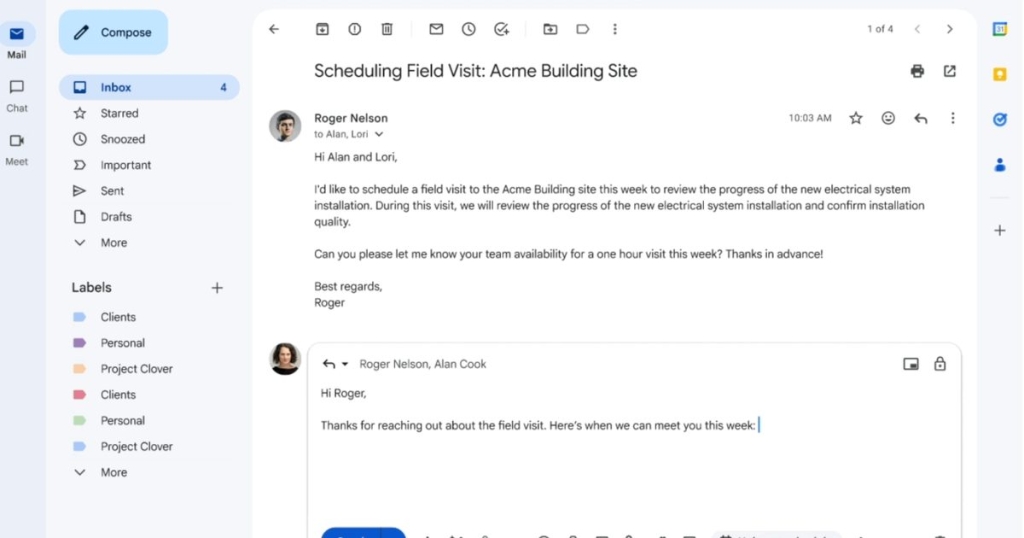
Google’s “Help Me Schedule” Gets a Major Upgrade: Group Meeting Scheduling Comes to Gmail
In a move that’s set to revolutionize workplace communication, Google has expanded its AI-powered “Help Me Schedule” feature in Gmail to now support group meeting scheduling. This update addresses the long-standing limitation that restricted the feature to scheduling meetings between just two individuals, making it infinitely more practical for real-world business scenarios.
The Evolution of a Smart Scheduling Tool
When Google first introduced “Help Me Schedule” in October 2025, it promised to eliminate the back-and-forth email chains that plague meeting coordination. The feature leveraged Google’s Gemini AI model to analyze email conversations and suggest optimal meeting times based on participants’ availability. However, there was a significant catch: it only worked for scheduling meetings between two people.
For anyone who’s ever tried to coordinate a team meeting, this limitation was immediately apparent. Team scheduling typically involves multiple stakeholders, each with their own calendar constraints, time zones, and availability preferences. The original implementation, while clever, solved only a fraction of the scheduling problem.
What’s Actually Changed?
The latest expansion transforms “Help Me Schedule” into a comprehensive group meeting coordinator. Here’s how it works:
When you’re composing an email thread that appears to be about scheduling a meeting, Gmail’s AI now detects the intent and displays a scheduling button in the toolbar. The Gemini AI model, with appropriate permissions to access your calendar data, analyzes the conversation and proposes ideal time slots that work for everyone involved.
The feature automatically pulls the guest list from the email thread, though you retain full control to add or remove participants. Once a time slot is selected by the primary recipient, Gmail automatically generates and sends calendar invites to all guests, including any external participants who might not be part of your organization.
What makes this particularly powerful is the AI’s ability to consider multiple factors beyond simple availability. The system takes into account working hours, existing calendar events, time zone differences, and even patterns in how people typically respond to meeting invitations.
Behind the Scenes: How It Works
The technology powering this feature represents a significant advancement in contextual AI understanding. When you begin typing an email that suggests meeting coordination—”Can we find a time next week to discuss…” or “I’d like to set up a call with the team…”—the AI analyzes the language patterns and triggers the scheduling interface.
The system then cross-references calendars of all participants who have granted the necessary permissions. It considers not just free/busy information but also factors like meeting duration preferences, buffer times between appointments, and even historical attendance patterns. For external participants, the AI makes intelligent suggestions based on the information available from your organization’s calendar data.
Who Gets Access and When?
Google is rolling out this enhanced “Help Me Schedule” feature to several tiers of users, though notably not to free Gmail accounts:
- Business Standard and Plus
- Enterprise tiers
- Google AI Pro users for Education
- Frontline Plus users
The scheduled rollout for eligible domains begins on March 16, 2026, with a phased deployment that will reach all supported users over the following weeks.
Why This Matters
While this update might not generate the same buzz as a flashy new hardware announcement, it represents the kind of practical AI integration that can genuinely transform daily workflows. The cumulative time saved by eliminating manual meeting coordination across organizations could amount to thousands of hours annually.
Consider the typical scenario: A project manager needs to schedule a kickoff meeting with seven team members, two external contractors, and a client representative. Previously, this would involve multiple email threads, calendar sharing, and potentially several rounds of rescheduling. Now, it can be accomplished in a single email composition with minimal back-and-forth.
The Bigger Picture
This update is part of Google’s broader strategy to embed AI more deeply into productivity workflows. By focusing on solving specific pain points—like the universally frustrating task of group scheduling—Google is demonstrating how AI can provide tangible value beyond novelty applications.
The feature also represents a step toward more proactive digital assistance, where AI systems don’t just respond to commands but anticipate needs based on context and patterns in communication.
Looking Ahead
As this technology matures, we can expect to see even more sophisticated scheduling capabilities. Future iterations might include automatic rescheduling when conflicts arise, intelligent meeting duration suggestions based on agenda content, or even AI-powered meeting preparation that gathers relevant documents and context before the scheduled time.
For now, though, the expansion of “Help Me Schedule” to support group meetings in Gmail represents a significant improvement in a tool that many professionals will find immediately useful in their daily work.
GoogleWorkspace #GmailUpdate #AIScheduling #ProductivityHacks #WorkplaceTech #GeminiAI #GoogleCalendar #MeetingScheduler #TechNews #DigitalTransformation #WorkplaceProductivity #AIAssistant #EmailInnovation #BusinessTech #GoogleUpdates #SmartScheduling #WorkFromAnywhere #TechInnovation #ProductivityTools #AIinBusiness #MeetingPlanning #CalendarManagement #WorkplaceEfficiency #TechEvolution #GoogleAI #SchedulingMadeEasy #BusinessCommunication #FutureOfWork #TechTrends #DigitalProductivity
,

Leave a Reply
Want to join the discussion?Feel free to contribute!