
I replaced my router with a Wi-Fi 7 mesh model, and wondered where my dead zones went
TP-Link Deco BE77 Wi-Fi 7 Mesh System Review: Blazing Speeds, Premium Coverage, and a Hefty Price Tag
In the ever-evolving world of home networking, Wi-Fi 7 is the latest frontier, promising unprecedented speeds and capacity. TP-Link’s Deco BE77 is one of the first Wi-Fi 7 mesh systems to hit the market, and it’s a powerhouse designed for those who demand the absolute best in wireless performance. After weeks of testing, it’s clear that this system delivers on its promises, but at a premium price that may give some buyers pause.
First Impressions: Size Matters
The Deco BE77 nodes make a statement with their substantial presence. Standing at nearly 8 inches tall with a cylindrical design, these aren’t the compact mesh units you might be used to. The bright white finish and prominent “7” branding clearly communicate the cutting-edge technology inside, but you’ll need to plan your placement carefully.
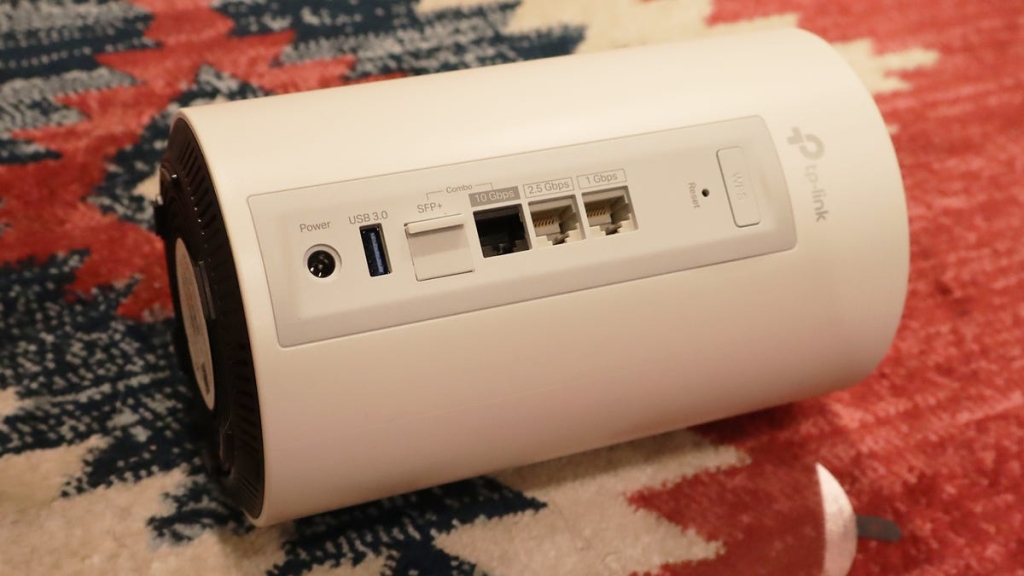
Each node features a multicolor LED status indicator and a ventilation grill on top—necessary given the powerful hardware inside that can generate significant heat during operation. Around back, you’ll find an impressive array of ports including a 1Gbps Ethernet port, a 2.5Gbps port ideal for gaming or NAS storage, and a unique 10Gbps RJ45/SFP+ combo port that supports both traditional Ethernet and fiber optic connections.
Setup: Plug and Play Perfection
Installing the Deco BE77 system is refreshingly simple. After downloading the Deco app and creating a TP-Link profile, you’re guided through a straightforward setup process. Plug in a node, connect it to your modem, create your network name and password, and the system handles the rest automatically.
For those already invested in TP-Link’s ecosystem, the process is even smoother. I was able to integrate the new Deco 7 Pro nodes into my existing network without starting from scratch. When one node unexpectedly lost connection during testing, I discovered another benefit: TP-Link’s compatibility across product lines allowed me to temporarily substitute an older Deco BE25 node as the main router, then reconnect the Deco 7 Pro without any complications.
Performance: Living Up to the Hype
The Deco BE77’s real-world performance is where it truly shines. Each node is packed with six 6GHz omnidirectional antennas, nine front-end modules for signal boosting, and two radiation frequency integrated circuits (RFICs) that enable true Wi-Fi 7 speeds.
My speed tests revealed impressive results:
- Wired connection: 931.7 Mbps download, 40.7 Mbps upload, 11ms ping
- Wi-Fi 7 connection (Ookla): 375.6 Mbps download, 39.7 Mbps upload, 27ms ping
- Wi-Fi 7 connection (Deco app test): 1.11 Gbps download, 40.3 Mbps upload, 8ms ping
While the Wi-Fi speeds show some drop compared to wired connections (a common occurrence), the performance remains more than sufficient for demanding applications. The three-band system (2.4GHz, 5GHz, and 6GHz) provides flexibility, with the 6GHz band offering additional bandwidth when needed. The system can handle up to 200 simultaneous devices, making it ideal for smart homes and tech-heavy households.
Coverage: Blanket Your Home in Fast Wi-Fi
With all three nodes deployed, the Deco BE77 system can cover up to 8,500 square feet. During testing, I experienced strong, stable connections even standing 100 feet away from my home—something impossible with standard routers. The Seamless AI Roaming feature ensures your devices automatically connect to the strongest signal as you move throughout your space, eliminating those frustrating connection drops.
Smart Features and Management
The Deco app provides comprehensive network management tools including parental controls, guest networking, device isolation for smart home products, and network optimization features that analyze your environment for interference and automatically adjust settings for optimal performance.
However, some premium features require a subscription to TP-Link’s HomeShield service, which costs around $130 annually and includes antivirus protection, VPN services, and new device alerts.
The Verdict: Premium Performance at a Premium Price
The TP-Link Deco BE77 is undoubtedly one of the most capable mesh Wi-Fi systems available today. Its Wi-Fi 7 support, impressive speeds, extensive coverage, and robust feature set make it an excellent choice for large homes, tech-heavy households, or anyone who simply wants the best wireless experience possible.
However, that excellence comes at a cost. The two-pack system typically retails for $550 (with occasional $50 discounts), while the three-pack runs $700. When you factor in the additional cost for premium features through HomeShield, the total investment becomes substantial.
For those who need top-tier performance and are willing to pay for it, the Deco BE77 delivers in spades. But for more modest needs or tighter budgets, TP-Link’s Wi-Fi 6 offerings or competing mesh systems might provide better value.
Tags: Wi-Fi 7, TP-Link Deco BE77, mesh network, home networking, wireless router, 6GHz band, tri-band mesh, smart home, network coverage, internet speed test, HomeShield, premium router, gigabit Wi-Fi, IoT devices, network security
Viral Phrases: “game-changing Wi-Fi 7 speeds,” “blanket your entire home in fast Wi-Fi,” “future-proof your network,” “the ultimate mesh experience,” “worth every penny for power users,” “leave buffering in the past,” “handles 200+ devices with ease,” “setup in minutes, performance for years,” “the router that makes ISP speeds feel slow,” “your smart home deserves this”
,

Leave a Reply
Want to join the discussion?Feel free to contribute!