
Turn Your Scripts into Quick Settings Toggles with this GNOME Extension
GNOME Users Rejoice: Custom Command Toggle Extension Revolutionizes Quick Settings Menu
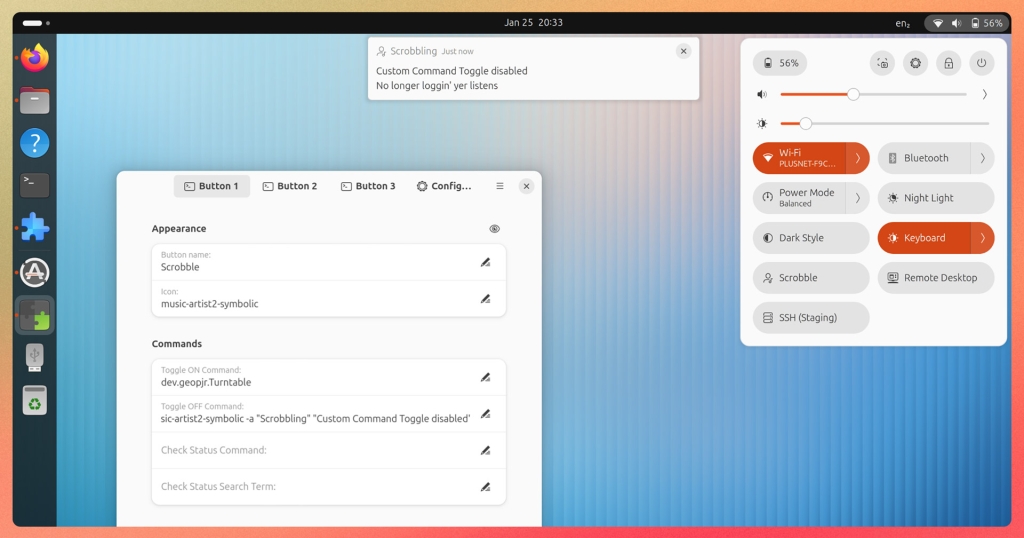
In a groundbreaking development for Linux desktop enthusiasts, a new GNOME extension is transforming how users interact with their systems by bringing unprecedented customization to the Quick Settings menu. The Custom Command Toggle extension, developed by an anonymous contributor in the open-source community, allows users to add up to six personalized buttons that execute commands, scripts, or service actions with a single click.
The Power of Personalization at Your Fingertips
The extension seamlessly integrates custom toggles alongside standard system controls like Wi-Fi, Bluetooth, and sound settings. Each button can be meticulously customized with user-defined labels and icons sourced from popular icon sets including Adwaita and Yaru, ensuring visual consistency with your desktop environment.
What sets this extension apart is its granular control options. Users can configure separate commands for activation and deactivation states, choose whether an indicator icon appears when active, and even assign keyboard shortcuts for lightning-fast access. The ability to import and export button configurations means you can replicate your perfect setup across multiple devices or share it with the community.
Advanced Features for Power Users
The extension doesn’t stop at basic toggle functionality. It offers sophisticated state management options including automatic state detection, restoration of previous states, or manual control. For users working with interconnected systems, the optional state synchronization via commands provides seamless integration with other scripts, applications, or even remote devices.
Perhaps most impressively, the extension includes an auto-start feature that executes commands or scripts upon login. This addresses a significant pain point for Ubuntu 25.10 users who have found startup application management less intuitive with GNOME 49, though workarounds do exist.
Real-World Applications That Will Blow Your Mind
The practical applications of this extension are virtually limitless. One early adopter configured a button to launch Turntable’s CLI, enabling background music scrobbling to Last.fm without the overhead of a full desktop GUI. Another user created a toggle for mounting and unmounting SSHFS shares, streamlining access to remote file systems.
Creative users are already brainstorming additional use cases: toggling Docker daemon states for development workflows, triggering automated rsync backups with a single click, enabling and disabling firewall rules for testing environments, or controlling smart home devices directly from the desktop. The extension effectively transforms your Quick Settings menu into a personalized command center tailored to your specific needs.
Installation and Compatibility
The Custom Command Toggle extension supports GNOME versions 45 through 49, covering a wide range of current Linux distributions. Installation is straightforward through the official GNOME Extensions website, accessible via any web browser. For users seeking an even smoother experience, the Extensions Manager desktop application provides a user-friendly interface for discovering, installing, and managing GNOME extensions.
Join the Revolution
This extension represents a significant leap forward in desktop customization, empowering users to create truly personalized computing experiences. Whether you’re a developer streamlining your workflow, a system administrator managing services, or simply someone who appreciates efficiency, Custom Command Toggle offers something for everyone.
The open-source community is already buzzing with excitement, and early adopters are sharing their configurations and use cases across forums and social media. As more users discover this powerful tool, we can expect to see increasingly creative applications emerge.
Ready to transform your GNOME experience? Head to the GNOME Extensions website to install Custom Command Toggle today and unlock the full potential of your Quick Settings menu.
Tags: #GNOME #Linux #OpenSource #DesktopCustomization #ProductivityHacks #TechInnovation #SystemTweaks #DeveloperTools #LinuxTips #DesktopEnvironment #CustomCommands #QuickSettings #GNOMEExtensions #LinuxDesktop #TechNews #Productivity #SystemAdministration #DeveloperLife #TechCommunity #OpenSourceSoftware
Viral Phrases: Game-changer for Linux desktop, Revolutionize your workflow, Ultimate customization tool, Power user’s dream, Must-have extension, Transform your Quick Settings, Seamless integration, Next-level productivity, Community-driven innovation, Desktop experience reimagined, Efficiency at your fingertips, Workflow optimization, Tech breakthrough, Linux customization revolution, Productivity powerhouse, System control simplified, Developer essential, Open source magic, Desktop transformation, Command center creation
,

Leave a Reply
Want to join the discussion?Feel free to contribute!