
GNOME 50 Is No Longer Treating Variable Rate Refresh “VRR” As Experimental
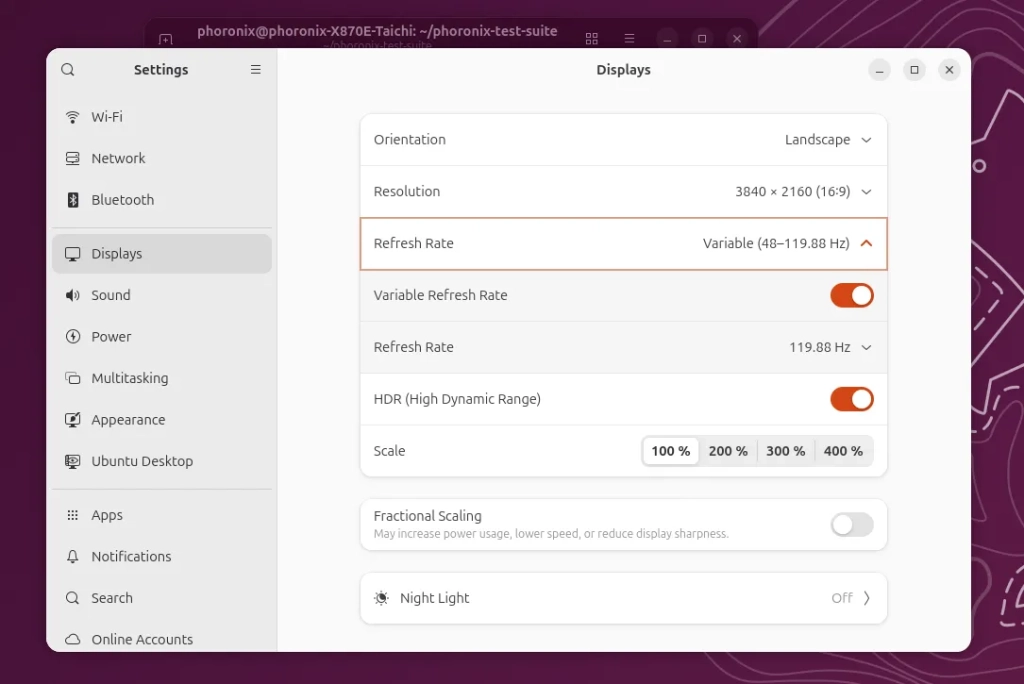
GNOME 50 Unleashes Variable Refresh Rate Support: A Game-Changer for Modern Displays
In a move that will delight gamers, video editors, and anyone with a modern display, GNOME 50 is finally promoting Variable Refresh Rate (VRR) support out of its experimental status. After two years of being hidden behind developer flags, this long-awaited feature is ready for prime time, promising smoother visuals and a more responsive computing experience for millions of Linux users worldwide.
The Evolution of VRR in GNOME
The journey of VRR support in GNOME has been nothing short of remarkable. It all began with GNOME 46, when the feature was first introduced as an experimental option. For those unfamiliar with the technical details, VRR allows a display to dynamically adjust its refresh rate to match the frame rate output by the graphics card, eliminating screen tearing and reducing input lag—two persistent headaches for users with high-performance hardware.
However, enabling VRR in earlier GNOME versions required a command-line ritual that would make even seasoned Linux users pause. You had to manually execute:
gsettings set org.gnome.mutter experimental-features “[‘variable-refresh-rate’]”
Only after this incantation would the VRR option appear in the display settings. This barrier to entry meant that many users with capable hardware were missing out on the benefits entirely.
The Big Breakthrough
The game-changing moment came with GNOME 50, where VRR support is no longer treated as experimental. This promotion represents a significant vote of confidence from the GNOME development team, signaling that the feature has matured enough for everyday use.
The credit for this milestone goes to Michel Dänzer, who authored the pivotal merge request (MR 4863) that moved VRR out of experimental status in Mutter, GNOME’s window manager and compositor. His work represents the culmination of years of incremental improvements and bug fixes that have made VRR stable enough for general consumption.
As Dänzer noted in his merge request, “With recent improvements, VRR should generally work well on most systems.” He acknowledges that corner cases may still exist, particularly with monitors that don’t support VRR optimally, but emphasizes that the feature remains disabled by default and must be explicitly enabled by users who want to take advantage of it.
What This Means for Users
For the average GNOME user, this change translates to a much more accessible VRR experience. No longer will you need to dive into the terminal and execute arcane commands to access this feature. Instead, VRR will be available directly in the display settings menu, making it as simple to enable as toggling night light or adjusting your screen resolution.
The practical benefits are substantial. Gamers will notice smoother gameplay with reduced screen tearing, especially in fast-paced titles where frame rates can fluctuate dramatically. Video editors and content creators will appreciate the elimination of visual artifacts during playback. Even casual users might notice improved scrolling smoothness and more fluid animations throughout the desktop environment.
Technical Considerations and Ongoing Improvements
While VRR support is graduating from experimental status, the GNOME team isn’t declaring victory just yet. Several improvements are still in the pipeline, including better VRR cursor handling and integration with the deadline timer system. These enhancements aim to further polish the user experience and address any remaining edge cases.
It’s worth noting that VRR functionality depends on both hardware and software support. Your display must be VRR-capable (supporting technologies like FreeSync or G-Sync), and you’ll need a compatible graphics driver. Fortunately, most modern GPUs from AMD, NVIDIA, and Intel support VRR, and driver support in Linux has improved significantly in recent years.
The Bigger Picture
This move by GNOME reflects a broader trend in the Linux desktop ecosystem toward embracing modern display technologies. As high-refresh-rate monitors become increasingly common—with 120Hz, 144Hz, and even 240Hz displays now mainstream—features like VRR transition from nice-to-have luxuries to essential capabilities for a competitive desktop experience.
GNOME’s decision to promote VRR also puts pressure on other desktop environments to prioritize similar features. KDE Plasma, XFCE, and others will likely face user demand to implement comparable functionality, potentially accelerating the adoption of VRR across the entire Linux desktop landscape.
Looking Ahead to GNOME 50
With GNOME 50’s beta cycle beginning and the VRR promotion already merged into Mutter’s Git repository, users can expect to see this feature land in distributions that ship GNOME 50 in the coming months. The timing is particularly fortuitous given the growing popularity of gaming on Linux, driven by improvements in Steam Proton and the increasing availability of native Linux titles.
As GNOME 50 development continues, we can anticipate further refinements to the VRR implementation, potentially including smarter automatic enabling based on connected display capabilities, more detailed status indicators, and integration with other display-related features.
Tags and Viral Phrases:
GNOME 50, Variable Refresh Rate, VRR, Mutter, Linux gaming, display technology, screen tearing, input lag, FreeSync, G-Sync, desktop environment, Michel Dänzer, experimental features, modern displays, high refresh rate, 120Hz, 144Hz, 240Hz, Linux desktop, window manager, compositor, graphics drivers, AMD, NVIDIA, Intel, Steam Proton, native Linux games, display settings, terminal commands, gsettings, merge request, GitLab, beta release, desktop experience, visual artifacts, smooth gameplay, fluid animations, content creation, video editing, scrolling smoothness, deadline timer, cursor handling, edge cases, hardware support, software support, display capabilities, automatic enabling, status indicators, refinement, adoption, competitive desktop, user demand, KDE Plasma, XFCE, Linux ecosystem, mainstream technology, incremental improvements, bug fixes, general consumption, user experience, modern hardware, frame rate, dynamic adjustment, visual quality, responsive computing, computing experience, millions of Linux users, long-awaited feature, game-changer, breakthrough, milestone, accessibility, technical details, practical benefits, casual users, fast-paced titles, visual quality, desktop environment, display settings menu, night light, screen resolution, visual artifacts, playback, scrolling smoothness, fluid animations, desktop environment, VRR-capable, FreeSync, G-Sync, compatible graphics driver, modern GPUs, driver support, Linux desktop landscape, high-refresh-rate monitors, essential capabilities, user demand, comparable functionality, adoption, desktop environments, competitive desktop experience, VRR implementation, smarter automatic enabling, detailed status indicators, integration, display-related features, distributions, growing popularity, gaming on Linux, improvements, native Linux titles, refinements, smarter automatic enabling, status indicators, integration, display-related features, distributions, growing popularity, gaming on Linux, improvements, native Linux titles, refinements, smarter automatic enabling, status indicators, integration, display-related features.
,
Leave a Reply
Want to join the discussion?Feel free to contribute!