
KYY X90E portable monitor review
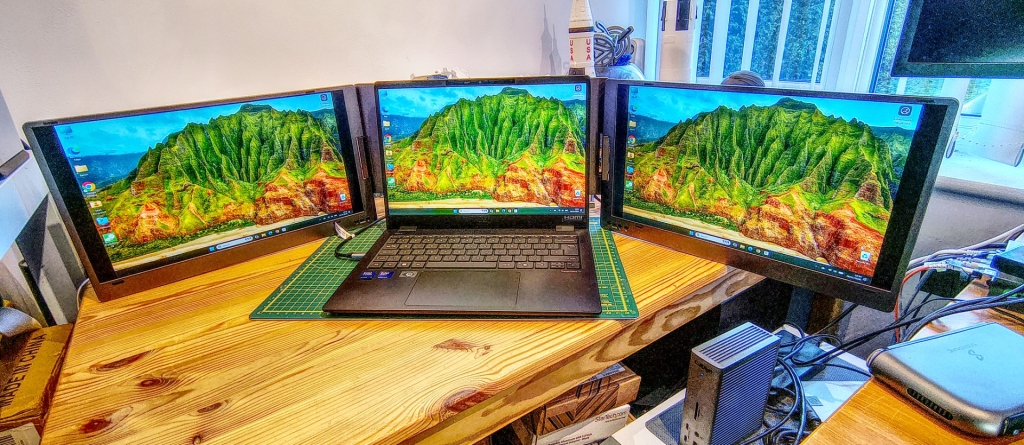
KYY X90E Portable Monitor Review: Triple Your Screen Space for Under $300
The KYY X90E is a portable monitor that promises to triple your screen space by adding two 15.6-inch 1080p displays to your laptop. At a little over $300, it’s an affordable way to boost your productivity on the go. But is it worth the investment? Let’s dive in and find out.
Design and Build Quality
The X90E has a sturdy metal construction that feels durable enough to withstand the rigors of travel. The two displays are connected by robust hinges that allow for various configurations, including a standard laptop-style setup with screens on either side, a presentation mode with screens folded back, or even a single screen in portrait orientation.
At 2.2kg and with a width of 115cm when fully extended, the X90E is not exactly compact. You’ll need a large laptop bag to accommodate it. However, the added bulk may be a worthwhile tradeoff for the extra screen real estate.
Connectivity and Compatibility
One of the standout features of the X90E is its single cable connectivity. Both displays can be powered and receive data through a single USB-C cable, simplifying setup and reducing cable clutter. However, this also means the X90E relies entirely on your laptop’s USB-C port for power, which could drain your battery quickly.
The X90E is compatible with Windows laptops that have USB-C with ALT-DP capability or Thunderbolt 3/4. Unfortunately, it’s not compatible with Apple MacBooks or laptops without USB-C. There’s also no HDMI input, limiting its versatility.
Performance
In terms of performance, the X90E delivers decent image quality for its price point. The IPS panels offer good color accuracy and a respectable contrast ratio, although the brightness could be higher. The X90E covers 82% of the sRGB color gamut, which is suitable for most productivity tasks but may not satisfy professional photo or video editors.
One issue I noticed was uneven backlight distribution, with the corners appearing slightly dimmer than the center. This is a common problem with budget monitors, but it’s worth keeping in mind if you’re sensitive to such things.
The X90E’s OSD menu is basic and a bit clunky to navigate, with separate menus for each screen. It would be nice to have a “copy to other screen” option, but that’s not available.
Should You Buy the KYY X90E?
The KYY X90E is an intriguing product that offers a lot of screen space for a relatively low price. If you’re a Windows laptop user who frequently finds yourself wishing for more screen real estate, the X90E could be a game-changer.
However, its compatibility limitations and the added weight and bulk may be dealbreakers for some users. If you have a MacBook or a laptop without USB-C, or if you prioritize portability above all else, you may want to look elsewhere.
Overall, the KYY X90E is a solid choice for Windows users who want to boost their productivity with extra screen space and don’t mind the added heft. At under $300, it’s an affordable way to transform your laptop into a triple-screen powerhouse.
Tags: portable monitor, triple screen, KYY, X90E, productivity, USB-C, Windows laptop, screen extender, affordable, mobile workstation
Viral phrases: “Triple your screen space for under $300”, “Transform your laptop into a triple-screen powerhouse”, “Boost your productivity on the go”, “The affordable way to get more screen real estate”, “The portable monitor that changes everything”,

Leave a Reply
Want to join the discussion?Feel free to contribute!