
Your eBooks Don’t Have to Look Boring, Calibre 9.0 Now has Shelves
Calibre 9.0: The Ultimate eBook Manager Just Got Even Better
Calibre, the beloved eBook management powerhouse, has just dropped version 9.0, and it’s packed with features that will make bibliophiles and tech enthusiasts alike rejoice. Whether you’re a casual reader or a hardcore eBook collector, this update brings a fresh wave of functionality that elevates your digital library experience to new heights.
The Bookshelf View: Your Library, Reimagined
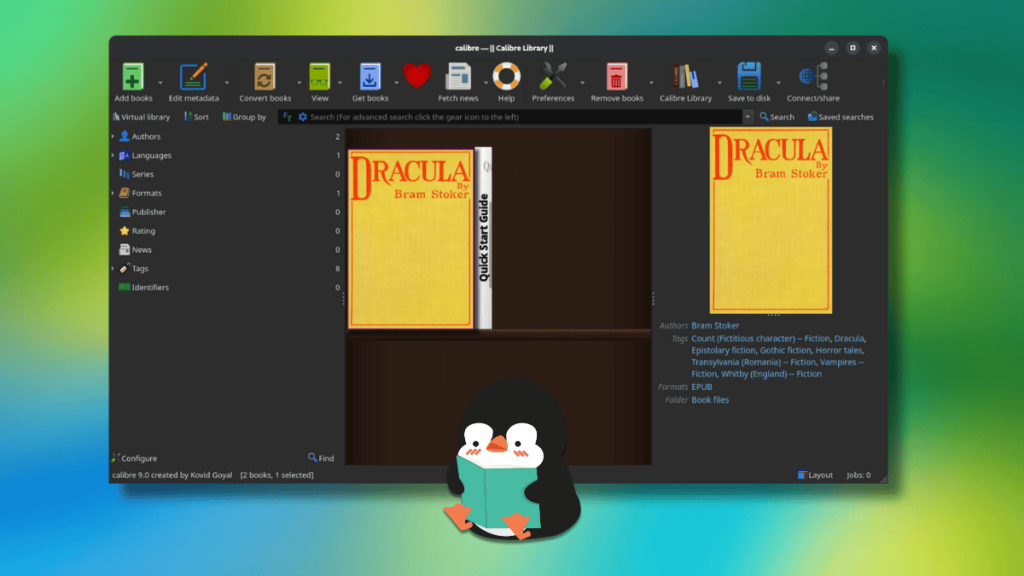
Remember the feeling of walking into a room lined with physical books, each spine telling a story before you even open it? Calibre 9.0 brings that nostalgic charm to your digital collection with its brand-new Bookshelf View. This isn’t just another layout option—it’s a complete reimagining of how you interact with your eBook library.
When you click the “Layout” button in the bottom-right corner, you’re transported to a virtual shelf where your eBooks are displayed like cherished collectibles. The covers are arranged in a visually appealing grid that mimics the organic arrangement of a real bookshelf, complete with subtle shadows and spacing that makes each title feel special.
Pro tip: Maximize your immersion by hiding the “Book details” panel on the right and resizing the left sidebar to take up the full screen. Suddenly, you’re not just managing files—you’re curating a digital library that feels alive and personal.
Smarter Navigation: Jump Straight to Your Page
We’ve all been there—scrolling endlessly through page numbers trying to find where we left off. Calibre 9.0 eliminates this frustration with a simple but brilliant addition: direct page number input. Type in the page you want, and boom—you’re there instantly. No more thumb-twiddling while you scroll through hundreds of pages.
This feature might seem small, but it’s the kind of thoughtful detail that shows the developers truly understand how people actually read eBooks. It’s about respecting your time and making the reading experience as seamless as possible.
Edit on the Fly: Your Books, Your Way
The new “Edit book” button is a game-changer for anyone who’s ever wanted to tweak their eBooks. Whether you need to correct a typo, adjust formatting, or make other modifications, you can now do it directly within Calibre—provided your book is in EPUB, AZW3, or KEPUB format.
This built-in editing capability means you no longer need to export your books to external editors and then re-import them. It’s all handled within Calibre’s ecosystem, maintaining your library’s organization while giving you unprecedented control over your content.
Linux Touchpad Users, Rejoice!
If you’re a Linux user with a touchpad, you’re in for a treat. Calibre 9.0 now supports momentum-based scrolling in the book list. Flick your finger, and the list continues to scroll smoothly, just like you’d expect from a modern application. Lift your finger, and the momentum gradually slows to a stop—no more jarring, immediate halts that break your flow.
It’s these kinds of platform-specific optimizations that demonstrate Calibre’s commitment to providing an excellent experience across all operating systems.
Under the Hood: Stability and Performance
The developers haven’t just focused on flashy new features—they’ve also been hard at work fixing bugs and improving stability. EPUB3 metadata handling has been enhanced to work with HTTP URLs without requiring the url: prefix, which should resolve compatibility issues with certain eBooks.
SVG export has been improved, making it easier to share your book covers and other graphics. Perhaps most importantly for users with older hardware, GPU acceleration for Qt WebEngine is now disabled by default to prevent crashes. This change prioritizes stability over performance, ensuring that Calibre remains reliable even on less powerful systems.
AI Integration: Chat With Your Books
While not new to this release, it’s worth mentioning that Calibre continues to support AI integration via LM Studio, allowing you to chat about your books using local AI models. This means you can ask questions about any book in your library and receive personalized reading recommendations without sending any data to cloud services. It’s privacy-focused AI at its finest.
How to Get Calibre 9.0
Ready to upgrade? Here’s how to get your hands on this fantastic release:
For Linux users, the easiest method is using the official installer script:
bash
sudo -v && wget -nv -O- https://download.calibre-ebook.com/linux-installer.sh | sudo sh /dev/stdin
Windows and macOS users can download the installer directly from the official Calibre website.
The source code is available on GitHub for those who prefer to compile from scratch or contribute to the project.
Why Calibre Remains Essential
In an era where eBook management often means surrendering your library to proprietary platforms, Calibre stands as a beacon of user empowerment. It’s free, open-source, and puts you in complete control of your digital reading collection.
Version 9.0 continues this tradition while adding modern touches that make the software feel fresh and contemporary. The new bookshelf view, in particular, shows that Calibre isn’t just resting on its laurels—it’s actively evolving to meet the changing needs of readers in the digital age.
Whether you’re managing a modest collection or thousands of eBooks, Calibre 9.0 offers tools that make organization, reading, and customization more intuitive than ever. It’s not just an update; it’s an invitation to fall in love with your digital library all over again.
Tags: #Calibre #eBookManager #DigitalLibrary #OpenSource #Linux #Reading #TechUpdate #BookshelfView #AIIntegration #SoftwareUpdate
Viral Sentences:
- “Calibre 9.0 transforms your eBook collection into a stunning virtual bookshelf!”
- “Jump straight to any page in seconds—no more endless scrolling!”
- “Edit your eBooks directly in Calibre—finally, control over your digital library!”
- “Linux users get momentum scrolling—your touchpad just got smarter!”
- “Privacy-first AI chat with your books—no cloud, all local!”
- “The ultimate eBook manager just got even better—Calibre 9.0 is here!”
- “Free, open-source, and now with a bookshelf view that’ll make you want to redecorate your digital library!”
- “Calibre proves that powerful software doesn’t need to be complicated or expensive!”
- “Your eBook collection deserves better—upgrade to Calibre 9.0 today!”
- “The feature you didn’t know you needed until now: momentum-based scrolling in your book list!”
,
Leave a Reply
Want to join the discussion?Feel free to contribute!