
watchOS 26.4 fixes one of the Workout app’s biggest annoyances
Apple Watch Users Rejoice: watchOS 26.4 Brings Back the Simple Workout Start
In a move that’s sure to delight fitness enthusiasts and casual Apple Watch users alike, Apple has rolled back a controversial change in watchOS 26.4, making it easier than ever to start your workouts. This update addresses one of the most common complaints from users since the release of watchOS 26 last fall.
The Problem with watchOS 26
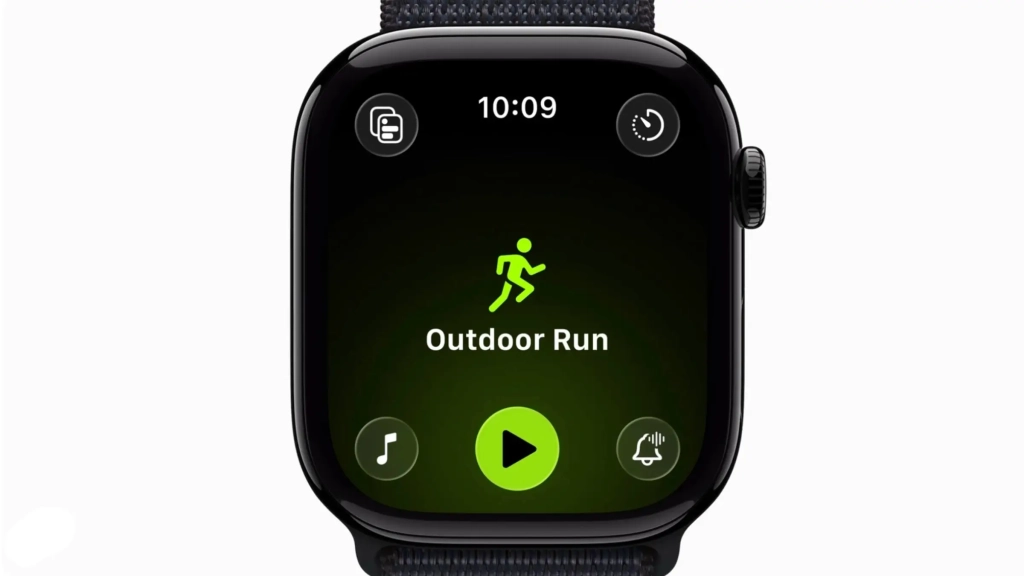
When Apple introduced watchOS 26, it brought a new “four corners” layout to the Workout app. While this change aimed to provide easier access to various settings, it inadvertently added an extra step to the workout-starting process that frustrated many users.
Previously, users could simply tap the large, easily recognizable workout type icon (such as “Outdoor Walk” or “Open Water Swim”) to begin their workout. However, with watchOS 26, this straightforward method was replaced by a more convoluted process. Users now had to tap a small, round icon with a triangle at the bottom of the screen to start their workout.
This change was particularly irksome for several reasons:
-
Screen Size: The Apple Watch’s small screen makes precision tapping challenging, especially when you’re about to start a workout and your hands might be a bit shaky with anticipation.
-
Outdoor Visibility: When using the watch outside in bright sunlight, it can be difficult to see and accurately tap small icons.
-
Muscle Memory: Many users had developed muscle memory for the old, simple method of starting workouts.
-
Icon Confusion: The new icon (a universal media control symbol for “Play”) didn’t make sense in the context of starting a workout, which is technically a “Record” function.
As one frustrated user on Reddit put it, “Now it shows me a screen with an arrow that I have to hit and then it starts the countdown. This seems like an extra step with no purpose.”
The Solution in watchOS 26.4
Apple has listened to user feedback and reverted to the previous, more intuitive method in watchOS 26.4. Now, users can once again tap the large workout type icon to start their workout immediately. This change is particularly welcome for those who found the extra step in watchOS 26 to be an unnecessary hindrance to their fitness routines.
Apple’s support document for watchOS 26.4 states, “Workout type icon in the Workout app lets you start a workout with a single tap.” This simple sentence represents a significant improvement in user experience for Apple Watch owners.
Why This Matters
This change highlights Apple’s willingness to listen to user feedback and make adjustments accordingly. It’s a reminder that even tech giants can misstep and that user experience should always be at the forefront of software development.
The workout app is a crucial feature for many Apple Watch users. It’s often the primary reason people invest in an Apple Watch in the first place. Making this feature as user-friendly as possible is essential for maintaining customer satisfaction and loyalty.
Moreover, this change underscores the importance of simplicity in user interface design. Sometimes, the most straightforward approach is the best one. By reverting to the single-tap method, Apple has eliminated a potential point of frustration for users, making their workout experience smoother and more enjoyable.
Other Updates in watchOS 26.4
While the workout app change is the headline feature, watchOS 26.4 includes several other updates and improvements:
-
New Emoji: The update adds eight new emoji, including a trombone, orca, fight cloud, landslide, ballet dancer, treasure chest, hairy creature (aka Bigfoot), and a distorted face.
-
AirPods Max 2 Support: The update adds support for Apple’s new AirPods Max 2 headphones, enhancing the audio experience for Apple Watch users.
-
Bug Fixes and Security Updates: As with most software updates, watchOS 26.4 includes various bug fixes and security enhancements to improve overall system stability and protect user data.
The Bigger Picture
This change in watchOS 26.4 is part of a broader trend in technology where companies are increasingly responsive to user feedback. It’s a positive sign that Apple is willing to admit when a change doesn’t work out as planned and take steps to correct it.
This approach stands in contrast to some of Apple’s more stubborn stances on other issues, such as the controversial menu item icons in macOS 26 Tahoe, which have drawn criticism from users and tech commentators alike.
Looking Ahead
As Apple continues to refine its watchOS, it will be interesting to see how the company balances innovation with user familiarity. The workout app change in watchOS 26.4 demonstrates that sometimes, the tried-and-true methods are the best ones.
For now, Apple Watch users can breathe a sigh of relief knowing that starting their workouts will be as simple as tapping the workout type icon. Whether you’re a marathon runner, a casual jogger, or someone who just likes to track their daily steps, this change makes the Apple Watch an even more user-friendly device.
In the end, it’s these small but significant improvements that keep users loyal to a brand and excited about future updates. Apple’s willingness to listen and adapt bodes well for the future of the Apple Watch and its ecosystem of devices and services.
Tags: Apple Watch, watchOS, workout app, fitness tracking, user experience, software update, Apple, technology, fitness, health, smartwatch, iOS, bug fix, security update, emoji, AirPods Max 2
Viral Phrases: “Apple listens to users”, “The simple things matter”, “Fitness tracking made easy”, “One tap to start your workout”, “watchOS 26.4 saves the day”, “Apple Watch gets smarter”, “Fitness enthusiasts rejoice”, “The return of simplicity”, “Apple’s mea culpa”, “Workout app woes solved”
,


Leave a Reply
Want to join the discussion?Feel free to contribute!