
Apple Continues Promoting iOS 26 and macOS 26 Liquid Glass With Updated Design Gallery
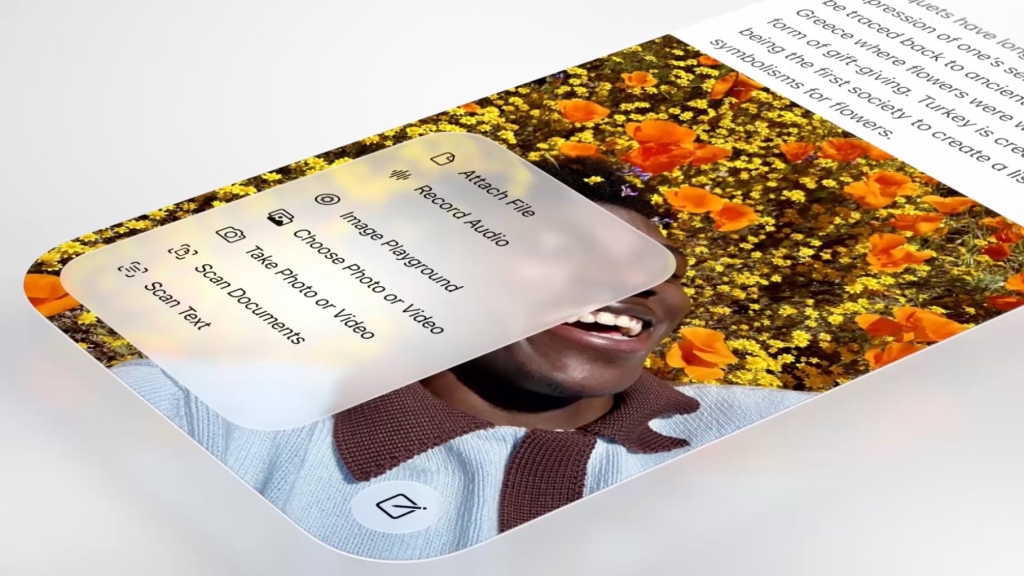
Apple’s Liquid Glass Design Revolution: How Third-Party Apps Are Embracing the Future of iOS Aesthetics
Apple’s latest design philosophy, Liquid Glass, continues to make waves across the tech world as the company unveils an expanded gallery showcasing how third-party developers are integrating this revolutionary aesthetic into their apps. Since its debut alongside iOS 26, iPadOS 26, and macOS 26, Liquid Glass has been transforming the visual landscape of Apple’s ecosystem, and now developers are following suit with stunning implementations.
The Evolution of Apple’s Design Language
The updated Liquid Glass Design Gallery, now available on Apple’s developer portal, represents a significant milestone in the company’s design journey. This comprehensive showcase features real-world examples from popular apps like AllTrails, Carrot Weather, Fantastical, Kroger, SketchPro, Trello, and Le Monde, demonstrating how the Liquid Glass aesthetic translates across different app categories and use cases.
What makes this gallery particularly compelling is its side-by-side comparison of app designs before and after Liquid Glass implementation. Developers and designers can see firsthand how the new design language transforms familiar interfaces, making them more dynamic, responsive, and visually engaging.
Key Design Elements Taking Center Stage
The gallery highlights several key areas where Liquid Glass shines brightest. Tab bars have been reimagined with translucent, fluid elements that respond to user interactions with subtle animations. Navigation buttons now feature depth and dimension that weren’t possible with previous design frameworks. Bottom toolbars have been elevated from static elements to interactive components that feel alive and responsive.
Perhaps most interestingly, Apple is showcasing how developers are implementing pop-out menu interfaces and dedicated search buttons using Liquid Glass. These design choices mirror Apple’s own app implementations, suggesting a cohesive vision for how the design language should be applied across the ecosystem.
The Developer Community Responds
The diversity of apps featured in the gallery speaks volumes about Liquid Glass’s versatility. From weather apps like Carrot Weather to productivity tools like Trello, from fitness tracking with AllTrails to news consumption with Le Monde, developers are finding creative ways to integrate the aesthetic while maintaining their app’s unique identity.
This widespread adoption is crucial for Apple’s vision. When users encounter Liquid Glass consistently across their favorite apps, it creates a seamless experience that reinforces the design language’s effectiveness and appeal.
Apple’s Iterative Approach to Design
Since introducing Liquid Glass, Apple has demonstrated its characteristic commitment to refinement. The company recently added a slider bar to the Lock Screen clock, allowing users to adjust the Liquid Glass level to their preference. This attention to user control and customization suggests Apple is listening to feedback and making thoughtful adjustments.
However, the core aesthetic remains largely unchanged, which speaks to the confidence Apple has in its design direction. Industry insiders suggest that iOS 27, iPadOS 27, and macOS 27 will continue to feature Liquid Glass with minimal modifications, though rumors persist about a potential system-wide slider for opacity adjustments.
The Technical Foundation
Behind the visual appeal lies sophisticated technical implementation. Liquid Glass relies on advanced rendering techniques that create the illusion of depth and movement while maintaining smooth performance across devices. The design language takes advantage of Apple’s hardware acceleration capabilities, ensuring that the visual effects don’t come at the cost of battery life or responsiveness.
For developers, adopting Liquid Glass requires understanding these technical foundations. The gallery serves not just as inspiration but as a technical reference, showing how complex visual effects can be achieved while maintaining app performance and usability.
User Experience Considerations
While the visual appeal of Liquid Glass is undeniable, Apple and developers alike must balance aesthetics with functionality. The gallery showcases examples where the design enhances rather than hinders usability. For instance, the translucency effects are carefully calibrated to ensure text remains readable, and interactive elements are clearly distinguishable from static content.
This balance is crucial for widespread adoption. Users who find Liquid Glass beautiful but impractical are unlikely to embrace it long-term. The gallery’s emphasis on real-world app implementations suggests Apple is committed to proving that beauty and functionality can coexist.
The Future of Apple Design
As Apple continues to refine and expand Liquid Glass, several questions remain about its long-term evolution. Will future iterations introduce new effects or interactions? How will the design language adapt to emerging technologies like augmented reality? The current gallery provides a snapshot of where we are, but the journey is far from over.
What’s clear is that Apple has once again set a new standard for mobile and desktop interface design. By providing developers with clear examples and technical guidance, the company is ensuring that Liquid Glass will become a defining characteristic of the Apple ecosystem for years to come.
Looking Ahead
The expanded Liquid Glass Design Gallery represents more than just a collection of pretty screenshots. It’s a statement of intent from Apple, signaling its commitment to a cohesive, forward-thinking design language that bridges the gap between hardware and software. As developers continue to experiment and innovate within this framework, users can expect increasingly sophisticated and delightful experiences across all their Apple devices.
The success of Liquid Glass will ultimately be measured not just by its visual appeal, but by how effectively it enhances the way we interact with our devices. If the current gallery is any indication, Apple is well on its way to achieving that goal.
Tags: #Apple #iOS26 #LiquidGlass #DesignLanguage #UXDesign #AppleEcosystem #DeveloperResources #MobileDesign #InterfaceDesign #TechInnovation #AppleDesign #iOS27 #iPadOS26 #macOS26 #AppDevelopment #DigitalDesign #TechNews #AppleNews #DesignGallery #UserExperience
Viral Sentences:
- Apple’s Liquid Glass is revolutionizing how apps look and feel across the entire ecosystem
- Third-party developers are racing to adopt Apple’s stunning new design aesthetic
- The future of iOS design is here, and it’s more fluid than ever
- Apple proves once again why it’s the king of design innovation
- Liquid Glass isn’t just pretty—it’s transforming user interaction
- Developers are discovering the secret sauce to Apple’s design magic
- This design language might be Apple’s most ambitious yet
- The gallery reveals Apple’s master plan for unified ecosystem design
- Users are about to experience their favorite apps in a whole new light
- Apple’s design evolution continues to set the industry standard
- The technical wizardry behind Liquid Glass will blow your mind
- Apple’s giving developers the keys to design excellence
- This aesthetic change could define a generation of apps
- The balance between beauty and functionality has never been better
- Apple’s latest move proves they’re still the design innovators to beat
,
Leave a Reply
Want to join the discussion?Feel free to contribute!